When you send a rescheduling email, you’re doing more than just moving a time slot on a calendar. You’re sending a message about your respect, organization, and professionalism.
This is one of those small touchpoints that can either strengthen a professional relationship or create unnecessary friction. Getting this right turns a potential headache into a smooth, seamless interaction.
Why Rescheduling Emails Define Your Professionalism
Let's face it: rescheduling meetings is just part of professional life. Things come up, conflicts arise, and even the most buttoned-up person needs to adjust their calendar. It’s unavoidable. But how you handle it says everything about you and how much you value other people’s time. This isn’t just about firing off a quick note; it’s about managing expectations and keeping trust intact.
A well-written email to reschedule a meeting builds your reputation as someone who is considerate and on top of things. The flip side? A hasty or unclear message can make you seem disorganized, or worse, disrespectful. That kind of negative impression can be tough to shake.
The Real-World Impact of a Simple Email
Think about it from the other person’s perspective. Imagine a client gets two different rescheduling requests. One is vague and sent at the last minute. The other arrives promptly, is polite, gives a clear (but brief) reason, and offers a few easy options to find a new time.
The first email causes frustration. The second shows professionalism and respect for their packed schedule. Your approach directly shapes how people see you and your working relationship.
Honestly, the constant need to reschedule often points to a bigger problem: a culture of too many meetings. It turns out a staggering 47% of employees say that excessive meetings are the single biggest waste of their time at work. This kind of inefficiency doesn't just lead to more cancellations; it costs businesses billions in lost productivity every year. You can dig into the numbers in the full report on Outlook Calendar analytics.
A great rescheduling email is an opportunity to turn a minor disruption into a positive professional interaction. It shows you're proactive, respectful, and in control, even when plans change unexpectedly.
At the end of the day, recognizing the weight of this simple email is the first step. It’s a small action with a surprisingly big impact on your professional brand.
The Anatomy of an Effective Rescheduling Email
A good rescheduling email isn't just a jumble of words; it's a carefully crafted message built for clarity and courtesy. I like to think of it less as a rigid formula and more as a simple blueprint for making the other person's life easier. Every piece has a job to do, from the subject line that grabs their attention to the closing that makes finding a new time a breeze.
The most critical part? The subject line. Seriously. A vague subject like "Meeting" or "Quick question" is a one-way ticket to getting lost in a crowded inbox.
You have to be direct and informative. Something like "Reschedule Request: Project Sync" or "Moving our call on Thursday" immediately tells the recipient what the email is about and what you need from them. This small tweak makes a massive difference in getting a quick reply.
This visual breaks down the simple, three-part flow that I always recommend for a professional rescheduling request.
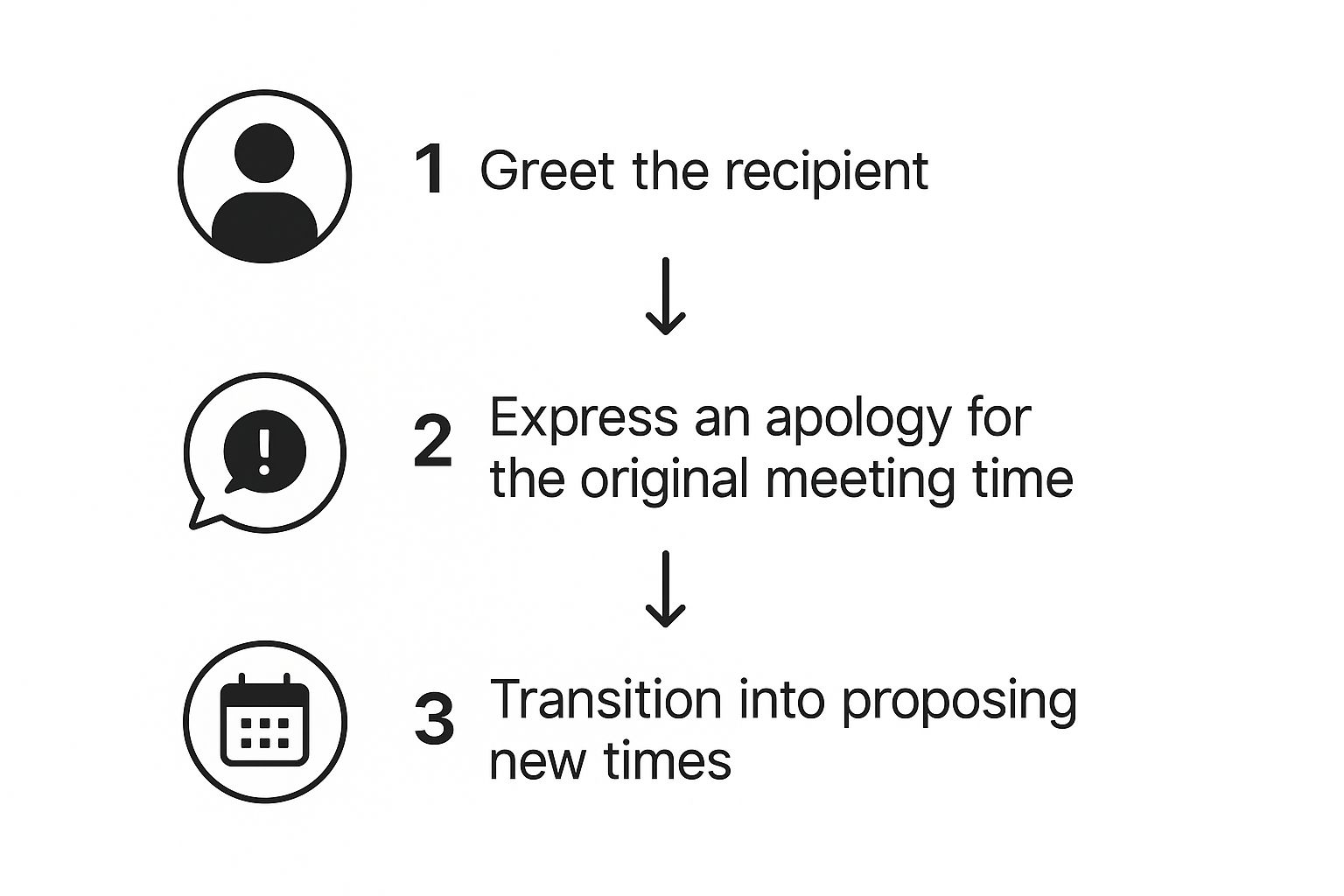
The path from a polite opening to a clear apology and then actionable next steps is what makes the whole thing feel smooth and professional, not sloppy.
Core Components for Clarity
Once you nail the subject line, the body of your email needs a few non-negotiable elements. Each one is a small way of showing you respect the other person’s time.
To keep things straightforward, I've broken down the essential parts of any good rescheduling email into a simple table. This is the stuff you absolutely need to include.
Key Components of a Rescheduling Email
| Component | Purpose | Example |
|---|---|---|
| Clear Subject Line | To immediately inform the recipient of the email's intent and urgency. | "Need to reschedule our 10 AM call tomorrow" |
| Sincere Apology | To acknowledge the inconvenience caused by the change. | "My apologies, but something urgent has come up." |
| Brief Reason | To provide context without oversharing unnecessary personal details. | "...due to an unexpected client matter." |
| Specific Next Steps | To make rescheduling easy and minimize back-and-forth emails. | "Would either Thursday at 2 PM or Friday at 11 AM work?" |
Think of these as your building blocks. Getting them right ensures your message is received well, even when you're delivering inconvenient news.
Here's where people often go wrong: they put the burden on the other person. A poor request might say, "Sorry, can't make it tomorrow. When are you free next week?" This instantly creates work for the recipient.
A much better approach looks like this: "Apologies for the late notice, but I need to reschedule our 10 AM call tomorrow due to an urgent client matter. Would either Thursday at 2 PM or Friday at 11 AM work for you instead?"
See the difference? It's polite, it gives just enough context, and it offers clear, easy-to-accept solutions. You're doing the heavy lifting.
For a complete breakdown with even more templates, check out our detailed guide on how to reschedule a meeting email. Mastering this basic structure ensures your request always comes across as professional and respectful.
Rescheduling Email Templates for Any Situation
Knowing the building blocks of a good rescheduling email is one thing. Actually applying them in the real world is a whole different ball game. Let’s be real: the way you ask to move a meeting with a high-value client is completely different from how you’d handle an internal team huddle.
So, let's get into some field-tested templates you can grab and adapt for the situations you'll actually run into. These go beyond the generic placeholders and give you specific language that works. We'll also break down why certain phrases are more effective in different contexts, so you can master the subtle art of professional communication.

For a High-Value Client or Prospect
When the stakes are this high, your email needs to be incredibly respectful and put their convenience first. The goal here is simple: show maximum respect for their time and make the rescheduling process completely painless for them.
Subject: Regarding our upcoming call on Wednesday
Hi [Client Name],
I’m writing to request we reschedule our meeting planned for this Wednesday at 2 PM. My sincere apologies for any inconvenience, but an unavoidable internal commitment has come up that I must attend.
I know how valuable your time is, and I am very sorry for this last-minute change.
Would you be open to one of these times next week instead?
- Monday, [Date], at 2 PM
- Tuesday, [Date], at 10 AM
If neither of those works, just let me know what your calendar looks like, and I'll gladly adjust to fit your schedule.
Thank you for your understanding.
Best regards,
[Your Name]
Why it works: This template hits all the right notes. It's formal without being stiff and apologetic without groveling. Most importantly, it puts the power entirely in the client's hands by offering to work around their schedule, reinforcing that they are the priority.
For an Internal Team Meeting
With your own team, you can afford to be more direct. The focus shifts to clarity and speed, not formality. You just want to get the meeting moved with minimal back-and-forth so everyone can get back to their day.
Subject: Rescheduling: Weekly Sync
Hi Team,
Quick update – I need to move our weekly sync scheduled for tomorrow at 11 AM. An urgent project deadline has popped up that requires my full attention.
I've already moved the calendar invite to Thursday at the same time (11 AM). Please update your RSVP. If that time creates a major conflict for anyone, please let me know by EOD today.
Thanks,
[Your Name]
For a Last-Minute Emergency
Life happens. When an emergency strikes, your email should be short, to the point, and sincerely apologetic for the extremely short notice.
Subject: Urgent: Need to reschedule our 3 PM call today
Hi [Name],
My sincerest apologies for this last-minute message, but I unfortunately need to reschedule our call scheduled for 3 PM today due to an unforeseen personal emergency.
I am very sorry for the disruption this will cause to your day. I will reach out first thing tomorrow to find a new time that works for you.
Thank you for your flexibility.
Best,
[Your Name]
Having these situational templates is a great start, but it's always good to have a wider toolkit. For a broader collection of professional communications, you might find some great examples in these effective business email templates. It's also interesting to compare how the language shifts when you're the one sending the initial meeting invitation email.
How to Handle Tricky Rescheduling Scenarios
Standard rescheduling emails are one thing, but what happens when the situation is a little more delicate? Navigating those awkward spots requires extra care if you want to keep your professional relationships in good shape. This is where a really thoughtful approach to your email matters most.
Let’s get into the tough ones. You might need to shift a meeting with a senior executive whose calendar is basically a fortress. Or maybe you're in the uncomfortable position of having to reschedule the same meeting for a second time. Each scenario calls for a slightly different strategy.
This isn’t just about managing your calendar; it's about managing your reputation. Handling these tricky moments with grace shows you’re reliable and respectful, even when things don't go as planned.
When You Have to Reschedule Twice
Asking to move a meeting once is understandable. Life happens. Asking twice can start to make you look disorganized if you don't handle it just right. The key is to take full ownership and make the next step incredibly easy for the other person.
Your email needs to show sincere regret and acknowledge that you know this is a big inconvenience. Don't make excuses—just be direct and apologetic.
Crucial Tip: When you're rescheduling for the second time, don't just offer up a few new time slots. Instead, hand over complete control. Try saying something like, "My schedule is completely open to accommodate you. Please just let me know what day and time works best, and I will make it happen." This gesture shows maximum respect for their time and flexibility.
Navigating a Senior Executive's Calendar
Getting time with an executive is notoriously difficult. A recent report really drove this home, showing that 68.2% of executives struggle with scheduling because of prioritization issues. On top of that, 32.1% of all meetings booked via scheduling links end up getting moved or canceled anyway. You can find the full report on scheduling trends here.
When you have to email a leader to reschedule, you need to do all the legwork for them:
- Be proactive: Before you even send the email, check their public calendar for any obvious open slots.
- Offer deference: Frame the request around their convenience, not yours.
- Work with their assistant: If they have an EA, it's often best to loop them in on the email to find a new time directly.
This kind of foresight prevents a lot of painful back-and-forth and shows that you truly value their extremely limited time. Once you do lock in that new time, it’s a smart move to know how to send a reminder email the day before to keep it on their radar.
Proactive Strategies to Avoid Rescheduling
The best rescheduling email is the one you never have to write. Honestly, shifting from being reactive to proactive is the secret to mastering your calendar and showing you respect everyone else's time. It’s all about tackling the root causes of a chaotic schedule instead of just getting really good at apologizing for it.
Adopting this mindset often starts with your tools. Modern scheduling software like Calendly or Reclaim.ai can completely wipe out those endless back-and-forth email chains. They find a time that works for everyone, automatically. This one change can single-handedly prevent a huge number of conflicts that would otherwise lead to rescheduling.
Another powerful move? Get aggressive about protecting your own time.
Block out non-negotiable "focus time" on your calendar and treat those blocks just like you would any other critical meeting. When your deep work sessions are visible to the team, people are far less likely to book over them, which means you're less likely to have to move things around later.

Adopt a Meeting-Minimalist Approach
At the end of the day, a lot of rescheduling happens simply because the meeting shouldn't have been a meeting in the first place. A recent survey blew my mind—it found that a staggering 82% of employees sit through meetings they feel could have easily been an email. That points to a massive, widespread issue with meetings lacking a clear purpose.
Before you even think about sending an invite, ask yourself this one simple question: "Does this absolutely need to be a synchronous meeting, or could it be an email, a shared doc, or a quick chat message?"
This simple filter is your best defense against unnecessary calendar clutter, not just for you but for everyone involved.
Ultimately, the best proactive strategy is to make your meetings so valuable and well-run that no one wants to reschedule them. It's about improving overall meeting effectiveness so you can reclaim your time. When you make every meeting count, you’re not just managing your calendar—you’re building a more productive and respectful work culture.
Common Questions About Rescheduling Meetings
Even with the best templates in hand, a few tricky situations always seem to pop up when you have to move a meeting. Let's tackle the most common questions so you can handle any rescheduling scenario with confidence.
How Much Notice Should I Give?
The golden rule? As much as you possibly can. Aiming for at least 24 hours' notice is a solid professional courtesy. It shows you respect the other person's time and planning.
But we all know last-minute chaos is a real thing. If an emergency pops up, send that email the second you know you have a conflict. If the meeting is just a few hours away, it's a smart move to also ping them on a chat platform to make sure they see your message right away.
The bottom line is simple: send your rescheduling email as soon as you know you need to. Waiting just creates more friction for everyone and can ding your professional reputation.
Should I Offer Specific Times or Send a Scheduling Link?
This is a great question, and the answer often comes down to who you're meeting with. There’s a bit of a power dynamic to consider here, and getting it right shows you're thoughtful.
- For senior leaders or high-value clients: It's almost always better to propose two or three specific new times. This shows you've put in the effort to find a solution yourself, rather than just pushing the work onto their plate.
- For peers or internal team meetings: A scheduling link (like Calendly) is your best friend. It’s way more efficient, cuts out all the back-and-forth emails, and lets them grab a spot that works for them in seconds.
What’s the Best Subject Line to Use?
Your subject line has one job: to be crystal clear. You don't want the recipient playing a guessing game with your email.
A few formats that work every time:
- "Reschedule Request: [Original Meeting Name]"
- "Moving our call: [Topic] on [Original Date]"
This kind of clarity is crucial for getting your email noticed in a slammed inbox. A vague subject line is the fastest way to have your request get lost in the shuffle.
Ready to stop rescheduling meetings in the first place? Distro routes high-intent leads to the right sales rep’s calendar the instant they book a demo, eliminating scheduling conflicts before they even start. See how you can 3X your conversion rates by visiting https://distro.so.