A great meeting invitation email does more than just get a "yes"—it sets the stage for a productive session. It clearly states the purpose, lays out a quick agenda, and gives everyone the details they need. From the very first line, it shows you respect their time, making it clear why attending is valuable before they even think about clicking "Accept."
Crafting Invitations That Get Opened and Accepted
Let's be honest, the road to a great meeting starts with an invitation people actually want to open. This isn't about finding the perfect generic template. The best requests are built on a simple foundation: clarity, respect, and obvious value. You're not just booking a slot on someone's calendar; you're framing the meeting as a can't-miss opportunity to get something important done together.
This all comes down to solid, effective written communication skills. Your real goal is to move beyond simply scheduling and start creating genuine interest.
The Non-Negotiable Components
Every single effective meeting invite I've ever sent or received has a few things in common. Think of these as the absolute must-haves for getting that "Yes" and making sure everyone shows up ready to contribute. The most important piece? The subject line. It's the first thing anyone sees in a crowded inbox, so it has to work hard.
A subject line like "Meeting" is a complete waste of space. It's a guaranteed way to get ignored. Instead, try something like, "Marketing Sync: Q3 Campaign Kickoff | Wed, Oct 26." Just like that, the recipient knows the topic, the goal, and the date without even opening the email. That small tweak makes a world of difference.
The body of your email should then deliver on the promise of that subject line with a clear, direct purpose. Why are you meeting? What do you need to accomplish? Often, one sentence is all it takes: "The goal of this meeting is to finalize the project plan for the new website launch."
Balancing Brevity and Detail
The real trick is giving people just enough information without burying them in text. Your best friend here is a short, sharp agenda. It's proof that you've thought this through and you value everyone's time.
Here are the essentials I always include:
- A Clear Purpose: One simple sentence explaining the primary goal.
- A Structured Agenda: List 2-4 key discussion points, maybe with rough time estimates.
- Required Prep: A quick note if attendees need to read a document or think about something beforehand.
- The Logistics: Date, time (with the time zone!), and a direct link to the virtual meeting room. No hunting around required.
This structure doesn't just look professional; it shows you respect everyone's packed schedule. It also has a funny way of making you, the organizer, really think about whether the meeting is needed in the first place. For a deeper dive into structuring the whole email, our post on the perfect email for meeting invitation has you covered.
You might be surprised by how much time is lost to bad meetings. Employees spend an average of 392 hours per year in them—that's a huge time sink. What's crazier is that only about 12.6% of meeting invites are marked 'optional,' which tells me we need to get much better at deciding who really needs to be there.
To help you get these core components right every time, here’s a quick-reference table.
Anatomy Of An Effective Meeting Invitation Email
This table breaks down the core elements every meeting invitation email must include. Use it as a checklist to ensure your invites are clear, professional, and get the response you want.
| Component | Why It Matters | Best Practice Example |
|---|---|---|
| Clear Subject Line | It’s the first impression and determines if your email gets opened in a busy inbox. | "Project Phoenix: Final Budget Review |
| Concise Purpose | Immediately tells attendees why the meeting is necessary and what it will achieve. | "This meeting is to align on the Q4 marketing budget and approve final allocations." |
| Structured Agenda | Shows you have a plan and respect everyone's time, setting expectations for the discussion. | 1. Review Q3 Spend (5 min) 2. Discuss Q4 Proposals (15 min) 3. Finalize Budget (10 min) |
| Logistics | Prevents confusion and ensures everyone can join on time without hassle. | "Date: November 10, 2023 Time: 2:00 PM EST Join via [Zoom Link]" |
| Required Prep | Ensures participants arrive prepared and ready to contribute, making the meeting more efficient. | "Please review the attached budget proposal before the call." |
Getting these five things right is the difference between a productive session and another meeting that could have been an email.
This chart drives home the point about subject lines. It shows just how much length can impact whether your email even gets seen.
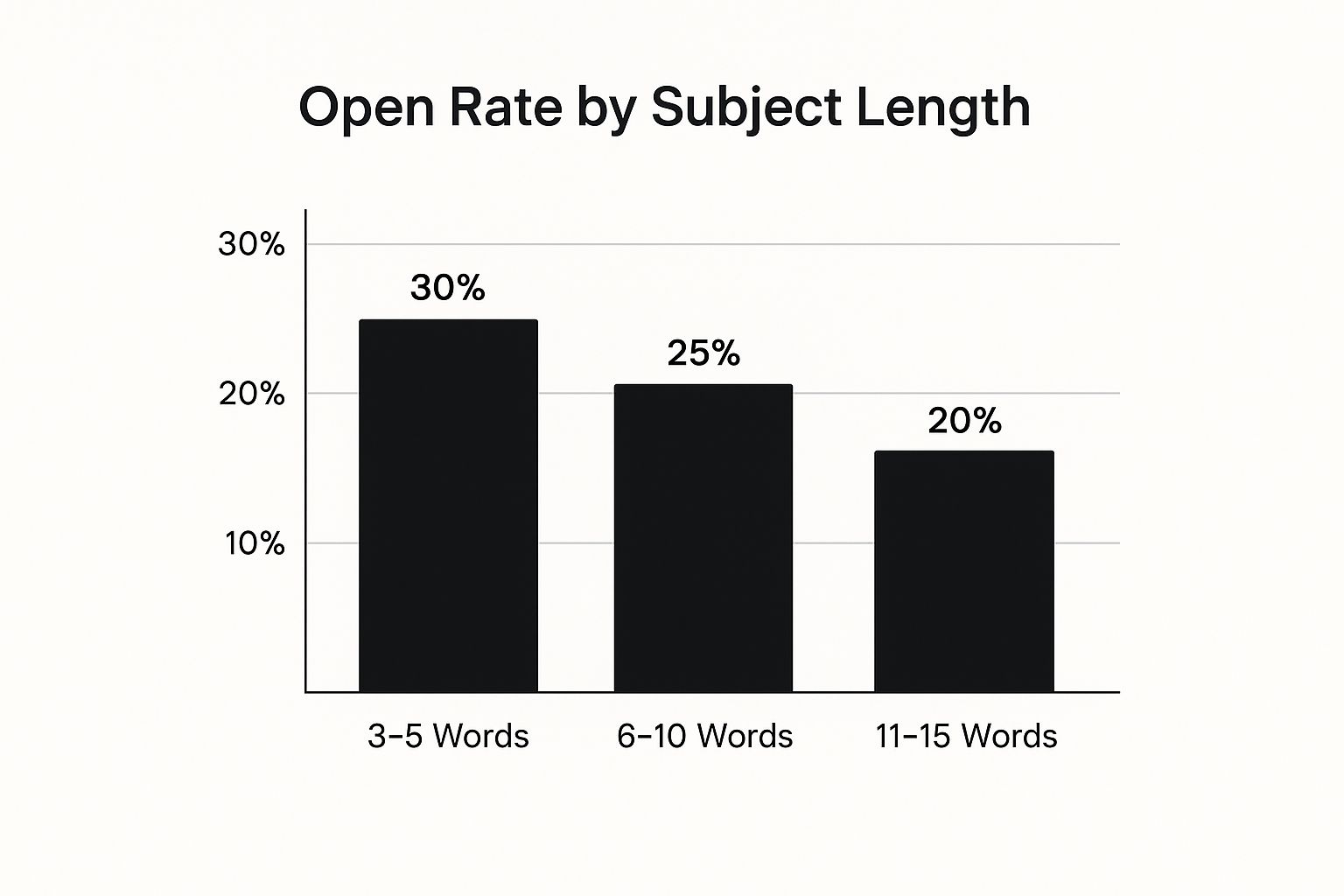
The data is pretty clear: shorter, punchier subject lines—somewhere between three and five words—get the best open rates. It's another reminder to keep your communication direct and to the point.
Writing Subject Lines That Cut Through The Noise
Let's be honest, your subject line is the gatekeeper. It's the one thing standing between your meeting invite and the abyss of a crowded inbox. If it’s vague or boring, your carefully crafted invitation is getting archived or deleted without a second thought. I’ve seen it happen countless times.
The real goal here is to give people maximum context in the fewest words possible. Everyone scans their inbox, making split-second decisions. A sharp subject line makes that decision dead simple by being direct, informative, and to the point.
A Simple Formula for Clear, Actionable Subject Lines
Think of your subject line as the headline for your meeting. At a glance, it needs to answer three basic questions: Who, What, and When? This simple structure immediately helps your attendees figure out if the meeting is relevant to them.
Here’s what I mean. See the difference?
- Vague: "Meeting"
- Much Better: "Marketing Sync: Q4 Content Plan | Oct 28"
And another one:
- Vague: "Catch-up"
- Much Better: "Project Atlas Check-in: Required | Nov 3 at 11 AM"
This small shift turns a forgettable invite into a clear agenda item, right there in the inbox.
Your subject line should be so clear that the recipient knows whether they need to open the email immediately or can save it for later. My rule of thumb: If they can’t figure out the topic and date from the subject line alone, it needs a rewrite.
To really stand out, you need a compelling hook. Exploring a collection of effective email subject lines can give you some great ideas to boost your open rates. That little bit of extra effort really does pay off.
Make It Personal to Make an Impact
Beyond the basic formula, adding a personal or urgent touch can work wonders, especially for those high-stakes meetings. Just dropping in the recipient's name or asking a direct question can be enough to pull them in.
Think about the psychological difference between these two:
- Standard: "Meeting about Sales Performance"
- Personalized: "John, quick question on Q3 sales numbers?"
The second one feels less like a corporate mandate and more like a real conversation, which makes it much harder to ignore. It creates a sense of immediacy and lets them know you need their specific input.
I also like to use action words like "Review," "Finalize," or "Decide" to signal that this meeting is about making progress. This subtle change in language frames the meeting as a productive step forward, not just another time-suck on the calendar. It’s all about managing expectations before they even open the email.
Structuring An Agenda That Shows You Value Their Time
Let's be honest: getting a meeting invitation without an agenda is a major red flag. It’s an instant signal that the meeting might be a disorganized, unfocused, and frankly, a complete waste of everyone's time. Your best tool for proving a meeting will be productive—before it even starts—is a well-crafted agenda.
Think of the agenda as more than just a list; it's a promise you're making to your attendees. It tells them exactly what you plan to cover, roughly how long each part will take, and what you want to achieve together. This simple act of planning sets clear expectations and shows you genuinely respect their schedule.
From Talking Points To Actionable Outcomes
A great agenda goes way beyond vague topics. Instead of a lazy "Discuss Project X," you need to frame each point around a specific goal or a question that needs an answer. This simple shift turns a passive update into an active, decision-making session where things actually get done.
I always start by defining the single most important outcome for the meeting. What absolutely must be decided or finished by the time you wrap up? Once you nail that down, you can work backward to build the agenda.
The best agendas I've seen are built on outcomes, not just topics. Instead of "Marketing Budget," a better agenda item is "Finalize and Approve Q4 Marketing Spend." This simple change shifts the focus from discussion to decision-making.
A high-energy brainstorming session, for instance, requires a totally different structure than a formal project review. You have to tailor the agenda to the meeting's purpose if you want it to be effective.
Practical Agenda Examples For Different Meetings
Let's break down how this looks in the real world for two very different meetings. Notice how each item has a time estimate and a clear action.
Example 1: 30-Minute Brainstorming Session
Here, the goal is to generate a ton of ideas. The agenda needs to be loose enough to encourage creativity but structured enough to prevent it from going completely off the rails.
- Welcome & Goal Setting (3 mins): Quickly state the brainstorming challenge we're tackling.
- Rapid Idea Generation (15 mins): Open floor for all ideas—no judgment, no critiques.
- Group & Theme Ideas (7 mins): Start clustering the ideas into logical groups.
- Next Steps & Ownership (5 mins): Decide who will take the lead on refining the top 2-3 concepts.
Example 2: 60-Minute Formal Project Review
This meeting is all about accountability and making decisions, so the agenda has to be much more structured and focused on data.
- Project Status Update (15 mins): Review key metrics against our project goals (Presenter: Alex).
- Identify Blockers & Risks (20 mins): Open discussion on current challenges and potential solutions.
- Decision on Next Phase (15 mins): Vote on whether to proceed with Option A or Option B.
- Action Items & Deadlines (10 mins): Assign clear tasks and due dates to specific team members.
Including details like time estimates and assigning owners to talking points might seem small, but they make a massive difference. It proves you’ve thought through the flow of the meeting and are serious about making every single minute count.
Getting Virtual And Hybrid Meeting Invitations Right
Inviting people to a virtual or hybrid meeting isn't just about booking a conference room anymore. There's a whole new layer of complexity. You're coordinating an experience for people who might be miles apart, and getting the details right is the difference between a smooth start and 10 minutes of "Can you hear me now?" frustration.
The way we meet has changed dramatically. Between 2020 and 2022, the number of virtual meetings shot up from 48% to 77% of all meetings held. This massive shift means a purposeful, crystal-clear invite is more important than ever.
This new reality demands a much more thoughtful approach to your meeting invitation email. You have to think ahead about what both your remote and in-office folks will need to feel like they're all in the same room.
Nailing The Technical And Logistical Details
For any meeting that isn't fully in-person, the "where" is digital, and you can't afford any confusion. Just dropping a link into the calendar invite and calling it a day is a recipe for a rocky start. Your invitation needs to be a complete, foolproof guide to joining the call. A few extra minutes of effort here saves everyone a headache later.
I always try to think through every possible point of failure. Does the video conferencing tool need to be downloaded first? Is there a password they'll need to dig up from their email? What if their webcam fails and they need to dial in with their phone?
Make sure these critical details are front and center in your invite:
- Direct Meeting Link: The link to join should be impossible to miss. Don't make people hunt for it.
- Meeting ID and Password: List these clearly, right below the link. They're a crucial backup if the one-click link doesn't work.
- Dial-In Numbers: Always include a phone number for audio-only access. It’s a lifesaver for people on the go or with spotty internet.
- Software Requirements: A simple line like, "Heads up, we'll be using Zoom for this call," can prevent last-minute software installation scrambles.
Of course, managing all the moving parts of these events can get complicated. If you're looking to get more organized, learning the ropes of creating task lists and scheduling meetings on Google Calendar can be a huge help.
Setting Expectations For A Hybrid World
A great hybrid meeting isn't just about the tech; it's about the people. It's incredibly easy for remote attendees to feel like they're just watching a meeting happen from a distance while the people in the room dominate the conversation. Your invitation is your first chance to set the right tone and make sure everyone feels included.
I've found it really effective to include a small section on virtual etiquette right in the invitation. It establishes a baseline for how we'll interact and helps bridge the physical and digital divide.
Pro Tip: In your hybrid meeting invites, try adding a line like this: "To make sure everyone can contribute equally, please join the call from your own laptop, even if you're in the office." This one simple instruction works wonders to prevent side-chats and keeps the entire group focused on a single conversation.
Finally, you absolutely have to get the time zone right. Always state the meeting time clearly, referencing multiple time zones (e.g., 2:00 PM EST / 11:00 AM PST) or using a calendar tool that automatically adjusts for each recipient. It's a small detail that shows respect for everyone's schedule, no matter where they're dialing in from. For more ideas on structuring your entire invite, you can also check out our guide on the essential meeting invitation format.
Optimizing Your Invite For Mobile And Fast Responses
Your perfectly crafted meeting invitation can fall flat for one simple reason: it looks terrible on a phone.
Let's be real. Most people will see your request for the first time on a mobile device, probably while they're juggling three other things. If your invite is a giant wall of text, it’s getting archived or deleted. Instantly.

This isn’t a small detail—it's a dealbreaker. A whopping 41.6% of all emails are now opened on mobile. You have to assume your invite will be read on a small screen first. In fact, 42.3% of people admit they'll just delete an email if it's not optimized for mobile. If you want more email insights, check out these compelling statistics from Porch Group Media.
This data points to a non-negotiable rule: design your invites for scannability.
Make Key Information Scannable At A Glance
Mobile optimization is all about making the important details pop. Put yourself in the shoes of a busy executive who has ten seconds to decide if your meeting is worth their time. They need to find the "what," "when," and "where" immediately, without any pinching and zooming.
The best way to nail this is with smart, simple formatting. Break your content into bite-sized pieces that are easy on the eyes.
Here’s how to do it right:
- Use Short Paragraphs: Keep every paragraph to just one or two sentences. This creates that crucial white space that makes your email feel less intimidating on a cramped screen.
- Emphasize With Bold Text: Make the most critical info—like the date, time, and primary goal—stand out with bolding. It’s like a visual shortcut that guides the reader’s eye right where it needs to go.
- Leverage Bullet Points: Instead of burying the agenda or prep work in a dense sentence, use a bulleted list. It's far easier to scan and digest on the fly.
My personal rule of thumb is simple: if someone can't grasp the meeting's purpose and logistics in under five seconds, the format has failed. Keep it scannable and direct.
Drive Action With Clear RSVP Buttons
Beyond just clean formatting, the single biggest driver of fast responses is making it ridiculously easy to say "yes."
This is where your calendar client's built-in features are your best friend. A meeting invitation email sent directly from Google Calendar or Outlook is miles more effective than a plain text email.
Why? It all comes down to those prominent, one-click RSVP buttons: Yes, No, Maybe. This simple feature removes all the friction. Your recipient doesn't have to type out a reply or manually add the event to their calendar. They just tap a button, and you get an instant answer. It’s a game-changer for your response rates.
Pair this with a clear call-to-action in the email body, like, "Please RSVP by EOD so we can finalize the attendee list." This combination creates a powerful nudge that encourages immediate engagement and helps you get the quick confirmations you need to move forward.
Common Questions About Meeting Invitations
Even the most seasoned pros can get tripped up by the small details of a professional meeting invitation email. It's a tricky balance—you need to be direct and clear, but you also want to be polite and show you respect everyone's time.
Let's walk through some of the questions I hear all the time. Getting these right keeps professional relationships strong and makes sure your meetings actually get off the ground smoothly.
What Should I Do If Someone Doesn't Respond?
We've all been there. You send out an invite, and a key player goes completely silent. Waiting feels like you're losing control of your schedule, but pinging them too often just feels pushy. The sweet spot is a gentle, well-timed nudge.
My rule of thumb is to wait until about 48 hours before the meeting. A quick, friendly follow-up is almost always enough to get a response. I just reply directly to the original invitation so all the context is right there.
Something like this usually does the trick:
"Hi [Name], just wanted to quickly check if you saw the invitation for our project sync on Thursday. We'd really value your input on the Q4 roadmap. Please let me know if the time works for you!"
See? It’s helpful, not demanding. You're reminding them why their presence matters and giving them an easy way to flag a conflict. If you want more ideas for these kinds of nudges, we have a whole guide on sending a reminder email for a meeting that can help you finalize your attendee list without ruffling any feathers.
How Far In Advance Should I Send An Invitation?
Timing is everything with invites. Send it too early, and it gets lost in the inbox abyss. Send it too late, and you'll find everyone's calendar is a wall of "busy." The right lead time really comes down to what kind of meeting you're calling.
Here’s a quick breakdown based on what I’ve seen work:
- Informal Team Huddles (like a weekly sync): A 24-48 hour heads-up is plenty. These are usually recurring and already on people's radar.
- Standard Internal Meetings (a project kick-off, for example): Give folks at least 3-5 business days. This gives them enough time to prep without the invite getting forgotten.
- Big Meetings with Execs or Clients: For these, you absolutely need to give at least one to two weeks' notice. It’s a sign of respect for their packed schedules and leaves room to reschedule if needed.
One of the biggest mistakes I see is a last-minute invite for something that isn't truly urgent. It signals poor planning and can tank your attendance before you even start.
Is It Okay To Decline A Meeting Invitation?
Yes, absolutely. In fact, learning how to politely say "no" to meetings that aren't a good use of your time is one of the most important professional skills you can develop. Guarding your calendar is how you make space for the work that actually matters. The trick is to do it gracefully.
You don't need a five-paragraph essay explaining why. A short, professional response is all you need.
Here’s a simple template you can steal:
"Thanks so much for the invitation. Unfortunately, I won't be able to make it due to a conflicting priority. Please feel free to share the meeting notes afterward, and let me know if there are any action items for me."
It's polite, it shows you appreciate being included, and it signals you still want to contribute, even if you can't be there in person.
How Can I Make An Optional Meeting Truly Feel Optional?
This one comes down to your wording. If you want a meeting to be genuinely optional, you have to be explicit. So many people feel obligated to accept every single invite, which is a fast track to meeting burnout.
To cut through that pressure, use clear language that gives your team permission to decline if their attendance isn't essential.
A few of my favorite phrases:
- "FYI only - no action required."
- "This is optional, but feel free to join if you're interested in the topic."
- "Your presence isn't required, but we wanted to keep you in the loop."
This tiny shift in how you frame the invitation helps lighten the meeting load for everyone and makes sure the people who do show up are the ones who can contribute the most.
Are you tired of qualified leads going cold while you manually assign them to sales reps? Distro automates lead routing from your demo forms directly to the right person's calendar, instantly. Stop letting high-intent prospects slip away and start converting them when their interest is at its peak. See how you can triple your demo request conversions at https://distro.so.