Let's be honest: having to reschedule a meeting is just a normal part of work. It’s not a sign of failure or disorganization. Unexpected conflicts pop up, priorities shift, and last-minute emergencies are just a fact of life. What really matters is how you handle it.
Nailing the reschedule request is a critical communication skill. It's about protecting your professional relationships and keeping things moving forward, even when the original plan gets tossed out the window.

Why Rescheduling Emails Are So Common (and Important)
This isn't just a hunch; the data backs it up. A recent analysis found that a staggering 32.1% of meetings set up through scheduling links get either rescheduled or canceled. On top of that, more than half of all professionals (55.4%) have to adjust their meetings at least 30% of the time.
So, if you feel like you're constantly shuffling your calendar, you're in good company. This is a routine task, and getting it right matters.
The Foundation of a Great Reschedule Request
A well-written reschedule email does more than just move an event on a calendar. It sends a clear message: you respect the other person's time, and you're a professional who knows how to handle a change of plans gracefully.
The key is to be both courteous and incredibly efficient.
Your main goal is to make this as painless as possible for everyone involved. By taking ownership of the change and making the next steps dead simple, you turn a potential annoyance into a smooth, professional exchange. This proactive approach is a cornerstone of the best way to schedule meetings and keep collaboration positive.
Your reschedule email isn't just a logistical note; it's a reflection of your professional courtesy. Making the process seamless for the other person shows you value their time as much as your own.
To make this crystal clear, here’s a quick breakdown of what every solid reschedule email should include.
Essential Components of a Reschedule Email
This table is a quick cheat sheet for crafting an email that is clear, polite, and gets the job done without any back-and-forth.
| Component | What It Achieves | Example Snippet |
|---|---|---|
| Clear Subject Line | Immediately tells the recipient what the email is about, preventing confusion. | "Reschedule: Marketing Sync on Thursday" |
| Polite Opening & Apology | Shows respect for their time and acknowledges the inconvenience. | "Hi [Name], I'm writing to request we reschedule our upcoming call." |
| Brief, Honest Reason | Provides context without oversharing, which builds trust. | "...due to an unexpected client conflict that has just come up." |
| Proactive New Times | Removes the burden from them and makes it easy to find a new slot. | "Would either Tuesday at 2 PM or Wednesday at 11 AM work for you?" |
| Flexible Fallback | Offers an alternative if your suggestions don't work, keeping the ball rolling. | "If neither of those works, please feel free to suggest a time that's best for you." |
Following this simple structure turns a potentially awkward task into a straightforward, professional interaction every time.
Going Beyond the Basics
Being great at email isn't just about what you say, but how comfortably and efficiently you can say it. If you're sending tons of emails and starting to feel it, it’s worth learning how to relieve wrist pain from typing to keep your productivity high.
Ultimately, by handling rescheduling with grace, you reinforce your reputation as a reliable and considerate colleague—even when plans have to change.
How To Write a Great Rescheduling Email
Let’s be honest, we’ve all been there. A last-minute conflict pops up, and you have to reschedule a meeting. It happens. But how you handle it can make a world of difference in how professional you look.
The best rescheduling emails nail three things: clarity, courtesy, and a clear path forward. Get these right, and you'll preserve the relationship and make the whole process painless for everyone involved. It all starts with the one thing they see first: the subject line.
A vague subject like "Meeting Update" is a one-way ticket to getting lost in a crowded inbox. Be direct.
Weak Subject: Quick Question
Strong Subject: Rescheduling Our Call on [Original Date]
That small tweak immediately tells them what the email is about and why it’s important, setting a professional tone before they've even opened it.
Get to the Point (Politely) and Explain Why
Once they're in the email, don't beat around the bush. Lead with a polite acknowledgment of the change and offer a brief, professional reason. You don’t need to spill your life story; a simple, honest explanation shows you respect their time.
Weak Reason: "Something came up."
Strong Reason: "...due to an unexpected client conflict that has just come up."
The second one gives just enough context to be credible without oversharing. It builds trust. If you find yourself staring at a blank screen, some AI text generator tools can be surprisingly helpful for getting a solid first draft down.
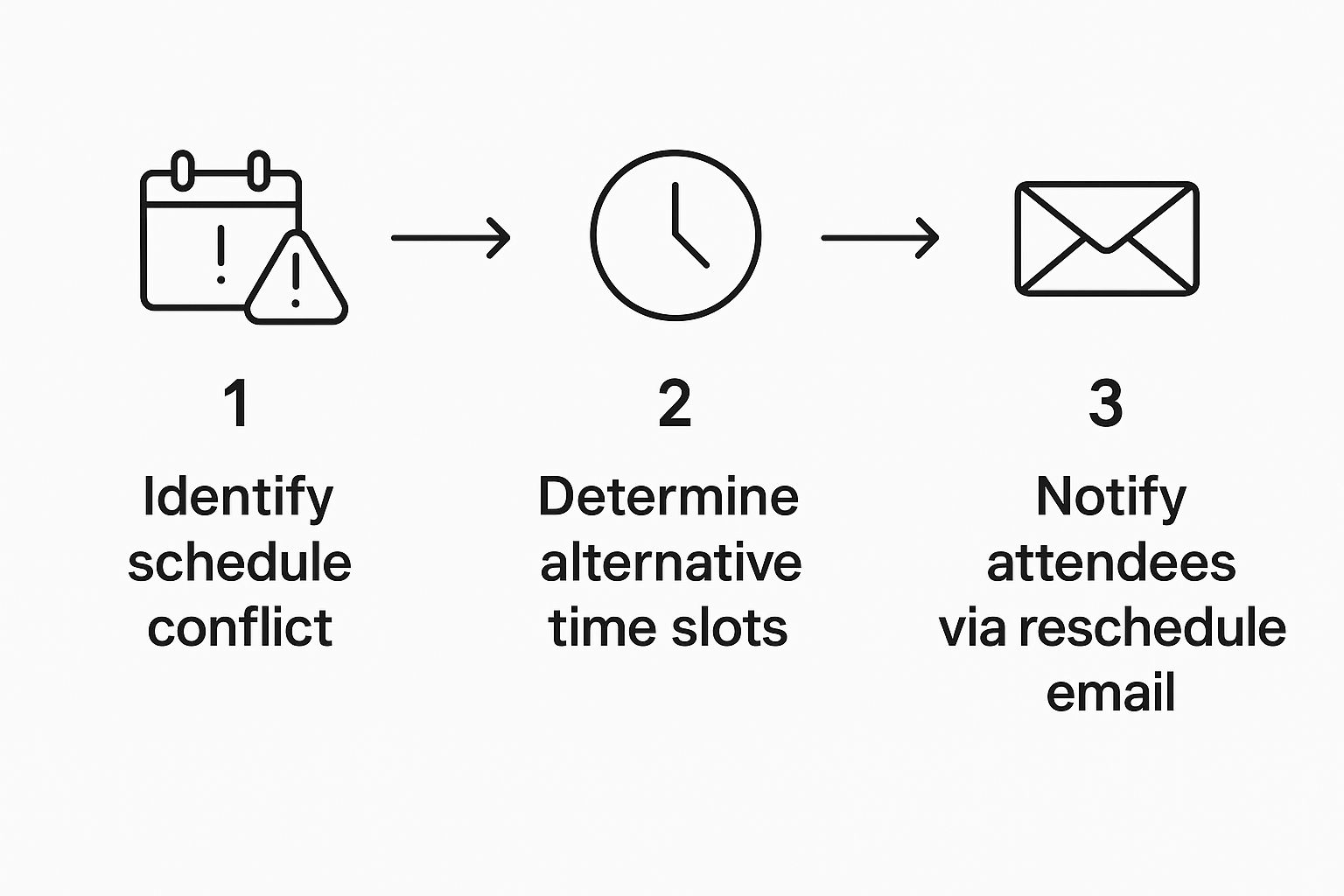
As the infographic shows, the flow is pretty simple: identify the conflict, prep your alternatives, and then communicate with clarity.
Make It Easy to Find a New Time
This is the most critical part. Don't just toss the ball back in their court by saying, "When works for you?" That creates more work for them. Instead, you need to drive the solution.
Here are a couple of ways I’ve found work best:
- Suggest a few specific times. Offer two or three solid options. For example, "Would either Tuesday at 10 AM or Thursday at 3 PM EST work on your end?" This narrows it down and makes for a quick reply.
- Share your scheduling link. Honestly, this is the gold standard for efficiency. It lets them see your real-time availability and pick a slot that works for them, completely eliminating the back-and-forth email chain.
By taking ownership of the next step, you turn what could be an annoyance into a smooth, professional interaction. It shows you value their time and are serious about making the meeting happen.
Templates for Real-World Rescheduling Scenarios

A generic template just won't cut it. The stakes are completely different when you’re rescheduling on a key client versus just pushing back a casual team check-in. The real skill is adapting your language to fit the context, your relationship, and how urgent the situation is.
I've put together a few practical, adaptable scripts for common scenarios you'll actually run into. Think of these less as copy-and-paste solutions and more as a guide to show you how specific phrasing can help you manage the tone and the other person's expectations.
For a Last-Minute Emergency
When something truly urgent blows up your schedule, speed and sincerity are everything. Your goal is to signal that the situation is serious without oversharing, all while apologizing for the extremely short notice.
Subject: URGENT: Need to Reschedule Today's 2 PM Meeting
Body:
Hi [Name],I am so sorry for the last-minute notice, but I need to reschedule our meeting planned for today at 2 PM. An unforeseen personal matter has come up that requires my immediate attention.
I sincerely apologize for any disruption this causes. I will reach out tomorrow to find a new time that is convenient for you.
Thank you for your understanding.
Why this works: The all-caps "URGENT" in the subject line gets their attention immediately. The message is direct, apologetic, and clearly states what will happen next, which is key—it doesn't put the burden of rescheduling on them while you're handling your emergency. It’s respectful of their time.
For Postponing With a Major Client
When it comes to a high-value client, your rescheduling email has to be exceptionally professional. This isn't just about moving a calendar invite; it's about reinforcing your commitment to the relationship and showing them you value their business.
Subject: Regarding our upcoming meeting on [Date]
Body:
Hi [Client Name],I'm writing to request we move our upcoming strategy session scheduled for [Date] at [Time]. A critical and time-sensitive project deadline has unexpectedly shifted, and I want to ensure I can give our conversation the full attention it deserves.
Would you be available at either [Date, Time 1] or [Date, Time 2] instead? If not, please feel free to suggest a time that works best on your end.
My apologies for any inconvenience, and I look forward to connecting.
For Needing More Preparation Time
Sometimes you're just not ready. Admitting you need more time shows integrity and is far better than wasting everyone's time in a meeting that goes nowhere. The trick is to frame it as a benefit to them.
Subject: Moving our [Meeting Topic] call to make it more productive
Body:
Hi [Name],To ensure we have the most productive discussion possible, I'd like to propose rescheduling our call for this Wednesday.
As I was preparing, I realized some additional data would be valuable for our conversation. Pushing our meeting back slightly will give me time to pull that together, which I believe will make our time much more effective.
Are you free early next week? My calendar is open on Monday afternoon or anytime Tuesday. Let me know what works.
Thanks for your flexibility.
Common Rescheduling Mistakes to Avoid
Knowing how to write a good "reschedule a meeting" email is a great start, but knowing what not to do is just as important. With the best of intentions, a few common slip-ups can easily create friction, waste everyone's time, and just look unprofessional. If you can steer clear of these pitfalls, your request will land much more smoothly.
One of the most common mistakes I see is being way too vague. A message like "Something came up" feels dismissive and leaves the other person guessing what happened. You don't need to write a novel, but a little honest context goes a long way. Something as simple as "an urgent client matter" or "a conflicting project deadline" builds trust and shows you respect their time.
Leaving the Next Steps Unclear
Another huge misstep is not proposing a solution. Just saying you need to reschedule and then tossing the ball back with, "When works for you?" puts all the work on the other person. That kind of passive approach just kicks off a long, unnecessary email chain.
The goal of a reschedule email isn't just to cancel the old time; it's to secure a new one efficiently. By not suggesting new times, you’re adding a task to someone else’s plate instead of removing one from your own.
Instead, always be proactive. Offer two or three specific alternative slots. Even better, share a link to your calendar. This small step makes it incredibly easy for them to lock in a new time and moves the whole process forward instantly.
Similarly, waiting until the last minute for a non-emergency is a big one. True emergencies happen, and people get it. But postponing a meeting an hour beforehand because of poor planning is just disrespectful. This also applies after a new time is set; check out our guide on how to send a reminder email to help prevent no-shows and keep things on track.
Ultimately, these mistakes often point back to a bigger problem: a broken meeting culture. People are often desperate to reschedule because they're buried in meetings that shouldn't exist in the first place. The numbers back this up—a staggering 82% of employees admit they sit in meetings that could have just been an email. On top of that, 57% feel some meetings are entirely unnecessary, which leads them to prioritize other work instead. You can find more data on meeting effectiveness in the latest meeting statistics.
By avoiding these common blunders, you're not just handling the immediate situation with grace—you're also doing your part to build a more respectful and efficient standard for how we all work together.
The Hidden Impact of Frequent Rescheduling
Let's be real: an occasional reschedule is just part of doing business. Life happens. But when it becomes a pattern, constant changes start sending a powerful, and usually negative, message.
A single, well-written email to move a meeting is totally fine. A habit of it, though, slowly chips away at your professional reputation. Every time you ask to move a meeting—no matter how politely you word it—you're interrupting someone else's workflow and breaking their focus.
This constant calendar shuffling doesn't just strain one-on-one relationships; it can kill a team's momentum. When meeting times are treated more like suggestions than commitments, it breeds a culture of unreliability. People start mentally downgrading your meetings, half-expecting them to get pushed anyway. It’s a fast track to meeting fatigue and makes getting any real collaborative work done a serious uphill battle.

A Symptom of a Larger Problem
More often than not, frequent rescheduling isn't the real problem. It's a symptom of something bigger: a bloated, unproductive meeting culture.
When calendars are jammed with low-value meetings, people naturally start scrambling to claw back some focus time. This leads directly to more cancellations and postponements. In fact, a staggering 71% of senior managers admit most meetings are unproductive, and executives figure about 45% of them are completely pointless. You can get more details on this trend and its impact in this deep dive from Worklytics.
This reframes the whole act of rescheduling. It’s not just a calendar tweak; it’s a direct reaction to a broken system. The constant need to shuffle things around usually comes from a few common culprits:
- Meetings with no clear agenda or goal.
- Inviting way too many people who don't actually need to be there.
- Defaulting to a meeting for updates that could have just been an email.
When you find yourself constantly needing to reschedule, it's worth asking a tough question: was this meeting even necessary in the first place? Protecting your team's time often means cutting down on meetings, not just moving them around.
Ultimately, fixing the root cause is far more effective than just getting better at writing apology emails. Sure, tools for automated meeting scheduling can help smooth out the logistics, but the real key is building a more intentional and respectful meeting culture. That's how you create a reliable, productive, and less chaotic work environment for everyone.
Common Questions About Rescheduling Meetings
Even with the best templates in hand, some situations just feel a little awkward. Let's tackle a few of the most common questions I get about rescheduling meetings. Think of this as your quick reference for handling those tricky scheduling curveballs with grace.
How Should I Respond When Someone Asks to Reschedule?
The name of the game here is flexibility. Always, always respond with an understanding and positive tone.
Start by acknowledging their message and thanking them for the heads-up. A simple, "Thanks for letting me know, I appreciate you reaching out," sets a great tone right away. Then, make it clear you're happy to find a new time. If they've already suggested a few options, great! Address those directly. If not, you can either propose a few new slots or, even better, share your scheduling link to take the back-and-forth out of it.
The goal is to be a great partner in finding a new time. Responding with grace and making it easy for them to reschedule strengthens your professional relationship and shows you respect their need for a change.
What’s the Best Way to Handle a Last-Minute Reschedule?
Okay, this one is tough. When you have to make a last-minute change, you need to act fast and be genuinely apologetic.
Your email subject line should signal the urgency immediately. Something like: "URGENT - Need to Reschedule Today's 2 PM Meeting" gets the message across. In the email itself, get straight to the point. Apologize for the short notice and briefly state that a "sudden conflict" or "unforeseen issue" has come up. You don't need to overshare.
The most important part? Immediately show you're committed to rebooking. This proves you still value their time, even with the sudden shift.
Is It Okay to Reschedule Because I'm Not Prepared?
Yes. In fact, it's a hundred times more professional than showing up and wasting everyone's time with an unproductive meeting. It all comes down to how you frame the request.
Don't just say, "I'm not ready." Instead, you need to position the change as a benefit to them.
- Try this: "To make sure our conversation is as productive as possible, I'd like to suggest we reschedule. This will give me a chance to pull some additional data that I think you'll find really valuable for our discussion."
This approach shows you respect their time and are focused on making the rescheduled meeting a true success.
Ready to stop the back-and-forth and turn more demo requests into booked meetings? Distro automatically routes and schedules high-intent prospects with the right sales rep instantly. Learn how Distro can 3X your conversion rates.