A good reminder email is simple, right? Just a quick, polite nudge. But getting it just right is an art form. You need to be clear and direct without coming across as demanding, and provide just enough context so the other person knows exactly what you need.
The goal is to state your purpose clearly in both the subject line and the body, jog their memory about the original request, and make it incredibly easy for them to take the next step.
The Art of the Gentle Nudge
Let's be real: no one loves getting a reminder about something they haven't done. But you know what everyone does appreciate? Not missing a deadline or an important meeting. That's the tightrope you walk when sending a reminder. It’s less about chasing someone down and more about being genuinely helpful.
A well-crafted reminder can actually build professional trust. Instead of creating friction, it shows you're organized, on top of your game, and that you respect everyone's time—including theirs. You're not just managing your own tasks; you're helping them manage theirs, too.
Why Are Reminder Emails So Important, Anyway?
Sending a reminder isn't about being pushy; it's just plain practical. Think of it as a service you're providing. In a world of overflowing inboxes and back-to-back meetings, your polite follow-up can be the one thing that cuts through the noise and keeps a critical task from falling through the cracks.
The right reminder can be the difference between a project that stalls and one that sails smoothly to the finish line.
This is especially true when you consider how central email is to our work lives. It's not going anywhere, with a projected 5.61 billion global users by 2030. Plus, data shows that 99% of people check their email daily, often first thing in the morning. This makes it a super reliable way to send time-sensitive messages. If you're interested in digging deeper into email trends, Cloudhq's blog has some great insights.
A thoughtful reminder does a few key things:
- It clears their mental cache. You're bringing an important item back to the top of their to-do list so they don't have to.
- It keeps projects moving. A quick nudge can prevent bottlenecks by getting you the timely feedback or approval you need.
- It helps you get paid. For freelancers and businesses, a gentle reminder is crucial for securing payments on time without souring client relationships.
Core Components of an Effective Reminder Email
Every great reminder email, whether you’re chasing an invoice or just need feedback on a draft, shares a few key ingredients. Once you get these down, you can adapt your message for just about any situation.
A great reminder is a conversation starter, not a demand. It re-opens the door for communication politely and gives the recipient an easy way to respond, even if it's just to say, "Thanks, I'm on it."
To help you craft the perfect nudge, here’s a quick-reference table summarizing the essential elements you'll want to include for maximum impact.
Core Components of an Effective Reminder Email
| Component | Purpose | Quick Tip |
|---|---|---|
| Clear Subject Line | Grabs attention and immediately states the email's purpose. | Be specific. Use keywords like "Follow-up," "Feedback," or the project name. |
| Polite Opening | Sets a friendly, professional tone and references the original context. | Start with a simple "Hope you're having a good week" or "Just following up on..." |
| Direct Request | Clearly states what you need and by when, removing any ambiguity. | Use bold text for key dates or action items so they're easy to spot. |
| Context/Attachments | Provides all necessary info, like the original email or relevant files. | Forward the original email thread or re-attach the document. Don't make them dig for it. |
| Clear Call-to-Action | Makes it dead simple for the recipient to take the next step. | Use action-oriented language like "Please reply by EOD Friday" or "You can book a time here." |
Mastering these pieces will turn a potentially awkward interaction into a positive and productive one, every time.
Crafting Your Reminder Email Body

Okay, your subject line worked—they opened the email. Now, the body of your message has to do the heavy lifting. This is where you walk a fine line between being clear and being courteous to get what you need without causing friction.
Let's be real: most people are skimming emails on their phones. A dense wall of text is an instant "I'll get to this later," which often means never. Your goal is to make the email incredibly easy to scan and understand at a glance. The core of any great reminder comes down to effective written communication skills, making sure your message is both clear and compelling.
Start With A Polite and Contextual Opening
Always kick things off with a friendly, professional tone. A simple, warm opening shows you see them as a person, not just a to-do list item. Don't just dive straight into your request—it feels abrupt and demanding.
Right after your greeting, give them some context. A quick reference to your last chat or the specific thing you’re following up on saves them the headache of digging through their inbox.
Here are a couple of ways this looks in practice:
- "Hi [Name], hope you're having a productive week! Just wanted to gently follow up on the project proposal I sent over last Tuesday."
- "Hello [Name], I'm just checking in on invoice #1234, which was due yesterday. I've re-attached it here for your convenience."
State Your Request Clearly and Directly
Once you've set the stage, get right to the point. Ambiguity is the enemy of action. You need to state exactly what you need and, if there’s a deadline, what it is. Never bury your main request in a long, winding paragraph.
This is where a little formatting goes a long way. Use bold text for the most important details, like dates, amounts, or specific action items. This makes the critical info pop, catching their eye even during a quick scan.
Remember: The goal is to remove all guesswork. The recipient should understand what you need within five seconds of reading your email. Make it effortless for them.
For instance, instead of something vague like, "I was hoping to get your thoughts on the report soon," be direct and helpful: "Could you please provide your feedback on the attached report by end-of-day this Friday, October 25th?" It's not rude; it's just clear.
End With A Clear and Simple Call to Action
The last piece of the puzzle is an unmistakable call to action (CTA). Tell them precisely what you want them to do next. Should they reply? Click a link? Send a file?
The key is to make that action as easy as possible.
- For feedback: "Just reply to this email with your thoughts."
- For a meeting: "You can book a time that works for you directly on my calendar here: [Link to scheduling tool]."
- For a payment: "You can pay the invoice directly using this link."
By giving them a clear, low-effort next step, you dramatically increase the odds of getting a quick response. It shows you respect their time, which turns a simple nudge into a positive and efficient interaction.
Writing Subject Lines That Get Opened
Let's be honest: your subject line is the gatekeeper. It's the first thing anyone sees and, more often than not, it's the single element that decides if your email gets opened or completely ignored.
A generic title like "Reminder" or "Follow-up" is a one-way ticket to the archive folder. It screams "low priority" because it has zero context and zero urgency. In an inbox overflowing with noise, it's just too easy to dismiss.
The key is specificity. A great subject line immediately answers the silent question in your recipient's mind: "What is this and why should I care right now?" This means you have to ditch the vague stuff and get straight to the point. Your goal is to provide just enough information to signal that your email is important, without giving the whole story away.
Be Specific and Action-Oriented
The best-performing subject lines are crystal clear, concise, and often tell the person exactly what to do. Instead of making them guess what you need, lead with the specific task or topic. This one small tweak can transform your email from a minor annoyance into a genuinely helpful nudge.
Think about these simple shifts:
- Instead of "Meeting Follow-up," try "Quick Question Following Our Call About Project Alpha"
- Instead of "Invoice," use "Action Required: Invoice 12345 Due This Friday"
- Instead of "Checking In," write "Feedback Needed on Q3 Marketing Report Draft"
This approach shows you respect their time by giving them all the context they need to prioritize your message. It’s the same logic you’d apply when sending an email for a meeting invitation, where the purpose needs to be understood at a glance.
A powerful subject line acts as a mini-summary of your request. If your recipient can understand the email's core purpose without even opening it, you’ve already won half the battle. This clarity is crucial for getting a timely response.
This is even more critical when you consider that roughly 60% of emails are now opened on mobile devices. Short, front-loaded subject lines are a must for smaller screens, ensuring your main point isn't cut off.
High-Impact Subject Line Examples
Let’s get practical. Here are a few examples you can steal and adapt for common reminder scenarios. Notice how each one provides context, a little bit of urgency, or a clear next step.
For a Meeting Reminder:
- Reminder: Marketing Sync Tomorrow at 10 AM PST
- Agenda for Our Call This Afternoon (Project Phoenix)
For an Unpaid Invoice:
- Follow-up: Invoice #6789 (Due Today)
- Gentle Reminder: Past Due Invoice for [Service/Product]
For Requesting Feedback:
- Your Thoughts on the Website Mockup? (Due EOD)
- Feedback Requested: [Document Name] - V2
Crafting the perfect subject line is a skill that takes practice. For a deeper dive, it's worth exploring how to write professional email subject lines that cut through the noise. Mastering this ensures your friendly nudge never goes unnoticed.
Timing Your Reminder for Maximum Impact
You can craft the perfect reminder email, but if you send it at the wrong time, it’s just as useless as a bad one. Knowing when to send your follow-up is a strategic move, and it can dramatically increase your chances of actually getting a response. The goal isn't just to remind—it's to pop into their inbox at the exact moment they’re most likely to act.
Think about a typical workday. A payment reminder sent at 4:55 PM on a Friday? That’s a one-way ticket to getting buried under a mountain of weekend emails. On the flip side, an event reminder sent a month out is way too early; it'll be forgotten long before the day arrives. You have to match your timing to the specific context of your request.
Aligning Your Reminder with the Situation
Different scenarios demand different timelines. A one-size-fits-all approach to sending reminders just doesn't cut it. You have to adapt your cadence based on the urgency and nature of the task.
I've learned through trial and error that some timelines just work better than others. Here are a few proven cadences for common business situations:
- For an Event: I always send the first reminder one week before the event. This gives people a heads-up. Then, a second one 24 hours before is crucial, followed by a final, quick nudge one hour before it kicks off. This multi-step approach keeps the event top-of-mind without feeling spammy.
- For a Payment: A friendly heads-up a few days before the due date is a nice courtesy. If it's still unpaid, a follow-up on the due date is necessary. After that, I start a polite follow-up sequence every 3-5 business days once it's officially past due.
- For a Project Deadline: The timing here really depends on the project's scope. For a task due in two weeks, checking in midway through is usually a good bet. A final reminder 1-2 days before the deadline gives your colleague a last chance to ask any questions.
And please, always consider the recipient's time zone. An email that lands at 3 AM their time is guaranteed to be at the bottom of a very crowded inbox by the time they start their day.
Developing a Thoughtful Follow-up Sequence
Sometimes, a single reminder just isn't enough. For more critical requests, like an overdue invoice or urgent feedback, you need a plan. This is where a follow-up sequence comes in—a series of emails that gently escalate in urgency over time. This structured approach saves you from sending those random, panicked "just checking in" emails that rarely work.
The real key is to space them out thoughtfully. You want to avoid overwhelming the recipient. A common and effective cadence is to wait a few days between each follow-up, giving them plenty of time to see it and respond.
This visual guide shows a standard, effective process flow for a non-urgent follow-up sequence.
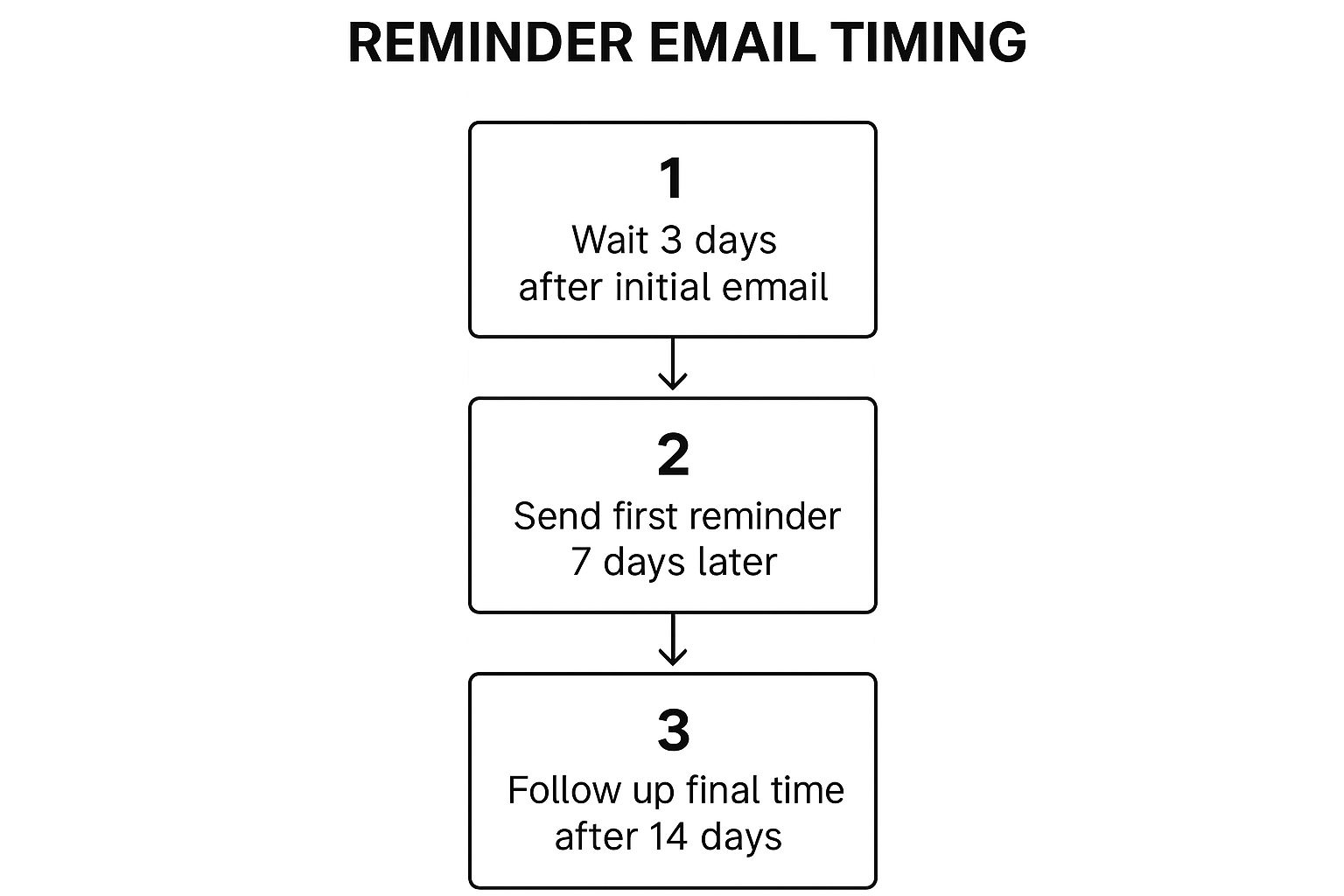
This spaced-out approach shows persistence without being pushy, which is everything when it comes to maintaining a positive professional relationship. It’s the perfect balance between respecting their time and driving toward your goal.
Practical Reminder Email Templates You Can Use Today
Knowing the theory is one thing, but having some solid, ready-to-go templates is what really saves you time and mental energy day-to-day. The real trick is to treat these less like rigid scripts and more like flexible starting points. You need to tweak them to fit your own voice and the specific situation.
Below are a few practical templates I've seen work time and again for some of the most common scenarios you'll run into. They're all built for clarity and to keep things positive and professional.
To give you a quick overview, here's a simple guide to choosing the right kind of reminder for your situation.
Reminder Email Template Guide
| Scenario | Key Objective | Recommended Tone |
|---|---|---|
| Upcoming Meeting | Confirm details & reduce no-shows | Friendly & helpful |
| Requesting Feedback | Nudge for input without being pushy | Respectful & flexible |
| Unpaid Invoice | Secure payment while maintaining goodwill | Professional & direct |
| Event Confirmation | Build excitement & provide logistics | Energetic & informative |
This table should help you quickly match your goal with the right approach, setting you up for a better response before you even start writing.
The Gentle Meeting Reminder
This is probably the reminder you'll send most often. The goal here is simple: be helpful, confirm the key details, and give the other person an easy out if they need to reschedule.
If you want to go even deeper on this specific type of email, we've put together a complete guide on crafting an effective reminder email for a meeting.
Subject: Reminder: Our Call Tomorrow at 10:00 AM PST
Hi [Name],
Just a friendly reminder about our call scheduled for tomorrow, [Date], at 10:00 AM PST to discuss [Topic].
I've attached the agenda to this email for your convenience. Looking forward to our conversation!
Best,
[Your Name]
I love this template because it’s brief, gives them everything they need (date, time, topic), and adds a little extra value by re-attaching the agenda. Simple. Effective.
The "Nudge for Feedback" Email
Let's be real: asking a busy teammate for their input can feel awkward. You have to walk a fine line between respecting their time and clearly stating what you need and when you need it.
Subject: Feedback on [Project Name] Draft?
Hi [Name],
Hope you're having a great week.
When you have a moment, could you please take a look at the attached [Document Name] draft? Your feedback on the [Specific Section] would be especially helpful. I'm hoping to finalize it by EOD Friday.
No pressure at all if you're swamped—just let me know.
Thanks a bunch,
[Your Name]
Pro Tip: Little phrases like "When you have a moment" and "No pressure if you're swamped" are gold. They soften the request and show you understand your colleague is buried in work, which honestly makes them more likely to help you out.
The Polite Unpaid Invoice Follow-Up
Chasing payments is never fun, but it's a necessary part of doing business. The key to the first reminder is to always assume it was an honest mistake or just fell through the cracks. The tone should be helpful, not accusatory.
Subject: Follow-up on Invoice #12345
Hi [Name],
Hope all is well.
This is a gentle reminder that invoice #12345, for the amount of [$Amount], was due last week on [Due Date].
I've re-attached the invoice to this email for your convenience. You can make the payment directly via [Payment Link or Method].
Please let me know if you have any questions.
Thank you,
[Your Name]
This one works because it stays professional, provides all the necessary info (invoice number, amount), and offers a direct, easy way to pay. You're removing any friction that might be holding things up.
The Final Event Confirmation
As your event gets closer, a final confirmation email is your best friend. It helps build excitement and, more importantly, reduces no-shows. This email should feel energetic and be packed with all the crucial details attendees will be looking for.
Subject: See You Tomorrow! Final Details for [Event Name]
Hello [Attendee Name],
The day is almost here! We're so excited to see you at [Event Name] tomorrow, [Date], at [Time].
Here’s everything you need:
- Location: [Full Address with Google Maps Link]
- Parking: [Instructions or recommendations]
- Check-in: Please have your ticket QR code ready.
We can't wait to see you there!
Best,
The [Your Company/Event] Team
Reminder emails are a specific but vital type of follow-up. If you want to zoom out and get a broader perspective on the art of persistence, this ultimate guide to writing follow-up emails has a ton of great strategies.
Common Questions About Sending Reminder Emails
Even with the best templates and a solid strategy, you're going to run into situations that just feel… awkward. Sending a reminder is one thing, but navigating the trickier scenarios takes a bit more finesse. Let's break down some of the common grey areas I see all the time.
What If They Don't Reply After Two Reminders?
So you've sent two polite follow-ups, and all you're hearing is crickets. Sending a third can feel like you're just shouting into the void.
At this point, it’s safe to assume email might not be the right channel anymore. The issue could be anything. Maybe your emails are hitting their spam folder, or the person is out on an unexpected leave. You just don't know.
Before you even think about drafting a third email, try a different approach. A quick phone call or a message on a platform like Slack or Microsoft Teams is far more direct and can clear things up instantly.
If you absolutely must send another email, keep it short and change the goal. Instead of pushing for the original request, focus on simply re-establishing contact.
Something like this usually works:
- Subject: Checking In
- Body: "Hi [Name], just wanted to make sure you received my previous emails about [Topic]. No worries if you're swamped, just let me know if there’s a better way to connect. Thanks!"
This shifts the tone from demanding to helpful.
The old saying is true: doing the same thing over and over and expecting a different result is madness. If two emails go unanswered, don't just send a third. It's time to pick up the phone or ping them on another channel.
How Do I Remind My Boss or a VIP Client?
Nudging someone in a position of authority—whether it's your boss or a high-value client—requires a delicate touch. You can’t just fire off a standard "just following up" email.
The key here is to frame your reminder as a helpful action that benefits them or the project, not as a demand for your own sake. Always assume they are incredibly busy and that your email needs to make their life easier, not add to their cognitive load.
Provide all the necessary context right in the email and make the action you need them to take as simple as humanly possible. For some extra ideas, you can adapt many of the approaches in these 7 friendly email reminder template examples for a more senior audience.
Here’s a phrasing I’ve used that works well:
- Subject: Quick question on the [Project Name] deck
- Body: "Hi [Boss's Name], circling back on the presentation deck for Friday's meeting. To make sure I can get the final version ready for your review, could you provide your feedback on the attached draft when you have a free moment? Appreciate your guidance on this."
See the difference? This language positions you as a proactive team member helping them meet their goals, not just another person chasing them for a task. It’s all in the framing.
Ready to stop chasing leads and start closing deals? Distro automatically routes high-intent prospects from your demo forms to the right sales rep's calendar in seconds. See how our intelligent scheduling can 3X your conversion rates by visiting https://distro.so.