
Why Your Meeting Invitation Format Actually Matters
We’ve all been there. You open your inbox to find yet another cryptic meeting invite. What’s it about? Why are you needed? A poorly written invitation leaves you scrambling for context (or just hitting "decline"). And on the flip side, we've all sent invitations that landed with a thud, resulting in low attendance or a room full of disengaged participants.
Trust me, a well-crafted meeting invitation isn't just about being polite. It's about respecting everyone's time and setting the stage for a productive discussion. Think of it this way: A handwritten invitation to a fun party gets you excited. A generic group text? Yeah, that might get ignored. Your meeting invites should feel more like the former.
The move to digital calendars and invitations has fundamentally changed how we handle meetings. Consider this: Over 65% of employees in large organizations rely on digital calendars, fielding an average of 12 meeting invitations every single week. That's a lot of digital noise! Discover more insights. With that kind of volume, your invitation needs to stand out and clearly communicate its value. If your format is weak, it’s likely to get lost in the shuffle.
The Psychology of Invitation Language
The words you use in your invitation directly impact how people perceive the meeting's importance. A vague subject line like "Project Update" tells people next to nothing and is easily dismissed. Instead, try something specific like "Project X: Key Milestone Discussion & Next Steps." Now you've signaled a clear purpose and encouraged people to actually show up.
Even small tweaks in your invitation language can make a big difference. Think about the contrast between "Your presence is requested" and "Your input is essential for this discussion." One feels obligatory; the other makes attendees feel valued and heard.
From Eye-Rolls to Engagement: Real-World Examples
Let me share a quick story. I had a client, a marketing agency, struggling with low meeting attendance and participation. Their generic invitations offered zero insight into the meeting’s purpose or desired outcomes. We revamped their invitation format to include clear objectives, expected outcomes, and a concise agenda. The result? A significant boost in both attendance and engagement. Suddenly, people understood why their presence mattered.
This experience really brought home the power of a well-structured invitation. It can completely transform the entire meeting experience.

The Non-Negotiable Elements Every Invitation Needs
Think of your meeting invitation like a mini-contract – it's a preview of how everyone's time will be spent. The best organizers treat invitations with this kind of respect, setting clear expectations up front. A well-crafted invitation helps avoid those dreaded "another pointless meeting" eye rolls and actually encourages people to show up engaged.
So, what's the secret sauce that transforms a potential time-waster into something valuable? It all comes down to the essential components of a killer meeting invite. Take the subject line, for example. It does way more than just announce the topic; it sells the meeting's value. Instead of a generic "Team Meeting," try something specific like "Q3 Marketing Strategy: Brainstorming New Initiatives." This instantly tells people what they're in for and why their input matters. By the way, if you're having trouble getting your invitations noticed, check out this helpful article on common email deliverability problems.
Clarity is King: Essential Details and Objectives
Beyond a compelling subject line, your invitation needs a clearly stated objective. What concrete outcomes are you hoping to achieve? Spelling this out helps attendees prepare and ensures everyone's on the same page from the start. I've personally seen how a clearly defined objective can transform a meandering discussion into a laser-focused, productive meeting. Looking for ways to make scheduling smoother? We've got you covered with our guide on the best way to schedule meetings.
A concise agenda is also non-negotiable. It acts as a roadmap, keeping the discussion on track and managing everyone's time efficiently. Think of it as a sneak peek of the meeting's structure, allowing participants to anticipate the key talking points. This simple step makes the meeting much more productive for everyone involved.
Finally, never underestimate the importance of logistical details. This includes the date, time, location (whether in-person or virtual), and any relevant links or dial-in information. Providing clear instructions avoids pre-meeting confusion and guarantees a smooth start. The goal is to empower your attendees with the information they need, not leave them scrambling to figure things out.
Mastering Hybrid Meeting Invitations
The way we invite people to meetings has definitely changed with more people working remotely. Invitations now need to cater to both in-person and remote attendees, which can be surprisingly tricky. I've seen perfectly organized people struggle with this, resulting in remote participants feeling left out and in-person attendees wrestling with tech gremlins.
Bridging the Gap: In-Person and Remote Attendees
One of the biggest hurdles is providing clear joining instructions for everyone. Think options: a physical address for those in the office, a video conferencing link for remote attendees, and maybe even a phone dial-in for people on the go. Also, clearly stating who's expected in person versus remotely helps with room setup and avoids those awkward "Are you here or there?" moments. If you're juggling a lot of scheduling, you might find round-robin scheduling software helpful.
Technical Clarity and Time Zone Triumphs
Remember the last time you wrestled with a broken link or confusing instructions just trying to join a meeting? Infuriating, right? Test those video conferencing links beforehand! And provide super-clear instructions right in the invitation. Making sure those invitations arrive safely is another key part of the puzzle – check out resources on email links that actually work. For global teams, specifying the time zone in multiple formats is crucial. I once saw a meeting start an hour late because of a time zone mix-up. A small detail with a big impact. The shift to hybrid is real: over 80% of corporations required video conferencing links in meeting invites in 2023, up from just 30% pre-2020. Discover more insights. That stat really drives home the importance of clear, accessible hybrid meeting invitations.
Reducing Meeting Fatigue: Required vs. Optional
Finally, let’s talk attendance. We all have jam-packed calendars. Clearly stating whether attendance is required or optional lets people prioritize their time and avoid unnecessary meetings. A simple "optional" tag can do wonders for reducing meeting fatigue and boosting engagement for those who do attend. It's a small gesture that shows respect for everyone's time and fosters a more positive meeting culture.
Battle-Tested Templates That Actually Work
Let's be honest, rewriting the same meeting invite details every single time is a drag. I've been there! That's why I started using templates. Not to make every invite identical, but to free up my time for the stuff that matters – the personal touches that make people actually want to attend. Here are a few of my go-to meeting invitation formats that have worked like a charm.
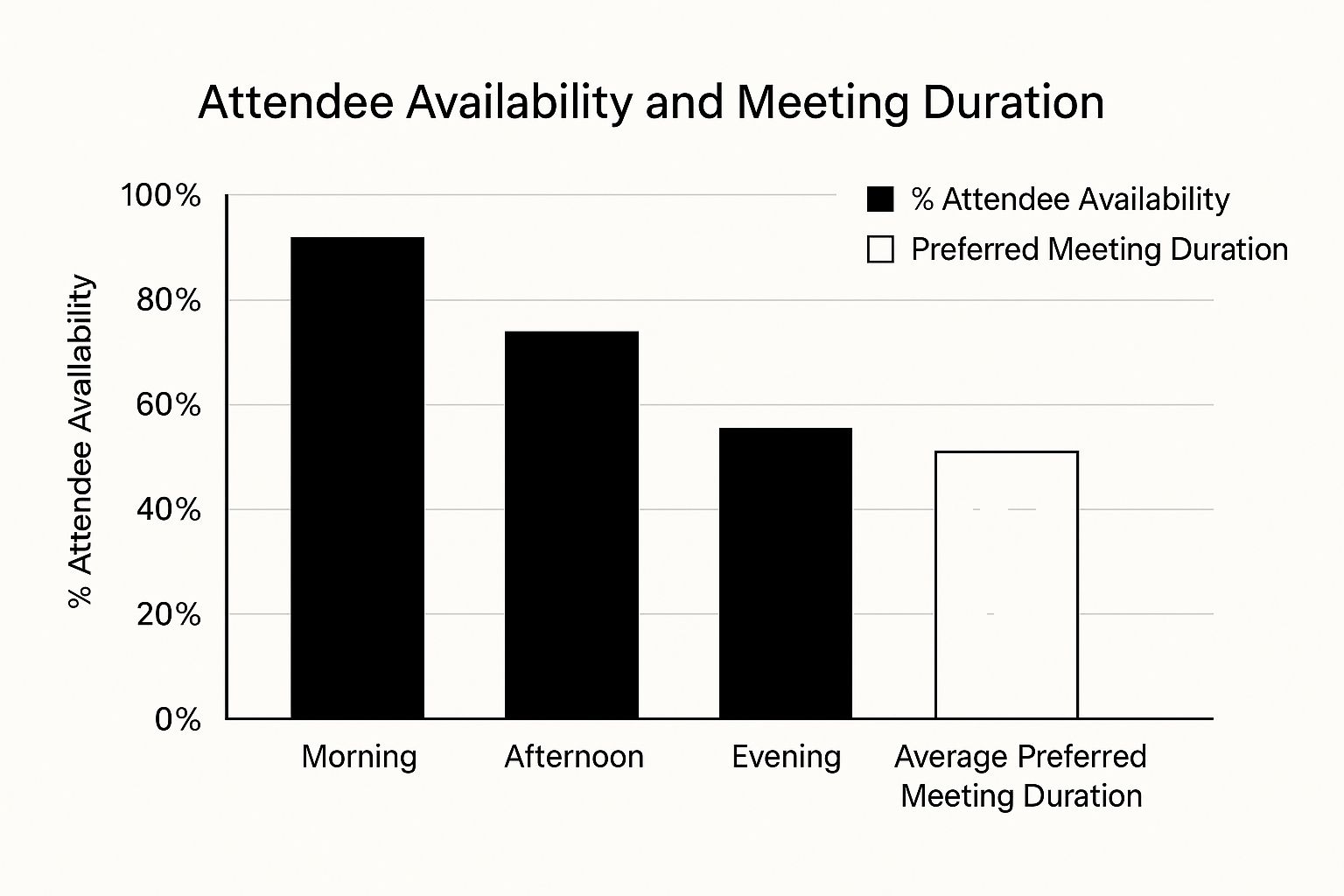
This infographic maps attendee availability against preferred meeting durations across the day. Notice how afternoons tend to have more open slots, but folks generally favor shorter meetings then. This kind of intel is pure gold when you're trying to nail down the perfect meeting time.
Quick Check-In
Need a fast touch-base with the team? Keep the invite concise. Something like "Team Check-in: [Project Name] Update" in the subject line does the trick. Inside, just bullet the main discussion points and mention how long you expect it to last (e.g., "15 minutes"). Setting clear expectations upfront keeps everyone on the same page.
Brainstorming Session
Brainstorming invites should spark some excitement. A subject line like "Innovation Session: [Project Name] - Let's Get Creative!" can get the ball rolling. Give a quick overview of the session's goal and maybe toss in a thought-provoking question to get those creative juices flowing beforehand.
Urgent Discussion
When something needs immediate attention, your invite should reflect that – without sounding panicked. A subject like "Urgent: [Issue] Discussion - Your Input Needed" conveys the importance. Clearly lay out the issue, what you hope to achieve, and why everyone's input is crucial.
To help you visualize how these templates apply to different scenarios, I've put together a quick comparison table:
Meeting Type Template Comparison: A comparison of different meeting invitation templates showing key elements and best practices for various meeting scenarios.
| Meeting Type | Essential Elements | Typical Duration | Preparation Required |
|---|---|---|---|
| Quick Check-In | Project name, key discussion points, expected duration | 15 minutes | Minimal - list of discussion points |
| Brainstorming Session | Project name, session goal, thought-provoking question | 30-60 minutes | Moderate - background information, potential prompts |
| Urgent Discussion | Clear description of the issue, desired outcome, reason for individual input | Varies depending on urgency | Moderate to High - Information gathering and potential solutions |
This table gives you a snapshot of how each meeting type differs in terms of what information is crucial and the general time commitment.
Seriously, building your own template library is a game-changer. Tweaking these examples to fit your specific needs will help you create winning invitations for any meeting, every time.
Writing Invitations People Want to Accept
The language you use in your meeting invitations really does matter. It can influence whether people show up ready to contribute or already feeling drained. Think about it: The best meeting organizers get that people need a reason to be there. It’s not just about your needs, it’s about the value attendees get out of it. Would you rather attend a "mandatory update" or a "collaborative strategy session"?
That subtle shift in wording can make a huge difference. When you frame the meeting purpose as mutually beneficial – and show you respect everyone’s time – people are much more likely to buy in. I've seen it happen time and time again: a few tweaks to the invitation wording and suddenly you have a room full of engaged participants. Instead of "I need your input on this project," try something like, "Let's collaborate on the next project phase and brainstorm some new ideas." Need a little help polishing your prose? An AI Writing Assistant Guide can be a lifesaver.
Handling Sensitive Topics and Urgent Situations
Sometimes, you need to have tough conversations or call a meeting at the last minute. Even then, keeping your invitation professional and clear is key. If you’re dealing with a sensitive topic, start by setting a respectful tone. For instance, rather than saying, "We need to discuss some performance concerns," you might say, "Let's check in on recent project progress and see what support we can offer."
Urgent situations also require a delicate touch. You need to convey the urgency, of course, but avoid language that creates unnecessary panic. Skip the "EMERGENCY MEETING!" subject line and try something like, "Urgent: Addressing [Specific Issue] - Your Input Needed." This gets the message across without resorting to alarmist tactics. Dealing with no-shows for other important appointments? This article on How to Reduce No-Show Appointments might offer some helpful tips.
Following Up Without Being Pushy
Following up is important, but no one wants to feel harassed. Instead of sending reminder after reminder, reframe your follow-up as helpful. For example, skip the impersonal "Have you responded to the meeting invite yet?" and try, "Just a friendly reminder about our meeting on [Date] about [Topic]. Please let me know if the time still works or if we need to reschedule." This approach emphasizes the meeting's importance while giving people a graceful way to suggest a different time. It’s a win-win for everyone involved.
Advanced Invitation Strategies That Set You Apart
You've nailed the meeting invite basics. Awesome! But how do you really make them shine? The pros treat invitations as a strategic lever, not just a scheduling tool. They use smart timing, prep work, and follow-up to transform meetings from time-wasters into productive sessions.
Leveraging Scheduling Intelligence
Let's be honest, finding a time that works for everyone can be a nightmare. Scheduling tools like Calendly can be lifesavers. They sync with your calendar, let attendees pick their preferred times, and automate the whole process. No more endless email chains! You get that time back for more important things.
Calendar Analytics and Workflow Optimization
Have you ever wondered if your meetings are truly effective? Calendar analytics can give you some real insight. By tracking how often you meet, how long meetings last, and who's participating, you can spot trends and make improvements. Are team meetings always running long? This data helps you pinpoint the bottlenecks and fix them.
Invitation workflows, especially those linked to project management tools, streamline everything from scheduling to post-meeting tasks. No more scrambling for notes or action items! In fact, research shows almost 50% of meeting invites now include buffer time for prep and follow-up. This focus on productivity highlights how important effective meeting management has become. Discover more insights.
Handling Complex Scenarios
Juggling time zones can be a headache. Scheduling tools with built-in time zone conversion are a game-changer, preventing those awkward scheduling mishaps. Recurring meetings are also simpler to manage, with features to update every instance at once. And for those big group meetings? Platforms with automated reminders and RSVP tracking keep things organized and easy to manage.
Automating Reminders and Feedback Loops
Reminders don't have to be annoying. Done right, they can be helpful. Instead of a generic ping, try sending a summary of the meeting goals or a link to the agenda. This keeps everyone focused and reminds them why the meeting is important.
Feedback loops are also key to better meetings. A quick post-meeting survey can offer valuable insights into what worked, what didn't, and how to improve things next time. By using these advanced strategies, you can transform meeting invites from simple scheduling tools into powerful ways to boost productivity and collaboration.
Here’s a handy checklist to keep in mind:
Meeting Invitation Best Practices Checklist A comprehensive checklist showing essential elements, timing considerations, and follow-up actions for professional meeting invitations
| Category | Best Practice | Why It Matters | Common Mistakes |
|---|---|---|---|
| Timing | Send invitations at least a week in advance | Gives attendees time to prepare and adjust schedules | Sending last-minute invitations |
| Clarity | Clearly state the meeting purpose and objectives | Ensures everyone understands the meeting's goal | Vague or missing objectives |
| Preparation | Include an agenda and any pre-reading materials | Allows attendees to come prepared and contribute effectively | Lack of preparation leads to unproductive meetings |
| Follow-Up | Send a post-meeting summary and action items | Reinforces key takeaways and keeps everyone accountable | Failing to follow up diminishes meeting impact |
| Technology | Use scheduling tools for easy time selection | Simplifies scheduling and reduces back-and-forth | Manual scheduling can be time-consuming |
| Accessibility | Consider time zones and provide dial-in options | Ensures everyone can participate, regardless of location | Ignoring time zone differences can exclude participants |
This checklist helps ensure your meeting invitations are clear, well-timed, and set the stage for a productive discussion. By paying attention to these details, you can significantly improve the effectiveness of your meetings.

By implementing these strategies and using the checklist, you’re not just scheduling a meeting; you're setting the stage for true collaboration and achieving real results.
Your Personal Meeting Invitation Upgrade Plan
So, we've covered the basics of meeting invitations. Now, let's talk about actually using these ideas. The key? Start small. Focus on easy improvements that'll quickly boost your meeting culture. Then, gradually add more advanced techniques. Think of it like leveling up your invitation game!
Auditing Your Current Approach
Before changing anything, look at your current invitations. Are your subject lines clear and to the point? Do they have all the important details? Are you using templates to make things easier? Honestly evaluating what you're already doing helps you find areas to improve. This doesn’t need to be complex. Just grab some recent invitations and compare them to the best practices we discussed.
Prioritizing Quick Wins
The best way to get going is to start with the easy stuff. Maybe your subject lines are usually vague. Try making them more specific and action-oriented. Or maybe you’re forgetting to include a clear objective. Start there! These small changes can significantly impact attendance and engagement. I've seen it firsthand – teams drastically improving their meetings just by tweaking their invitations. Prioritizing quick wins gets you fast results and keeps you motivated.
Implementing Gradual Improvements
Once you’ve tackled the easy stuff, start adding more advanced techniques. Try different templates, check out scheduling tools like Calendly, and consider adding pre-reading materials or post-meeting surveys. These strategies can take your meetings to the next level. It's about finding what works best for your team and your needs. This isn't an overnight change. It's a gradual process of getting better over time.
Troubleshooting and Adapting
You’ll probably run into some bumps along the way. Maybe a template isn't working, or you’re not getting enough responses to your invitations. That’s totally normal! This is where troubleshooting and adapting comes in. Try different approaches, get feedback from your team, and don’t be afraid to change things as needed. Be flexible and keep trying until you find the right fit. Every team is different, so the perfect invitation format often takes some experimentation. Ready to transform your meeting culture and boost productivity? Distro can help automate scheduling and optimize lead distribution. Learn more about how Distro can improve your meeting workflow: Distro Meeting Workflow.