A meeting invitation is more than just a calendar alert. Think of it as a strategic tool—your first, best chance to set the stage for a session that actually gets things done. A great invite clearly lays out the purpose, agenda, and logistics, making sure everyone shows up prepared and ready to contribute.
This is your opportunity to turn a potentially vague get-together into a focused, valuable meeting.
Why Your Meeting Invitation Email Actually Matters

Let's be real—sending a meeting invite often feels like a quick admin task to tick off a list. But treating it that way is a huge mistake. This simple email is the foundation of a successful meeting. It's the first impression you make and the main way you align expectations before anyone even logs on.
A poorly written email is a recipe for disaster. It leads to confusion, attendees who haven't done the prep work, and wasted time for everyone. A thoughtful, clear invitation, on the other hand, is a roadmap. It tells people not just where and when to show up, but why their presence is critical. That simple context boost can make a massive difference in attendance and engagement.
The Real Cost of a Bad Invitation
When an invite is vague, it creates a domino effect. People might decline because they don't see the point. Or, they’ll show up cold, without reviewing key documents, completely derailing the conversation from the get-go. All that inefficiency adds up.
The shift to remote and hybrid work has only made this worse. Between 2020 and 2022, the share of meetings held virtually shot up from 48% to 77%. But here's the kicker: executives say 67% of those meetings are failures, often because the planning and communication—starting with the invitation—were terrible. You can explore these virtual meeting trends to see the full picture.
A great meeting invitation isn't just about logistics; it’s about respect for other people's time. By clearly communicating the objective and agenda, you empower your team to contribute meaningfully, turning a potential time-sink into a productive collaboration.
Ultimately, a well-crafted meeting invite is your secret weapon. It ensures people don't just show up—they show up ready to make an impact.
The Anatomy of a Perfect Meeting Invitation
Every great meeting invitation email boils down to two things: clarity and purpose. Think of these core components as the essential ingredients for turning a vague request into a compelling, can't-miss event. If you skip any of them, your invite is going to fall flat.
Your goal is to give the recipient the full picture at a glance. They need to instantly get the meeting's value, what's expected of them, and all the logistical details without having to ping you back with questions. Showing that you respect their time is the first step toward a productive conversation.
A killer subject line is your first impression, and it’s often the make-or-break element. This simple flow chart breaks down how to nail it.
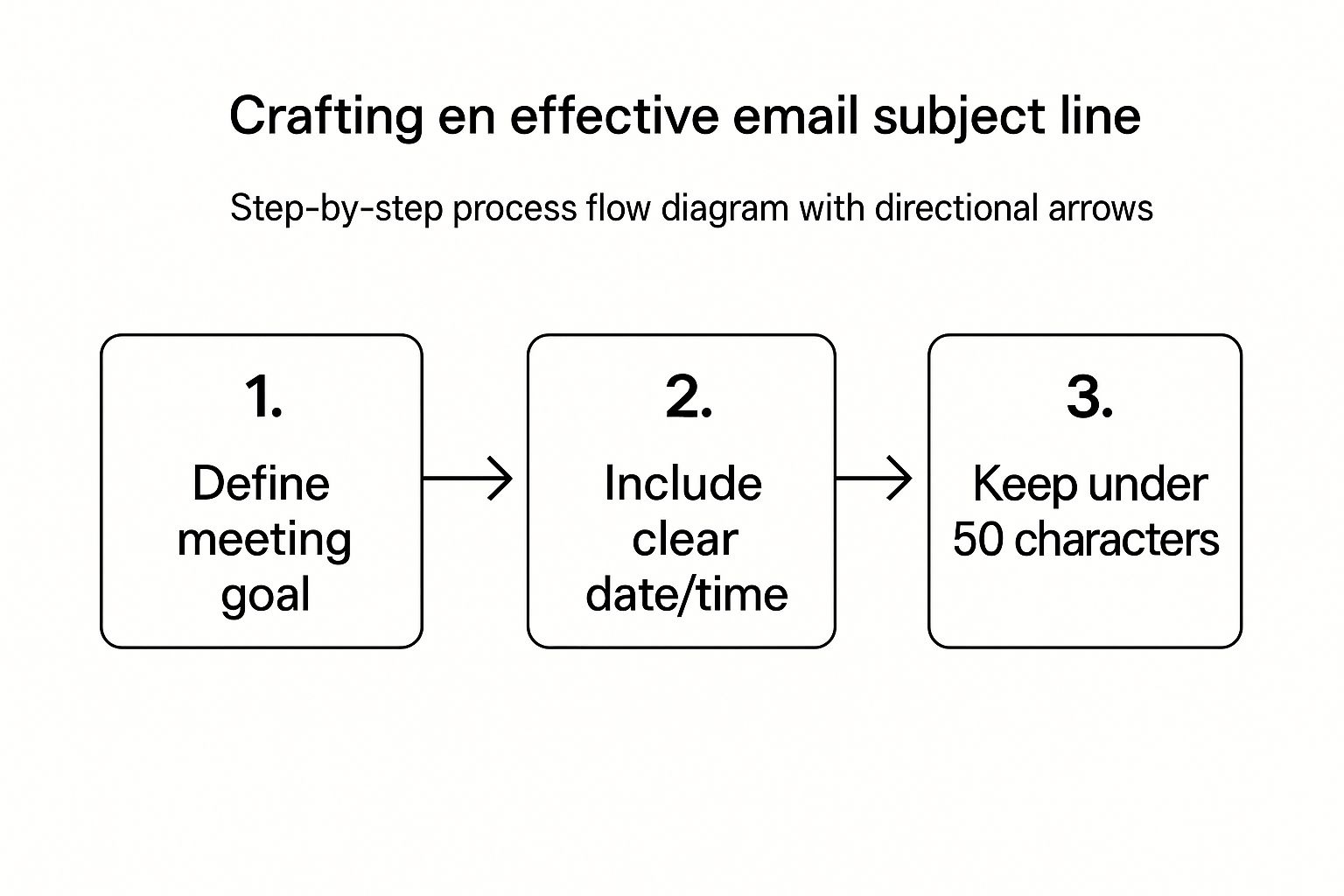
As you can see, a powerful subject line connects the why with the when and where, all while being short enough to read easily on a phone.
Must-Have Components for Clarity
To make sure your invitation is impossible to misunderstand, there are a few non-negotiable pieces of information every email needs. These elements work together to set clear expectations and help attendees show up on time and ready to contribute.
The table below breaks down these essential components. Think of it as your pre-flight checklist before hitting send.
| Component | Purpose | Best Practice Example |
|---|---|---|
| Clear Objective | Answers "Why are we meeting?" upfront. | "Meeting to finalize the Q3 marketing budget." |
| Focused Agenda | Outlines the key discussion points. | A list of 3-5 topics with estimated timings. |
| Essential Logistics | Provides all the necessary details to attend. | Date, time (with time zone, e.g., 10:00 AM PST), and location/link. |
| Role & Preparation | Clarifies what's expected from each attendee. | "Please come prepared to discuss your team's budget requests." |
Getting these basics right isn't just about logistics; it's about signaling that this meeting will be a valuable use of everyone's time.
Here's a closer look at a few of those critical pieces:
- A Clear and Concise Objective: Always start with a single sentence that gets straight to the point. Ditch vague phrases like "Let's sync up" for something direct like, "We are meeting to finalize the Q3 marketing budget." This immediately frames the discussion and shows it’s important.
- A Focused Agenda: You need to list out the 3-5 key discussion points or questions. A real pro move is to add estimated timings for each item on the agenda. It shows you've actually thought through the meeting's flow and are serious about finishing on time.
- Essential Logistics: This one seems obvious, but it’s amazing how often people mess it up. Include the date, start and end times (always specify the time zone, like 10:00 AM PST), and the location. For virtual meetings, make that video conference link big, bold, and easy to click.
A great meeting invitation anticipates questions and answers them proactively. Your goal is to eliminate any friction that might prevent someone from accepting or preparing for the discussion.
To really elevate your invites, check out some of the best practices for sending personalized event invitations that can add a more human touch. For an even deeper dive into structuring all of these elements, our guide on the ideal https://www.distro.so/blog/meeting-invitation-format offers more layouts and examples. These details communicate professionalism and respect, signaling that you value everyone's contribution.
Writing Subject Lines That Get Your Meeting Prioritized
Let's be honest: the subject line is the gatekeeper of your meeting invite. It's the first—and sometimes only—thing people see, and it dictates whether your email gets opened immediately, flagged for later, or flat-out ignored.
A vague subject like "Meeting" or "Catch-up" is a one-way ticket to getting lost in the inbox abyss.
Your mission is to communicate the meeting's purpose and urgency in under 50 characters. Think of it as a headline. It has to instantly answer two questions for the recipient: "What is this about?" and "Why should I care right now?" If they have to open the email to figure that out, you've already lost a step.
This is especially true for high-stakes conversations. A weak subject line can unintentionally delay critical decisions or signal to busy attendees that the meeting isn't a valuable use of their time.
Formulas for Different Scenarios
A one-size-fits-all approach just doesn't work. The type of meeting you're calling should shape your subject line's structure. I've found that using simple, repeatable formulas is the easiest way to get it right every time.
Here are a few I use constantly:
- For Decision-Making: Kick things off with a word that signals action is needed.
- Example: ACTION REQUIRED: Final Q3 Budget Decision - Nov 15
- For Brainstorming: Use a word that gets the creative juices flowing.
- Example: BRAINSTORM: New Campaign Ideas for Project Alpha
- For Updates: Stick to clear, common terms like "Sync" or "Update" for routine check-ins.
- Example: SYNC: Weekly Project Update & Next Steps
A powerful subject line acts like a mini-agenda. It doesn't just ask for someone's time; it justifies the request by immediately highlighting the value and purpose of the gathering.
When you start categorizing your meetings this way and using specific, action-oriented language, you train your colleagues to instantly recognize and prioritize your invites. This small shift turns your subject line from a passive label into an active tool for engagement.
For more tips on what to include inside the email itself, check out our detailed guide on crafting the perfect email for meeting invitation.
Designing Invitations for People on the Go
Let's be honest, your carefully worded meeting invitation might completely fall flat for one simple reason: it’s a nightmare to read on a phone. Most of us are living in our inboxes while running between tasks, which makes mobile-friendly design an absolute must.
A clunky, hard-to-read invite creates friction. That friction means you get slower responses or, even worse, no response at all.
Think about how you use your own phone. You’re not sitting down to carefully dissect an email; you’re scanning for the critical info. Your design has to reflect that reality. The purpose, date, time, and location (or video link) need to be right at the top, bolded, and impossible to miss.
Make It Scannable and Tappable
The secret to a great mobile meeting invitation is breaking the information into digestible chunks. Ditch the long paragraphs and embrace short, punchy sentences.
Try these formatting tips to get your point across instantly:
- Bulleted Agendas: Instead of a block of text describing the topics, list them out with bullet points. It’s cleaner and gives attendees a quick snapshot of the meeting's flow.
- Bolded Logistics: Make the Date, Time (with the time zone!), and Location/Link stand out. This is the information people are looking for, so don't make them hunt for it.
- Large, Tappable Buttons: If you can, use big buttons for "Accept," "Decline," or "Maybe." Tapping a button is way easier than trying to hit a tiny text link on a small screen.
This isn’t just about making things look nice; it’s about getting people to actually show up. With mobile devices accounting for roughly 41.6% of email opens, a bad mobile experience is a serious handicap. In fact, a staggering 42.3% of users will just delete an email if it doesn’t look right on their device. You can dig into more email engagement statistics to see just how much mobile design impacts response rates.
A mobile-first design isn't just a best practice—it's a sign of respect for your attendees' time and attention. By making your invitation effortless to read and act on from any device, you significantly increase the likelihood of getting a prompt and positive response.
Proven Templates for Any Meeting Scenario
Knowing the rules is one thing, but seeing them in action is what really makes the difference. A meeting invitation by email for a new client looks completely different from a casual team brainstorm. The key is adapting your tone and structure to fit the specific context and audience.
Instead of a one-size-fits-all approach, let's explore a few battle-tested templates you can adapt for your most common business situations. These aren't just copy-and-paste solutions; they're frameworks designed to get the right response every time.
The Formal Client Discovery Meeting
When you're reaching out to a potential client, your invitation has to scream value and professionalism right from the subject line. This email really sets the stage for your entire relationship, so clarity is non-negotiable.
Subject: Discovery Call with [Your Company] & [Client Company]
Body:
Hi [Client Name],
Thank you for your interest in [Your Company]. I'd like to schedule a 30-minute discovery call to discuss your goals for [mention a specific area, e.g., increasing inbound leads] and show you how we might be able to help.
Please use this link to select a time that works best for you: [Your Scheduling Link]
Looking forward to connecting.
Best,
[Your Name & Title]
The goal here is to make it as easy as possible for the prospect to say "yes." By providing a direct scheduling link and a clear value proposition, you remove all friction from the process.
The Internal Project Kickoff
For internal meetings, you can be a bit more direct, but you still need to set clear expectations. This kind of invitation is all about alignment and getting everyone on the same page before the real work begins.
Here’s a practical example I've used dozens of times:
- Subject: KICKOFF: Project Alpha - Marketing Plan
- Objective: To finalize roles, timelines, and deliverables for the Q4 marketing plan.
- Agenda:
- Review project goals (5 mins)
- Confirm team roles & responsibilities (10 mins)
- Outline key milestones & deadlines (10 mins)
- Q&A and next steps (5 mins)
This structure ensures everyone arrives knowing exactly what needs to be accomplished. It turns a potentially chaotic first meeting into a highly productive launchpad. Simple, but effective.
Mastering the Art of Follow-Ups and Reminders
Sending the initial meeting invitation is really just step one. The real magic happens in how you manage the responses and send reminders—the kind that are helpful, not harassing. A well-crafted follow-up can make a huge difference in who actually shows up and how prepared they are.
If a few days go by and you haven't heard back from someone, a gentle nudge is usually all it takes. You want to avoid any language that sounds like you're chasing them down. Instead, just frame it as a friendly check-in.
Something as simple as, "Hey Alex, just wanted to follow up on the invite for the Project Alpha kickoff. Let me know if that time works for you," is polite, professional, and gets the job done.
Pre-Meeting Reminders That Actually Work
A reminder sent 24 hours before the meeting isn't just a nice-to-have; it's a non-negotiable best practice in my book. This email pulls double duty: it drastically cuts down on no-shows and gives everyone a final confirmation of the key details, keeping your meeting top-of-mind.
Make sure it includes:
- The Goal: A quick one-liner to restate why you're meeting.
- The Agenda: Attach it again so nobody has to dig through their inbox to find it.
- The Logistics: The time (with time zone!) and the video link, clear as day.
This one proactive step is more crucial than you might think. Unproductive meetings cost U.S. businesses an estimated $37 billion annually, and a big chunk of that comes from poor organization and attendees showing up unprepared. A simple reminder email is your first line of defense. You can find more eye-opening meeting efficiency statistics on usebubbles.com.
Don't forget the post-meeting follow-up, either. Sending a quick recap with key decisions and assigned action items is what separates a good meeting from a great one. It closes the loop and solidifies your professionalism.
This final touch is what turns conversation into action. It ensures the momentum you built in the meeting carries forward into real, tangible progress. For a deeper dive on crafting these messages, check out our guide on writing an effective reminder email for a meeting.
Ready to stop chasing leads and start booking meetings instantly? With Distro, you can automate your entire inbound scheduling process, from form submission to the right sales rep's calendar. Convert more high-intent leads when their interest is highest by visiting https://distro.so.