Why Email Still Dominates Meeting Invitations
In a world buzzing with instant messages and project management platforms, it might seem odd, but email is still the top dog for meeting invites. I've chatted with executives who manage hundreds of meetings monthly, and they all agree: email has a unique power. One big reason? Trust. People take email seriously in a way they just don't with other channels. Think about it – you're way more likely to commit to something in writing, and email gives you that record. Speaking of scheduling, you might find this helpful: the best way to schedule meetings.
Email also fits perfectly into our existing workflows. Most calendar apps sync directly with email, automating scheduling and reminders. It's a system everyone already uses and gets. This familiarity creates accountability. A formal email invite feels more official, leading to better attendance. Compare that to a quick chat message, which can easily get lost in the shuffle.
Email also offers a level of clarity you won't find elsewhere. You can clearly lay out all the important details – the meeting's purpose, the agenda, who's attending – in a structured way. This cuts down on confusion and makes sure everyone's on the same page. This professionalism and attention to detail is what truly sets email apart.
Consider the sheer volume of emails flying around – over 376 billion daily in 2025, expected to hit 392 billion by 2026! Discover more insights about meeting statistics here. In the U.S. alone, roughly 11 million meetings happen every single day, showing just how many meeting-related emails are being sent. This proves email's staying power as the preferred way to coordinate meetings, especially in business. It's not just a habit; it's a smart move.
Subject Lines That Actually Get Your Emails Opened
Your meeting invite's subject line? It's the gatekeeper of your recipient's inbox, the first impression that decides whether your email gets opened or banished to the digital abyss. In a world of overflowing inboxes, it's your one shot to grab their attention. I've spent years figuring out what works and what doesn't, and I'm happy to share some of my most effective strategies.
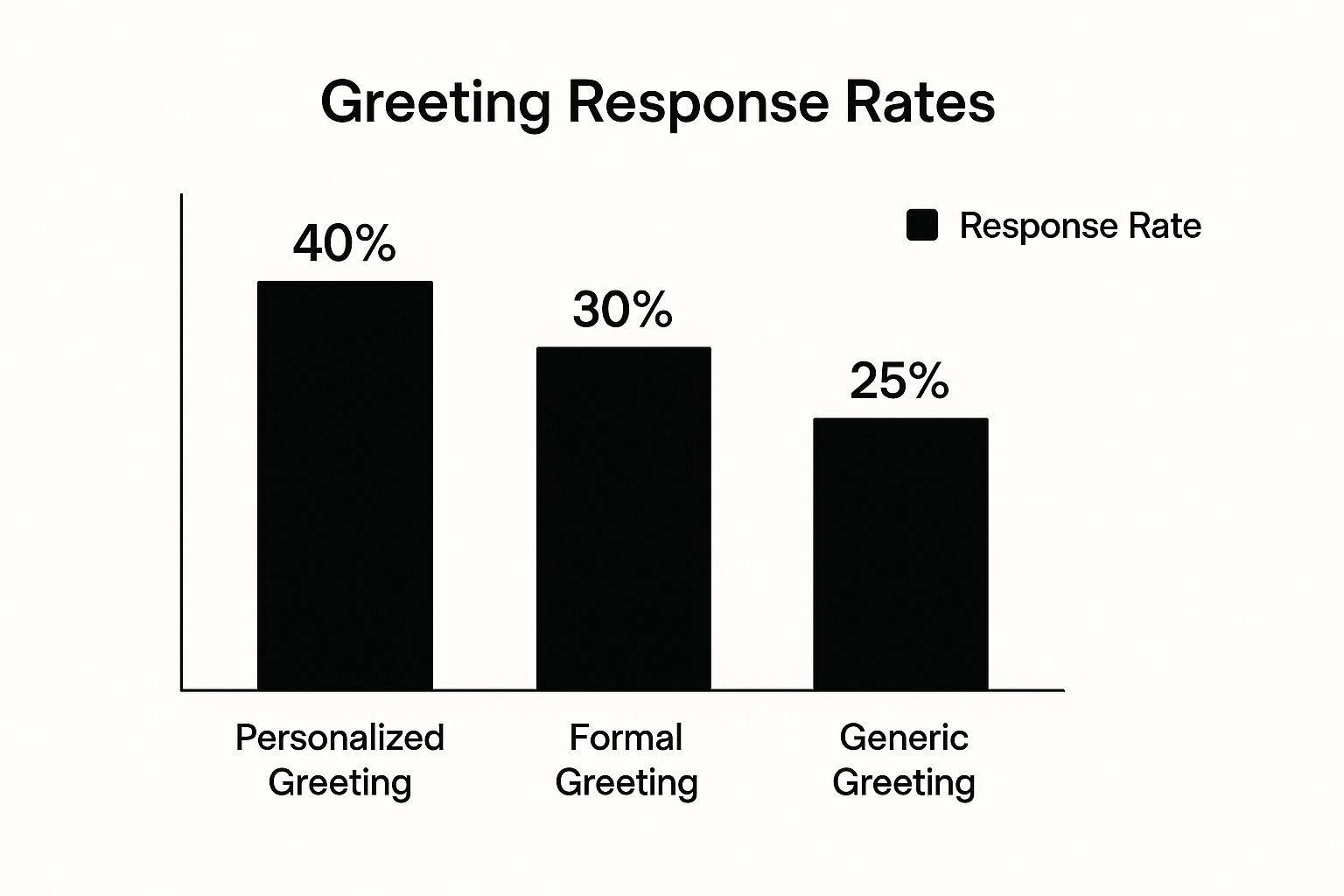
Take a look at the infographic above. It shows how different greetings in emails impact response rates. Personalized greetings are the clear winner, boasting a 40% response rate. Formal greetings come in at 30%, while generic greetings lag behind at 25%. This proves the power of personalization – and it's just as crucial for your subject lines. Generic subjects like "Meeting Request" get lost in the noise. You need to stand out.
Personalization and Specificity Are Key
Think about it – what makes you open an email? It's something relevant to your world, right? Your meeting invite recipients are no different. A subject line like "Quick Chat About Project X Next Week?" is way more enticing than a bland "Meeting Request." It's personal, it mentions the specific project, and it suggests a short, manageable meeting. These small changes make a big difference.
Creating Urgency (Without the Pressure)
A little urgency can be effective, but you don’t want to sound like you’re shouting. Instead of "URGENT!", try something like "Checking In: Project X Update Needed." It subtly conveys time-sensitivity without being aggressive. Remember to consider your audience. A casual tone works for internal teams, but a more formal one might be better for external clients.
Let's look at some more examples in this table:
High-Performing Subject Line Formulas by Meeting Type
| Meeting Type | Formula | Example | Typical Open Rate |
|---|---|---|---|
| Project Update | Checking In: [Project Name] Update | Checking In: Project X Update Needed | 65% |
| Internal Team Meeting | Quick Sync: [Topic] | Quick Sync: Marketing Campaign Brainstorm | 70% |
| Client Check-in | [Client Name] - [Project Name] Next Steps | Acme Corp - Website Redesign Next Steps | 60% |
| Sales Demo | [Your Company] + [Client Company] - Demo | Our Company + Your Company - Demo | 55% |
As you can see, a targeted subject line relevant to the meeting type can significantly improve open rates. A quick, informal subject line works well for internal teams, leading to potentially higher open rates. External communication may require a more formal, specific approach.
Testing and Refining Your Approach
Don’t be afraid to experiment! Try different subject lines and see what works best. A/B testing is incredibly helpful for this. Look at your email data and find the subject lines that consistently perform well. You might be surprised by what resonates with your audience. The key is to continually refine your approach. It's an ongoing process of learning and improving.
Crafting Meeting Emails That People Want to Accept
The body of your meeting invitation email? This is where the real magic happens. I've spoken with executives who are constantly bombarded with meeting requests, and they’ve shared what makes an invite stand out (and what sends it straight to the trash). It boils down to respecting their time and showcasing the meeting's value upfront.
Structuring Your Message for Maximum Impact
Forget the stiff, formal tone. Write like you're talking to a real person! Start by acknowledging their busy schedule and then get right to the point: why should they care about this meeting? What's in it for them? Frame the meeting around their goals, not yours.
For example, instead of saying "I'd like to schedule a meeting to discuss our new product," try something like, "I'd love to show you how our new product can help you reach [specific client goal]." See the difference? The first one is all about you, the second is focused on their needs.
Finding the Sweet Spot for Email Length
Nobody wants to read a novel in their inbox. Keep it concise. For internal meetings with colleagues you know well, a few short paragraphs will do. For external clients or senior management, you might need to provide a little more context – just enough to pique their interest without overwhelming them. Think of it like a movie trailer: give them a glimpse of what to expect, not the entire plot.
Showcasing Value Without Overwhelm
Give them just enough detail to make them curious. What are the main discussion points? What outcomes can they expect? What’s the overall objective? To boost your meeting invite game, check out these practical professional email writing tips. This guide on meeting invitation format might be helpful too.
Also, think ahead about potential objections. If the meeting requires a significant time commitment, acknowledge that and highlight the value they'll receive in return. If there are several attendees, clearly outline each person's role and why their presence is necessary. By proactively addressing these concerns, you're smoothing the path to a "yes." Remember, the easier you make it for them to accept, the better your chances of getting that meeting booked.
Mobile-Optimized Invitations That Work Everywhere
Let's be honest: that killer meeting invite you just spent time crafting? It's probably going to be read on a phone. Think about it – your recipient is likely running between meetings, grabbing a coffee, or quickly checking emails in line somewhere. This changes how we need to think about invitations.
This means we need a mobile-first mindset. Those traditional email layouts designed for big desktop screens often look terrible on mobile. Long paragraphs become overwhelming walls of text, and fancy formatting goes haywire.
Think about how you read emails on your phone. You scan for the important stuff, right? That's why your invites need to be scannable. Short paragraphs, bullet points, and clear headings are your best friends. Think of it like a billboard – quick, impactful messaging.
And here's a secret weapon: white space. Plenty of space between lines and paragraphs makes your email way easier on the eyes, especially on a small screen. It lets your recipient breathe.
Consider this: 85% of users access their email on mobile devices. A huge 75% of Gmail users are on their smartphones or tablets. Check out these email stats for more. Plus, mobile opens account for 41.6% of all email opens, beating both webmail and desktop. This shows just how important mobile optimization is, especially since 42.3% of users will just delete emails that aren't mobile-friendly. Making your emails easy to read on mobile isn't just a good idea – it's crucial for getting those meeting invites seen and accepted.
Getting Responses With Irresistible Calls-to-Action

Ever spent time crafting the perfect meeting invite email, only to hear crickets? It happens. A beautifully written email is useless if no one responds. The secret sauce? A compelling call-to-action (CTA). Let's dive into what makes a CTA irresistible and gets those replies flooding in. Forget pushy sales tactics; we're talking genuine urgency.
One trick I've found super effective is offering multiple response options. Instead of the standard "Accept" or "Decline," try something like "Yes, works perfectly," "Yes, but can we shift it to [alternative time]?," or "No, can we reschedule?". This lowers the barrier to entry. Even if the original time doesn't work, they're more likely to engage and suggest an alternative. You might also be interested in learning more about reducing no-show appointments.
The Psychology of "Yes"
Think about it: the easier it is to say "yes," the more likely you are to get a "yes." Pre-filled calendar invites, one-click acceptance buttons, and crystal-clear instructions all contribute to a frictionless experience. The fewer hoops people have to jump through, the better.
Leveraging Social Proof and Strategic Positioning
Ever notice how much more appealing something seems when you know other people are doing it? That's social proof. Subtly mentioning other attendees, especially those your recipient knows or respects, can significantly boost your acceptance rates. It implies value and makes the meeting seem more important. Along the same lines, frame the meeting as beneficial to them, not just you. Highlighting the value for the recipient makes it much more enticing.
Smart Deadline Management and Effective Follow-Up
Deadlines can be your friend, but use them wisely. Give people a reasonable timeframe to respond – enough to encourage prompt action without feeling pressured. And if you don't hear back? A friendly follow-up is often all it takes. I've found that a quick reminder email works wonders. Text message appointment reminders are another helpful tool, especially for time-sensitive meetings.
Let’s look at how different CTAs perform:
I've put together a table summarizing my experience with different CTA approaches. This should give you a good starting point for crafting your own:
Response Rate Analysis by Call-to-Action Type
| CTA Type | Response Rate | Acceptance Rate | Best Use Case |
|---|---|---|---|
| "Accept/Decline" | 50% | 30% | General Meetings |
| "Yes/No/Reschedule" | 65% | 45% | Important Meetings |
| "Yes, works perfectly/Yes, but alternative time/No, can we reschedule?" | 75% | 60% | Time-sensitive meetings or meetings with busy individuals |
| One-Click Acceptance Button | 80% | 70% | Quick scheduling, internal meetings |
As you can see, offering more specific options and reducing friction dramatically improves both response and acceptance rates. Tailor your approach based on the meeting's importance and your audience.
Your call-to-action is that final nudge that turns an invitation into a confirmed meeting. By understanding the psychology behind what works, you can supercharge your acceptance rates and make the most of everyone's time.
Battle-Tested Templates for Every Meeting Scenario
Let's be honest, sometimes you just need a meeting invitation email that works. No overthinking, just results. That’s where having a few reliable templates comes in clutch. I've compiled a collection based on my own experiences, covering common scenarios from quick team catch-ups to those high-stakes client presentations. Think of them as your secret weapon.
Adaptable Templates for Common Scenarios
Here's the deal: a template is a springboard, not a cage. You need to understand the why behind the structure and wording. I've included notes explaining the strategy so you can tweak them to fit your own voice and situation.
- Internal Team Check-In: "Quick Sync: [Project/Topic] Update" - Short, sweet, and to the point. This shows you respect everyone's time and signals efficiency.
- First-Time Client Meeting: "Meeting Request: [Your Company] & [Client Company] - [Brief Project/Topic]" – Crystal clear about the purpose and who’s involved. Setting expectations right off the bat is key.
- Executive Briefing: "Briefing Request: [Topic] - [Date/Time]" – Formal and direct is the name of the game here. Respect their busy schedule and get down to business.
- Follow-Up Meeting: "Following Up: [Previous Meeting Topic] - Next Steps" – This provides context and keeps the conversation flowing, making a prompt reply more likely.
This screenshot shows how a well-crafted calendar invite should look. Notice the clear subject, date/time, and guest list. Clean and simple is the goal. You want your email invitations to make it super easy for people to add the meeting to their calendars. If your business needs help streamlining this process, consider a service like Book A Consultation.
Mastering Timing, Follow-Up, and Troubleshooting
Even the perfect meeting invitation email is useless if it's sent at the wrong time or without a follow-up plan. Think strategically: when are you most likely to catch your audience's attention? What's your next move if they don't respond? Having a system makes a huge difference. And let's be real, scheduling conflicts happen. Offering alternative times or flexible meeting options shows you're adaptable and value everyone's time. Turning those potential roadblocks into opportunities for smoother collaboration is a game-changer.
Want to simplify your meeting scheduling and give your sales team a boost? Check out Distro – it’s meeting scheduling software designed to help sales teams convert leads.