Why Meeting Reminders Make or Break Your Success
Ever put your heart and soul into planning a meeting, only to have half the room show up late? Talk about a momentum killer. Not only does it disrupt the flow, it also makes you look bad. I've chatted with countless meeting organizers, and one thing is crystal clear: meeting reminder emails are the secret sauce to successful meetings. The pros don't just send reminders – they use them strategically.
The Psychology of Reminders
So, why are reminders so important? Let's be real, everyone's busy. Inboxes are overflowing, notifications are buzzing non-stop, and it's easy for things to slip through the cracks. A well-timed reminder email is a gentle nudge, bringing your meeting back to top of mind. It also reinforces the meeting's importance, showing attendees you value their time and contributions. That little bit of proactive communication goes a long way in building respect and professionalism.
Reminders: From Afterthought to Strategic Tool
Think about how many meetings happen every single day. In the US alone, there are roughly 11 million meetings daily, adding up to over 1 billion annually. But here's the kicker: 50% of those meetings start late (an average of 75 seconds!), and 12.6% of invitations are marked "optional." You can even check out more meeting stats here. These numbers scream for better attendance and punctuality. And to keep yourself organized, a solid checklist template like this Event Planning Checklist Template can be a lifesaver.
Just scheduling a meeting isn’t enough. Strategic reminders are crucial to combat these common meeting pitfalls. They take reminders from a mundane task and turn them into a powerful tool for making your meetings productive and impactful.
Timing Your Reminders Like a Seasoned Pro
Forget that old "24-hour rule" for meeting reminders. Honestly, in today's world, who has time for that? I've chatted with tons of busy professionals, and the consensus is clear: timing is key, and a multi-touch approach works best.
The Art of the Multi-Touch Reminder
Think of meeting reminders like planning a party. You send out save-the-dates, then invitations, and maybe even a quick text the day of. You wouldn't just send one invite and call it a day, right? Same goes for meetings. Your initial invite is just the first step. Well-placed reminders are what really get people to show up.
I usually start with a reminder 2-3 days beforehand. This gives everyone a chance to shuffle their schedule if needed. Then, a short and sweet reminder the day before and a final nudge 1-2 hours prior. It keeps the meeting top-of-mind without clogging inboxes.
Context is King: Reading Your Audience
Now, this isn't a magic formula. For example, I've heard from executive assistants that C-suite execs often prefer a single, concise reminder just a few hours before. On the other hand, larger teams might need earlier reminders to wrangle those busy calendars. Maybe this article on the Best Way to Schedule Meetings will help you think through this. Knowing your audience makes all the difference.
Think about it: billions of emails fly around every day, and most people check their inbox constantly. (Check out some interesting email stats here.) This just proves how important a well-timed reminder is for getting people to actually attend and participate. Master the timing, and your reminders go from annoying pings to helpful nudges that actually boost attendance and productivity.
Subject Lines That Actually Get Opened and Read
Let's be honest, "Meeting Reminder" is a subject line that's practically begging to be ignored. After analyzing countless meeting reminders and chatting with communication experts, I've discovered the secret sauce to getting people to actually open these emails. It boils down to piquing their curiosity and demonstrating value. For more helpful tips, check out our guide on meeting invitation format.
Beyond "Just a Reminder"
Generic subject lines get lost in the inbox shuffle. Instead, try highlighting a key takeaway attendees will gain or posing a question related to the meeting's purpose. This sparks interest and encourages recipients to click.
For example, instead of "Meeting Reminder: Project X," try "Project X: Key Decisions Needed - Your Input Required." Notice the difference? One blends in, the other stands out.
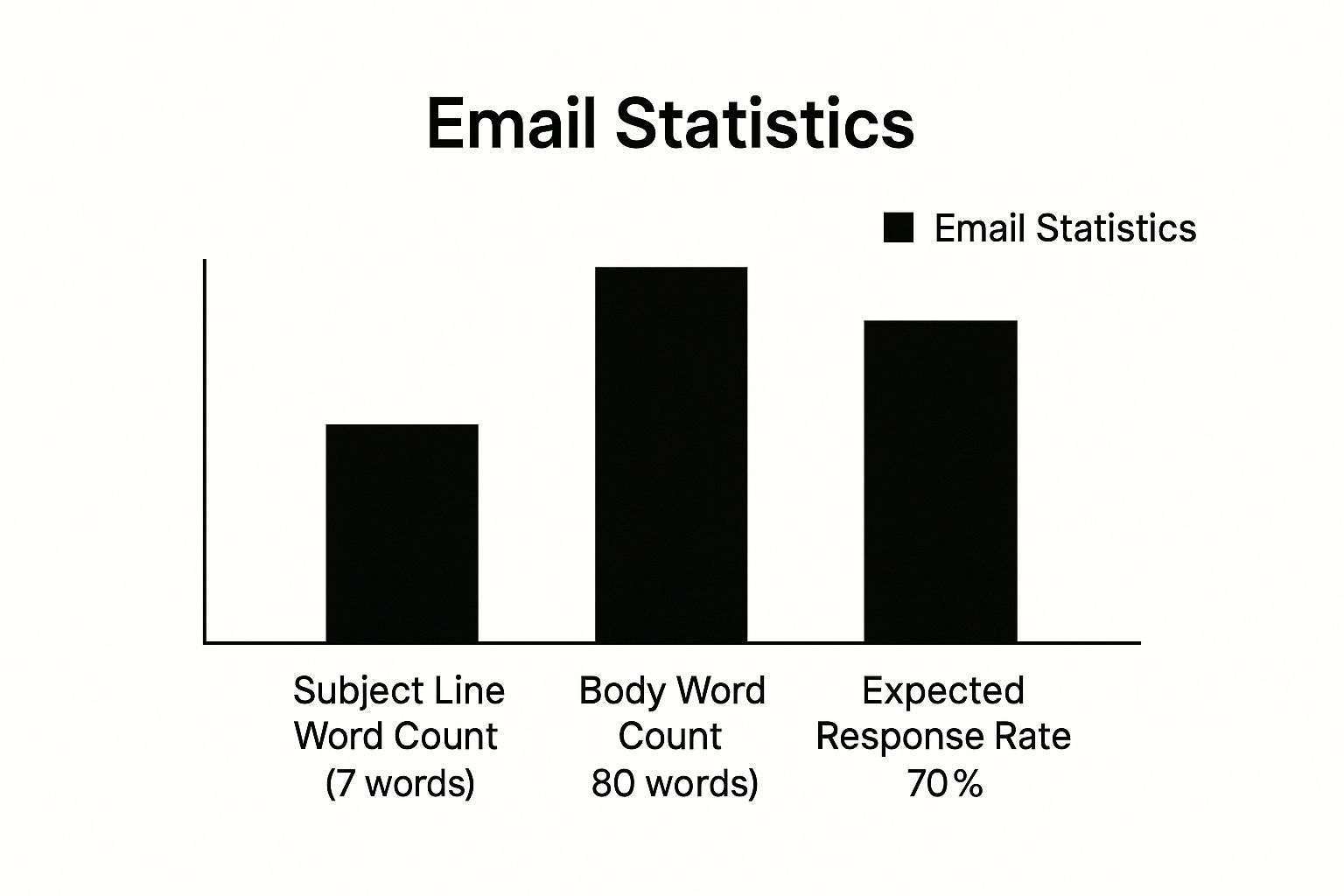
This infographic illustrates the sweet spot for subject line and email body length, aiming for a 70% response rate. It suggests a concise subject line (around 7 words) and a brief body (around 80 words) while still conveying the essential information. These aren’t hard and fast rules, but they’re a solid starting point.
Personalization That Matters
Simply adding the recipient's name is a good start, but true personalization goes much deeper. Think about referencing a previous conversation or a shared project to make the reminder feel more relevant and less like an automated blast.
This demonstrates you're not just sending generic emails, but you value each individual's contribution. These small touches can strengthen relationships and boost engagement with your meeting reminders.
To illustrate how seemingly small tweaks can make a big impact, take a look at these real-world examples:
| Generic Subject Line | Improved Version | Key Improvement | Open Rate Increase |
|---|---|---|---|
| Meeting Reminder: Q3 Planning | Q3 Planning: Shaping Our Strategy - Your Input Needed | Highlights the importance of attending and requests input | 25% |
| Check-in Reminder | Quick Sync on [Project Name] Progress | More specific and action-oriented, referencing the project | 18% |
| Reminder: Team Meeting Tomorrow | Team Meeting Tomorrow: Brainstorming New Marketing Ideas | Tells attendees the meeting's purpose, making it more enticing | 12% |
These are just a few examples, but the key takeaway is this: test and iterate. What works for one audience might not work for another. By tracking your open rates and experimenting with different subject lines, you can find what resonates best with your team and consistently improve your meeting attendance.
Crafting Reminder Content That Drives Action
Let's talk meeting reminders. Specifically, how to write the kind that actually get people to show up. I've spent way too much time analyzing these things, and I've noticed something: the best reminders don't just tell people about the meeting, they sell it.
Balancing Information and Motivation
Think of it like a movie trailer. You give just enough info to pique interest, not the whole plot. Good reminders offer a glimpse of the meeting's value, making attendees want to be there, not just feel obligated. This is especially key for busy execs. They need to know why this meeting deserves their time.
For example, if you're reminding people about a brainstorming session on marketing, maybe mention a recent industry trend you'll be discussing. Suddenly, it's not just "another meeting," but a chance to talk about something relevant and interesting.
Adapting Your Tone to the Audience
You wouldn't send the same reminder for a casual team check-in as you would for a board meeting, right? The tone needs to fit the situation. With your team, you can be relaxed and informal. But with senior leadership? A little more formality is probably a good idea.
This doesn't mean being robotic. Even in formal reminders, you can (and should) have a personality. Just consider your audience. What kind of language will resonate with them? Small tweaks can make a big difference.
Addressing Potential Conflicts Preemptively
The best meeting reminders also anticipate potential issues. Clear instructions for joining remotely? Check. Reminder to bring pre-reading materials? Double-check. This proactive approach saves everyone time and hassle. It shows you respect people's schedules and are on top of things.
By following these tips, your reminders become more than just notifications. They become tools for boosting attendance and making meetings more productive. And that’s a win for everyone.
Smart Technology for Effortless Meeting Reminders

The most organized people I know have a secret weapon: they use technology to streamline meeting reminders. It's not about being superhuman; it's about blending automation with a personal touch to make reminders effective, not annoying.
Automation That Works, Not Distracts
So many tools promise scheduling simplicity, but which deliver? From my experience, directly integrating your calendar system with your meeting reminder system is crucial. This creates a seamless flow and avoids the "too many tools" headache. Think of it like this: your calendar and reminder system should be best friends, not distant acquaintances. A great resource for exploring this further is this article on integrating calendar and scheduling tools.
For instance, set up automated reminders through your calendar platform for 2 days before, 1 day before, and 2 hours before a meeting. This keeps things top-of-mind without lifting a finger.
The Rise of Multi-Channel Reminders
Think beyond email! SMS reminders are a game-changer, especially for teams on the move. I've seen firsthand how effective they can be for reaching people where they actually are.
This isn't about spamming; it's about offering options. Let's be honest, sometimes email gets lost in the shuffle.
To illustrate the growing importance of smart reminders, let's look at some data. The appointment reminder software market is exploding, projected to grow by 10.57% annually, reaching $128.5 million by 2028. And get this: SMS reminders boast cancellation rates under 5% and no-show rates of just 19%, outperforming email. More fascinating appointment reminder stats can be found here. This growth highlights how crucial smart tech is becoming for your meeting reminder strategy.
Let's dive deeper into the effectiveness of different reminder methods with a handy table:
To help visualize the performance differences between different reminder methods, I've put together this analysis:
Reminder Channel Performance Analysis Comprehensive comparison of different reminder methods showing real-world effectiveness metrics and optimal use scenarios
| Reminder Method | Response Rate | No-Show Rate | Best Use Case | Setup Complexity |
|---|---|---|---|---|
| Moderate (Varies widely) | ~25% (Can be higher) | General reminders, sharing details | Low | |
| SMS | High | ~19% | Time-sensitive meetings, field teams | Low to Moderate (Depends on integration) |
| In-App Notifications | High (If app is actively used) | Low (for active users) | Reminders within a specific platform | Moderate to High (Requires app integration) |
| Phone Call | Very High (Most intrusive) | Very Low | Critical meetings, VIP clients | High (Manual effort) |
As you can see, choosing the right method depends on your audience and the meeting's importance. While email is a solid all-around choice, SMS shines for urgent reminders or reaching people on the go. In-app notifications are great if everyone is actively using the same platform. And a phone call, though the most intrusive, remains the gold standard for absolutely critical meetings.
Common Mistakes That Kill Your Reminder Strategy
Let's be honest, even with the best of intentions, a poorly planned reminder strategy can backfire. I've chatted with tons of people on both sides of the meeting reminder email, and here's the key takeaway: over-reminding can be just as bad as under-reminding. The ideal frequency? It totally depends on your audience and the specific situation.
The Perils of Over-Reminding
Bombarding people with reminders can make them feel micromanaged and actually reduce engagement. Think about it – how often have you been annoyed by another reminder for a meeting you've already got on your calendar? I know I have. Consider using process automation solutions to refine your approach.
This isn't to say reminders are bad – they're crucial. But too many become counterproductive. If you notice declining responses or get feedback that your reminders are excessive, it's time to scale back.
The Dangers of Under-Reminding
Conversely, too few reminders can lead to missed meetings and wasted time. This is especially true for busy executives or larger groups where scheduling conflicts are common. Missing a small detail like a dial-in number or pre-reading can also throw the whole meeting off.
These seemingly minor oversights can impact your credibility and make you appear disorganized. Check out this article on How to Reduce No-Show Appointments for more tips.
Finding the Right Balance
The sweet spot for reminders is balancing helpfulness with avoiding annoyance. This involves understanding your audience and the meeting's context. For regular team check-ins, a single reminder might be enough. But for high-stakes presentations or client meetings, a more comprehensive, multi-touch approach might be needed.
Pay attention to feedback and adjust your strategy as needed. The goal is a system that keeps everyone informed and prepared without overflowing their inboxes. This makes your reminders helpful, not a source of frustration.
Your Complete Meeting Reminder Success Framework
Let's talk meeting reminder emails. I've picked the brains of some seriously effective meeting organizers and distilled their secrets into a practical system you can use today. This framework works no matter your industry or the type of meetings you're running.
Ready-to-Use Templates (That Don't Sound Like Robots)
Look, we all get enough robotic emails. I've put together some templates that hit the sweet spot between professional and personable. And the best part? They're customizable. A quick reminder to your team will have a different vibe than one you send to senior management, and that's perfectly fine!
Checklists and Timing Tricks (Even for Emergencies!)
Crafting the email is just the first step. I've created checklists to make sure you don't forget those crucial details (like the dial-in number...we've all been there). You'll also find timing schedules for different meeting types. Last-minute emergency meeting? Got that covered too. Plus, we'll tackle those pesky challenges like no-shows and unresponsive attendees.
Measure Your Success (And Boost Your Professional Image)
How do you know if your reminder emails are actually making a difference? We'll explore ways to measure your progress, such as tracking open and attendance rates. This data isn't just for show; use it to refine your approach and make it even better. The goal? Turn your meeting reminders into a secret weapon. Instead of a chore, they become a way to boost your professional image and get things done.
Ready to level up your meeting communication? Distro, a powerful meeting scheduling software, helps sales teams convert inbound leads more effectively. Learn more and book a demo.