Lead scoring in Salesforce isn’t just a fancy feature; it’s a strategic way to rank your prospects by assigning values to who they are and how they interact with you. It uses your own CRM data to spotlight the leads most likely to become customers, letting your sales team focus their energy where it actually matters and stop chasing dead ends.
Why Lead Scoring in Salesforce Matters Now
Let's be real: not all leads are created equal. If you’re treating every new contact the same, your sales team is essentially flying blind. A smart lead scoring Salesforce strategy is what turns a chaotic flood of names into a clear, prioritized roadmap for your reps.
This is about more than just being efficient. It’s about finally closing that all-too-common gap between marketing’s hard work and sales’ results. When marketing crushes a campaign and delivers hundreds of leads, sales can easily get swamped. That means slower response times and deals slipping through the cracks. Lead scoring is the filter that pushes only the truly qualified people to the front of the line.
Turning Chaos into Clarity
Picture this: your software company just wrapped up a killer webinar that brought in over 1,000 new leads. That list is a mixed bag—you’ve got VPs from your dream accounts, students doing research, and even competitors snooping around. A solid lead scoring model cuts through the noise instantly.
It might look something like this:
- Assign points for a valuable job title like "VP" or for using a corporate email domain.
- Add more points for high-intent behaviors, like someone who visited your pricing page right after the webinar.
- Deduct points for red flags, like a generic Gmail address or a "Student" title.
Just like that, your sales team isn’t staring down a list of 1,000 contacts. They're laser-focused on the top 50-100 prospects who are clearly signaling they’re ready to talk. This kind of focus is how you shorten sales cycles and boost conversion rates. A good system also cleans up the handoff from one team to the next; for a deeper look at that, check out our guide on https://www.distro.so/blog/lead-routing-in-salesforce to see how you can automate distribution.
A great lead scoring system doesn't just tell you who to call next. It tells you why they're the right person to call, based on a combination of their profile and their actions.
Choosing Your Scoring Path
When it comes down to it, you have two main ways to implement lead scoring in Salesforce. You can roll up your sleeves and build a manual, rule-based model using Salesforce Flow, which gives you total control over the criteria. The other option is to let AI do the heavy lifting with Salesforce Einstein Lead Scoring, which digs into your historical data to create a predictive model for you.
Each approach has its own pros and cons. The right choice really depends on your team's resources, how clean your data is, and what you’re trying to achieve.
Defining Your Ideal Lead Profile
Before you touch a single setting in Salesforce, the real work begins. Let's be honest: a successful lead scoring Salesforce model isn't built on fancy automation alone. It's built on a rock-solid, shared vision of your ideal lead. Without that foundation, you're just automating guesswork.
The whole point is to stop making assumptions and start using your own historical data to define what a "perfect" lead actually looks like. This isn't just a marketing job or a sales responsibility—it’s a team sport. Getting both teams in a room to hammer out this profile is the single most important thing you can do. Seriously.
Analyzing Your Historical Wins
Your most reliable source of truth? Your closed-won opportunities. These are the leads who didn't just convert; they became paying customers who are driving your business forward.
Start by pulling a report on all deals closed in the last 6-12 months. Look for the common threads. What patterns keep showing up? Don't just glance at the surface-level stuff. Dig deep into both the explicit data (info they gave you) and the implicit data (their behaviors).
Here’s what to look for:
- Demographic & Firmographic Traits: What are the most common job titles? Which industries pop up again and again? Are your best customers coming from companies of a certain size?
- Behavioral Signals: Where did they come from? Think organic search, webinar sign-ups, or specific ad campaigns. Did they hang out on high-value pages like pricing or demo requests? How many emails did they open before they finally talked to sales?
This deep dive gives you a data-backed blueprint for your scoring model. For instance, you might find that VPs of Operations from manufacturing companies with over 500 employees are your absolute sweet spot. That kind of insight is pure gold.
Your past successes are the best predictor of future wins. Analyze your closed-won deals to build a scoring model based on proven characteristics, not just gut feelings.
Identifying Key Scoring Attributes
Once you've done your homework, you can start translating those winning traits into a real scoring framework. This is where you map your ideal profile to specific fields and actions in Salesforce. A great way to organize your thinking is to split attributes into two buckets: Fit (who they are) and Intent (what they do).
Fit Attributes (Who They Are)
These criteria measure how closely a lead matches your ideal customer profile. It’s all about demographics and firmographics.
- Job Title: A "Director" or "VP" might get +15 points, while an "Intern" or "Student" could get -10 points.
- Industry: If you sell primarily to tech, a lead from the "Software" industry might earn +10 points.
- Company Size: If your product is built for the enterprise, a company with 1,000+ employees could be worth +20 points.
- Location: Targeting a specific region? Give points to leads from that country or state.
Intent Attributes (What They Do)
This is all about a lead's engagement and active interest. These actions signal they're moving from curious to serious.
- Website Visits: A visit to your pricing page is a big deal. That's worth at least +10 points.
- Content Downloads: Downloading a bottom-of-funnel case study (+15 points) shows way more intent than grabbing a top-of-funnel ebook (+5 points).
- Demo Request: This is the ultimate buying signal. A submitted demo form should get a huge score, maybe +30 points or more.
Don't get hung up on making the numbers perfect on day one. Your goal is to establish a logical starting point based on what your data tells you. You can always tweak and refine it later. For more ideas on what makes a lead sales-ready, check out our guide on how to qualify sales leads.
This entire process is getting smarter, by the way. The rise of AI in lead scoring is changing the game, especially for teams drowning in leads. In fact, companies using AI-powered scoring see a 25% increase in conversion rates and shrink their sales cycles by around 30%. Salesforce Einstein is a perfect example, using predictive analytics to find these patterns for you automatically. It's worth exploring the latest insights on AI lead scoring tools to see just how much this space is evolving.
Alright, you've figured out what an ideal lead looks like. Now comes the fun part: making Salesforce do the heavy lifting for you. We're moving from strategy on a whiteboard to the actual technical build that will score and surface your best leads automatically.
The goal here isn't just to build something that works, but something that’s smart and scalable.
Think of it as a simple, logical process. You define the rules, you tell Salesforce how many points each rule is worth, and then you flip the switch to let it run on its own.
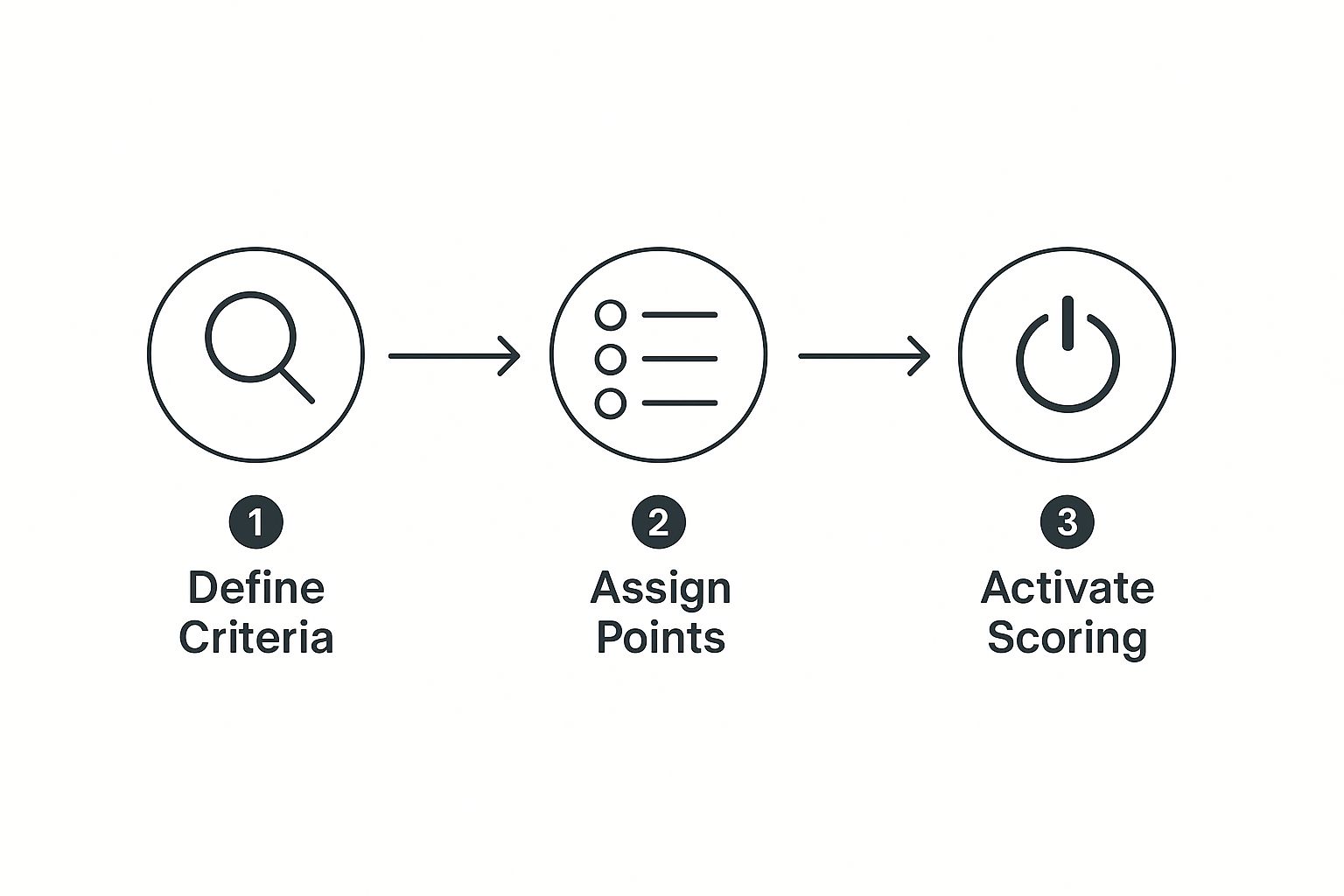
This whole setup follows a natural progression—from high-level strategy right down to the automated system that brings it all to life.
Prepping Your Salesforce Org with Custom Fields
First things first, you can't score leads if you don't have a place to put the score. So, our initial step is to create a few custom fields on the Lead object. These are basically the buckets that will hold all our scoring data.
You'll want to head over to Setup > Object Manager > Lead > Fields & Relationships and click "New."
Here are the three essential fields I always recommend creating:
- Lead Score: This is your master score. It’s a Number field that adds up all the points from your different criteria. This is the main number your sales team will live by.
- Fit Score: This is also a Number field, but it only tracks demographic and firmographic points. It answers the question: "How closely does this lead match our ideal customer profile?"
- Engagement Score: You guessed it—another Number field. This one is all about behavior. It measures a lead’s active interest based on things like email clicks, page views, and form submissions.
Why split them up? It gives you so much more context. A lead with a high Fit Score but a low Engagement Score is a perfect target for a marketing nurture campaign. On the flip side, a lead with high scores across the board is red-hot and needs a call from sales yesterday.
Defining Your Scoring Criteria
Before we dive into the automation, let's lay out what a practical scoring model might look like. Generic rules give you generic results, so it's all about being specific. You need to assign point values that truly reflect what a "good lead" means for your business.
Here’s a sample table to give you a starting point. Think of this as a blueprint you can adapt for your own model.
Sample Lead Scoring Criteria and Point Values
| Attribute Type | Criteria | Points Assigned |
|---|---|---|
| Fit (Firmographic) | Industry is 'Technology' or 'SaaS' | +15 |
| Fit (Demographic) | Job Title contains 'VP', 'Director', or 'C-Level' | +20 |
| Fit (Demographic) | Job Title contains 'Intern' or 'Assistant' | -10 |
| Fit (Firmographic) | Company Size is 100-500 employees | +10 |
| Fit (Demographic) | Email is from a free provider (gmail, yahoo) | -15 |
| Engagement (Behavioral) | Submitted 'Contact Us' or 'Demo Request' form | +30 |
| Engagement (Behavioral) | Visited the Pricing Page | +15 |
| Engagement (Behavioral) | Downloaded a whitepaper | +10 |
| Engagement (Behavioral) | Unsubscribed from email | -25 |
| Engagement (Behavioral) | No activity in the last 90 days | -20 |
Remember, these values aren't set in stone. The key is to start with a solid baseline, test it, and then tweak the numbers based on what's actually leading to closed deals.
Bringing It to Life with Salesforce Flow
With your fields ready and criteria defined, it's time for the real magic in Salesforce Flow. This is where you build the engine that does all the scoring work for you, no code required. You’ll set up a record-triggered flow that kicks off every single time a lead is created or updated.
Your flow will essentially be a decision tree. You'll use "Decision" elements to check if a lead meets a certain condition and "Assignment" elements to add or subtract points from your score fields.
For example, a Decision element might check if Lead.Industry EQUALS 'Technology'. If it's true, an Assignment element fires and adds 15 points to the Fit Score field. You just repeat this process for every rule you've defined.
Pro Tip: Build your flow with the most important criteria first. Put the rules that assign the biggest points—like a "Demo Request"—right at the top. It makes the whole thing much easier to read and troubleshoot later on.
Building these rules is an iterative process. You don't need to get it perfect on day one. Start with a handful of your most critical criteria, test them out, and then build on your model as you gather more data. While this guide focuses on building your model in Salesforce, exploring a comprehensive lead scoring software guide can offer valuable perspectives for any implementation. Understanding the broader landscape helps you make more informed decisions, whether you're building from scratch or evaluating third-party tools.
Using AI with Salesforce Einstein Lead Scoring
Building and maintaining a lead scoring model with Salesforce Flow is a powerful way to take control, but it's a hands-on job that needs constant attention. But what if you could skip all the rule-making and let an AI do the heavy lifting for you? That's exactly what Salesforce Einstein Lead Scoring offers.
Instead of you meticulously defining what makes a good lead, Einstein figures it out on its own. It dives deep into your historical data, analyzing every past lead that successfully converted into a customer. By spotting hidden patterns and common threads among your biggest wins, it builds a predictive model to score new leads based on their actual likelihood to convert.
This goes way beyond simple, explicit rules. Einstein might discover that leads from an obscure referral source who download two specific whitepapers convert at a dramatically higher rate—a subtle insight you'd likely miss when building rules manually.
Getting Started with Einstein
Turning on Einstein isn't just flipping a switch; you need to make sure the AI has enough quality data to learn from first. Your starting point is the Einstein Lead Scoring Readiness Assessor, a built-in tool that checks if your Salesforce org meets the necessary data thresholds.
To deliver accurate predictions, Einstein generally needs:
- At least 1,000 new leads created in the last six months.
- A minimum of 120 of those leads successfully converted into accounts and contacts.
- A clear, consistent process in your data that distinguishes converted leads from unconverted ones.
If you get the green light, you can enable the feature in Setup. The process is pretty straightforward. Once you kick it off, Einstein starts crunching your data, which can take up to 48 hours. When it's done, you'll see a new "Einstein Scoring" component on your Lead page layouts, showing a score from 1 to 99 and highlighting the key factors that influenced it.
Understanding the Benefits of an AI Model
The most obvious win here is the massive reduction in admin work. You're no longer spending hours tweaking decision elements and point values in Flow. Einstein handles all that behind the scenes and, more importantly, continuously refines its own model as new data flows in.
Einstein Lead Scoring doesn't just build a model and walk away. It's a living system that adapts over time, ensuring your scoring stays relevant even as your market or customer profiles shift.
This self-optimizing nature is a huge advantage. As your business evolves, Einstein learns right alongside it. The system helps you prioritize the right leads by assigning a score that truly reflects their likelihood to buy, based on a complex analysis of demographics and engagement. You can dive deeper into how Salesforce Einstein is reshaping sales processes at Mirketa.
Is Your Organization Ready for Einstein?
While Einstein is incredibly powerful, it’s not a perfect fit for every company right out of the gate.
Those data prerequisites are non-negotiable. If you're a newer business or have a lower volume of inbound leads, you simply might not have enough historical data for the AI to build a reliable model.
Data quality is also critical. If your historical lead data is a mess—full of incomplete, inconsistent, or inaccurate information—Einstein's predictions will suffer. It's a classic "garbage in, garbage out" scenario. For some companies, it makes more sense to start with a manual model to enforce better data hygiene before handing the reins over to an AI.
For organizations looking to push their AI-driven lead scoring even further, it might be necessary to bring in specialized expertise. There are resources that can help you find the best staffing agencies for data and AI talent to build out your team's capabilities.
How to Measure and Refine Your Scoring Model

Launching your lead scoring Salesforce model isn’t the finish line; it’s the starting pistol. The most successful scoring systems are living, breathing models that adapt to your business. Your initial point values are really just educated guesses. Now it's time to validate them with real-world data and feedback.
This continuous improvement cycle is what separates a good scoring model from a truly great one. You need a system to measure performance, gather insights, and make intelligent adjustments. Think of your model less as a static set of rules and more as a dynamic tool that gets smarter over time.
Building Your Performance Dashboards
You can't refine what you don't measure. Your first move should be to build some reports and dashboards in Salesforce that give you a real-time pulse on your model's effectiveness. These aren't just for you; they’re crucial for proving the value of the system to leadership and your sales team.
Start by creating a new Dashboard titled something like "Lead Scoring Performance." This will be your command center for monitoring everything related to your model.
Here are a few essential reports to build and add to your dashboard:
- Lead Conversion Rate by Score Range: This is your most important report. Group leads into score buckets (e.g., 0-25, 26-50, 51-75, 76-100) and track the conversion rate for each group. You should see a clear, upward trend—the higher the score, the higher the conversion rate. If you don't, something's off.
- Top Scoring Attributes for Converted Leads: This report shows which criteria (like a "Demo Request" or "VP Title") appear most frequently on leads that actually converted. This helps you confirm if your high-point-value attributes are genuinely driving results.
- Time to Conversion by Score: Analyze how long it takes for leads in different score ranges to convert. High-scoring leads should, in theory, move through the funnel much faster.
These reports transform abstract scores into tangible business outcomes, showing exactly how your lead scoring Salesforce efforts are impacting the bottom line.
Gathering Qualitative Feedback from Sales
Data tells you the "what," but your sales team tells you the "why." They are on the front lines, and their qualitative feedback is an invaluable piece of the puzzle. A lead might have a perfect score on paper but turn out to be a terrible fit in a real conversation.
Don’t wait for them to come to you. You have to be proactive about gathering this feedback.
A lead score is a hypothesis about a lead's quality. A sales rep's conversation is the experiment that proves or disproves it. Without feedback, you're just guessing.
Set up a recurring monthly meeting with sales leadership to review the performance dashboard and discuss what they're seeing. An even easier win? Create a simple process for reps to flag leads whose scores feel off. Adding a "Score Feedback" picklist field on the Lead object with options like "Score Too High" or "Score Too Low" is a quick way to capture this data systematically.
Making Data-Driven Adjustments
With both quantitative data from your reports and qualitative feedback from sales, you’re finally ready to make informed adjustments to your model. This isn’t about making random changes; it’s about targeted tweaks based on solid evidence.
Here’s a practical scenario I see all the time:
Your "Lead Conversion by Score Range" report shows that leads with scores between 51-75 are converting at nearly the same rate as those with 76-100. At the same time, your sales team reports that many leads who downloaded your "Ultimate Guide" whitepaper (worth 15 points) are still in the early research phase and not ready for a sales call.
This combination of data and feedback points to a clear action: the point value for that whitepaper download is likely too high. By reducing its score from 15 down to 5, you can more accurately reflect its true intent value. This ensures that only the most sales-ready leads reach the highest score tiers.
Look for these kinds of patterns every quarter:
- Are certain criteria consistently showing up on unconverted leads? Consider reducing their point values.
- Is there a high-value action that isn't being scored at all? Time to add it to your Flow.
- Are reps complaining that MQLs (Marketing Qualified Leads) are coming over too early? You might need to raise your MQL qualification threshold.
This feedback loop of measuring, gathering feedback, and refining is what keeps your lead scoring Salesforce model aligned with your business goals, making it a powerful engine for predictable revenue growth.
Common Questions About Salesforce Lead Scoring
As you start building out your lead scoring in Salesforce, a few questions always seem to come up. I've seen them time and time again. Getting straight answers is the key to creating a system that actually works and, just as importantly, gets your sales team's buy-in. Let's tackle some of the most common ones.
How Often Should I Update My Lead Scoring Rules?
Your lead scoring model isn't a "set it and forget it" project. Think of it more like a garden that needs regular tending to produce results.
As a general rule of thumb, a full review every quarter is a great starting point. This cadence is frequent enough to spot real trends without getting whiplash from every minor blip in the data.
That said, you should absolutely do an immediate review after any major company shift. This could be a new product launch, a pivot in your marketing strategy, or expanding into a new market. These kinds of events can totally change what a "good lead" looks like overnight, making your old rules instantly obsolete.
The most important trigger for a review isn't on the calendar—it's qualitative feedback from your sales team. If they consistently report that high-scoring leads aren't ready for a sales conversation, it's time to dig into your model immediately.
What Is the Difference Between Lead Scoring and Grading?
This one trips a lot of people up, but the distinction is absolutely critical for a sophisticated GTM motion. Lead scoring and lead grading aren't the same thing; they're two sides of the same coin, working together to give you the full picture.
- Lead Scoring is all about a lead's interest and engagement. It answers the question, "How interested is this person in us right now?" This score goes up based on behaviors like visiting your pricing page, downloading a whitepaper, or requesting a demo.
- Lead Grading is about fit. It measures how closely a lead matches your ideal customer profile (ICP). This answers the question, "How much does this company look like one of our best customers?" Grades (usually A, B, C, D) are based on firmographic data like company size, industry, or the lead's job title.
The real power comes when you combine them. A lead with an "A" grade and a score of 95 is a golden ticket—sales should be on that immediately. But a lead with a "D" grade and a score of 100? That’s likely an enthusiastic student or a competitor. Your team can safely ignore them.
Can I Use Both Manual Rules and Einstein Scoring?
Short answer: no, not really. You can't have a manual, rule-based model and Einstein Lead Scoring running at the same time to produce a single, unified score.
When you flip the switch on Salesforce Einstein, its AI-powered model takes over and populates its own dedicated score field. Your old custom scoring fields built with Flow will still be there, but running both systems in parallel creates a ton of confusion for your sales reps. They need one clear, authoritative score to guide their day.
Because of this, you have to pick one path to be your official source of truth. Most companies that have enough data eventually move to Einstein. It cuts down on the administrative headache and gets smarter over time all on its own.
For a deeper dive into creating a robust and effective model, check out our comprehensive guide on lead scoring best practices for more advanced tips.
Ready to stop leads from slipping through the cracks? Distro automatically routes your hottest prospects to the right sales rep's calendar the moment they hit "submit" on your demo form. Schedule meetings instantly and watch your conversion rates soar. Learn how Distro can accelerate your sales pipeline.