If your Salesforce lead conversion process feels less like a well-oiled machine and more like a leaky bucket, you're not alone. We've all seen it: high-value leads come in, only to disappear without a trace. This is a common, but incredibly costly, problem that usually boils down to a few core issues: slow response times, clunky manual handoffs, and a sales team drowning in unqualified contacts.
Let's dive into why this happens and what you can do about it.
Why Your Salesforce Leads Aren't Converting
It’s a frustrating story that plays out in too many companies. Marketing is crushing it, generating a ton of inbound leads, but revenue growth is stubbornly flat. That disconnect is a classic sign of a broken lead conversion workflow in Salesforce.
When a promising lead enters your system only to sit idle, you’re not just losing one potential deal. You're bleeding marketing budget.

The High Cost of a Slow Lead Response
In sales, speed is everything. A lead's interest is at its absolute peak the moment they hit "submit" on a form or request a demo. Every single minute that ticks by after that dramatically lowers your chances of ever connecting with them.
The data on this is staggering. Contacting a lead within one minute can boost qualification rates by a massive 391%. Just waiting five minutes can tank your odds. Responding in the first two minutes can increase your overall conversion rates by up to 50%.
This is precisely where most Salesforce setups fall apart. Manual processes, where a manager has to individually review and assign every new lead, create huge delays. Those delays are deal-killers.
The harsh reality is that if you don't engage with a hot lead almost instantly, your competitor will. This delay is the single biggest, yet most fixable, leak in the majority of sales funnels.
Symptoms of a Broken Funnel
So, how can you tell if your own lead conversion process is broken? The signs are usually pretty clear and they take a toll on both your team's morale and your company's bottom line.
- High-Value Leads Go Cold: Your "Request a Demo" leads are gold. Yet, they often end up in a queue, just waiting for someone to notice them. By the time a rep finally reaches out, that prospect has already cooled off or, worse, booked a meeting with your competition.
- Sales Reps Waste Time on Bad Leads: Without solid qualification and scoring, your best reps spend their valuable time sifting through junk leads instead of talking to qualified buyers. It’s not just inefficient; it's incredibly demotivating for your top performers.
- Inconsistent Follow-Up: Manual processes are a recipe for human error. It's a tale as old as time: some leads get hounded with multiple calls from different reps, while others fall through the cracks and never get contacted at all.
These issues almost always stem from a lack of automation and intelligent routing. You can have the most effective marketing strategies in the world, but if your Salesforce instance can't handle the volume efficiently, all that effort goes to waste.
Before we get into the nuts and bolts of fixing this, let's look at the core strategies we'll be covering. Think of these as the pillars of a high-performing lead conversion engine.
Core Strategies for Salesforce Lead Conversion
| Strategy Pillar | Common Problem It Solves | Primary Goal |
|---|---|---|
| Instant Speed-to-Lead | Leads go cold waiting for manual assignment. | Engage with every hot lead in under 5 minutes. |
| Intelligent Lead Routing | The wrong reps get the wrong leads. | Match every lead to the best-fit sales rep automatically. |
| Automated Meeting Booking | Back-and-forth scheduling kills momentum. | Allow qualified leads to book a meeting instantly. |
| Data Enrichment & Scoring | Reps waste time on unqualified contacts. | Prioritize high-intent leads and filter out the noise. |
These strategies are designed to work together to plug the leaks in your funnel. In the sections that follow, we'll break down the actionable steps to implement each one and build a system that turns more of your hard-won leads into paying customers.
Defining and Scoring High-Value Leads

To really move the needle on lead conversion in Salesforce, you have to stop treating every lead the same. It’s a classic mistake. A flood of leads feels great, but it means nothing if your sales team is burning daylight chasing contacts who will never, ever buy.
The real key is shifting your mindset from quantity to quality. And that all starts with a smart, robust lead scoring system.
This isn't about just slapping an "MQL" or "SQL" label on a contact and calling it a day. We're talking about building a dynamic profile that clearly separates the high-intent buyers from the casual browsers. This is how you make sure your sales team invests their energy where it actually counts—on conversations that have a real shot at closing.
If you ignore lead quality, the consequences can be brutal. Salesforce data has shown that a company with a million leads—where more than half are low-quality—will be stuck with abysmal conversion rates. These junk leads are often plagued by bad data, show zero engagement, or simply don't have the authority to make a purchase.
On the flip side, organizations that focus on a smaller, higher-quality pool of leads consistently see much better results.
Assigning Scores for Buyer Intent
I've found that effective lead scoring is part art, part science. It’s about blending what a lead explicitly tells you (their firmographic and demographic data) with what their actions show you (their behavioral data). The first step is to sit down and define what actions and attributes actually signal genuine buying intent for your business.
A powerful scoring model typically weighs two main categories of data:
- Firmographic & Demographic Data: This is all about who the lead is. Think job title, company size, industry, and location. A "VP of Sales" at a 500-person tech company in your target market is obviously way more valuable than an intern from a completely different sector.
- Behavioral & Engagement Data: This is all about what the lead does. It tracks every interaction they have with your brand—website visits, content downloads, email clicks, you name it. High-value actions should always get higher scores.
Here's a pro tip: Don't make the rookie mistake of scoring every action equally. A lead who clicks "Request a Demo" has shown exponentially more intent than someone who just downloaded a top-of-funnel eBook. Your scoring model needs to reflect that reality.
A Practical Scoring Example
Let's make this real. Imagine you're building out a new scoring model in your Salesforce instance. You might set up your points system to look something like this:
Behavioral Scores (Intent Signals)
- Request a Demo: +50 points
- Viewed Pricing Page: +25 points
- Attended a Webinar: +15 points
- Downloaded an eBook: +5 points
Firmographic Scores (Profile Fit)
- Job Title (VP, Director, C-Level): +20 points
- Industry (Target Sector): +15 points
- Company Size (50-500 employees): +10 points
This tiered system automatically pushes the best leads to the front of the line—the ones who both match your ideal customer profile and are taking high-intent actions.
From there, you just set a qualification threshold—let's say 75 points. Once a lead hits that score, you have a clear, automated trigger to mark them as "sales-ready."
For a deeper look at refining your system, check out our guide on essential lead scoring best practices. Getting this data-driven strategy right is absolutely fundamental to optimizing lead conversion in Salesforce.
Automating Lead Routing for Faster Engagement
So, you’ve defined and scored your high-value leads. Now what? The clock is officially ticking. In the world of lead conversion Salesforce optimization, speed isn't just a nice-to-have; it's everything. Relying on manual lead assignment is like putting a speed bump in front of a race car—it kills all your momentum and lets your best leads get away.
This is where automation comes in. Your goal is to build an intelligent system that zips every new lead over to the perfect sales rep the second it arrives. This gets rid of human delays and makes sure you connect with buyers while their interest is red-hot.
The flow below gives you a good visual of how leads should move from the moment they're captured all the way to conversion.
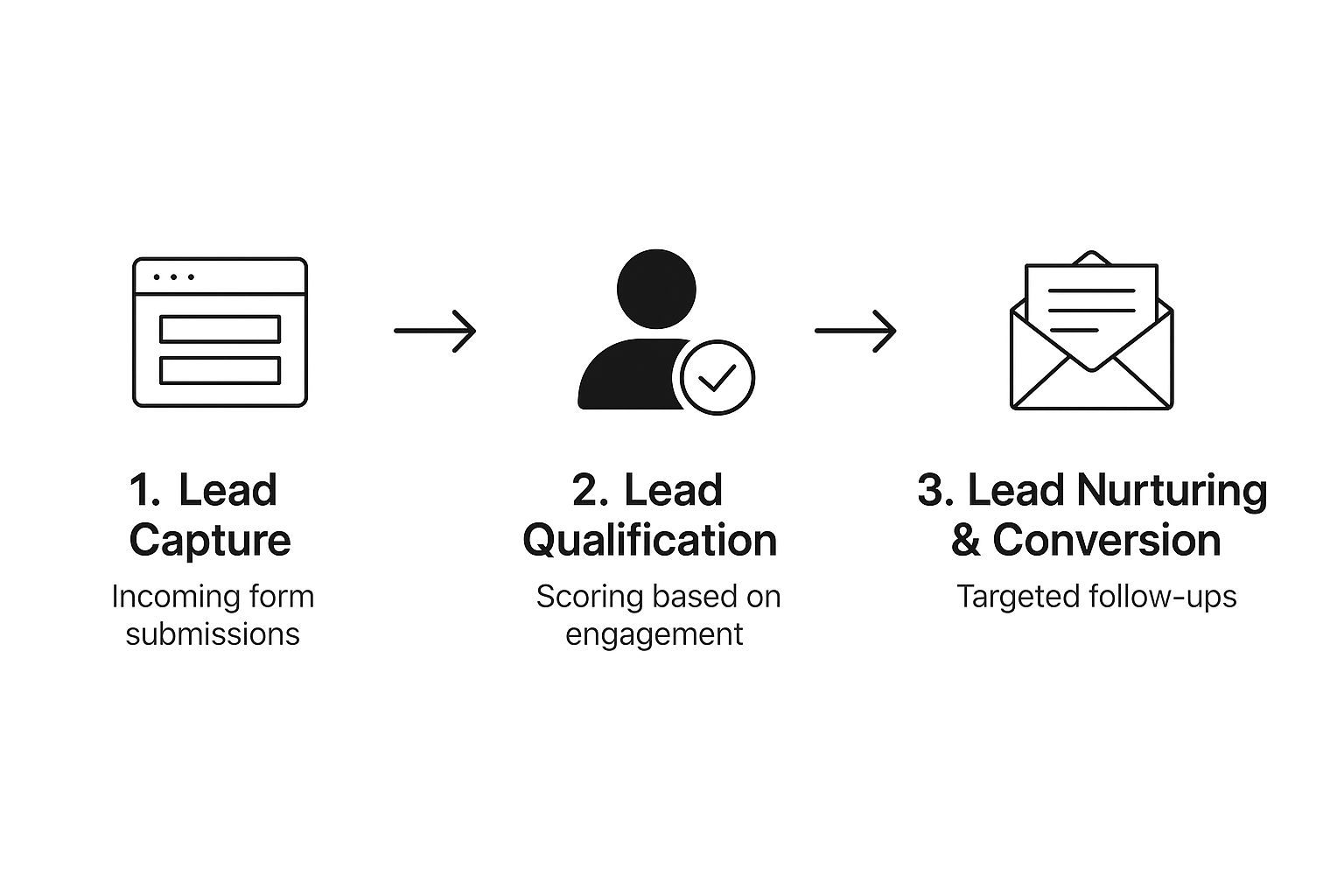
As you can see, a smooth handoff between each stage is absolutely critical to keeping things moving.
Setting Up Smart Assignment Rules
First things first, let's put Salesforce’s native Lead Assignment Rules to work. These are the basic building blocks for your automated routing machine. Think of them as the air traffic controllers for your inbound leads, directing them based on criteria you set.
Some of the most effective routing rules I've seen are based on:
- Geography: Sending leads to reps based on their state, country, or sales territory.
- Industry: Routing a lead from the "Finance" sector to a rep who lives and breathes that vertical.
- Company Size: Making sure leads from companies with over 500 employees go straight to your enterprise team.
- Product Interest: If someone asks about a specific product, get them to a specialist who knows it inside and out.
This isn’t just about speed; it’s about context. You're making sure every lead lands with the person who is best equipped to understand their specific world.
Implementing a Fair Round-Robin System
But what if you have a few reps covering the same territory or specializing in the same industry? That's where a round-robin system is a lifesaver. It automatically and evenly distributes leads among a group of reps, which keeps workloads balanced.
This simple setup stops one person from getting buried in leads while another is waiting for the phone to ring. It also eliminates "cherry-picking," where reps jump on what they think are the 'easy' leads, letting others go cold. Most importantly, it guarantees every single lead gets assigned right away.
A fair, automated round-robin system is key to maintaining team morale and maximizing coverage. It creates a predictable and equitable process that allows every rep an equal opportunity to succeed.
If your needs are a bit more complex, it's worth digging into different lead routing best practices to see how you can handle more advanced scenarios.
Supercharging Routing with Instant Meeting Booking
Standard routing is great—it gets the lead to the right person. But the best systems I’ve built take it a step further and get rid of the scheduling headache altogether. Integrating a tool like Distro here can be a complete game-changer.
Instead of a rep getting a lead and then kicking off an email chain to find a time to talk, Distro can show the correct rep's calendar right on the "thank you" page after someone fills out your form. The qualified lead can book a demo on the spot.
This one tweak collapses the sales cycle by capitalizing on that peak moment of intent. I’ve seen this single change triple form-to-meeting conversion rates.
This is just one example, but thinking about the bigger picture of how automation transforms everyday tasks can help you spot other opportunities to make your entire funnel more efficient.
Building Follow-Up Sequences That Actually Work
Okay, so your lead is scored and routed to the right rep. Now what? This is where the real work begins. The follow-up is where most deals are won or lost, yet it’s also where so many sales processes completely fall flat with robotic, one-size-fits-all outreach.
A killer lead conversion Salesforce strategy hangs on building automated nurture sequences that actually feel personal and get people to act.
The point isn't to just hammer leads with messages. It's about building trust and staying top-of-mind. This means creating thoughtful, multi-touch cadences that use different channels—not just a volley of emails. A solid sequence guides a lead toward a conversation without ever feeling pushy or desperate.
Designing a Multi-Touch Cadence
A powerful follow-up sequence is more than a simple list of emails. Think of it as a carefully choreographed dance of interactions, designed to meet your leads where they are. The secret weapon here is using the rich data inside Salesforce to personalize every single touchpoint, but at scale.
Here’s a real-world example of a 10-day cadence for a "Demo Request" lead, which is about as high-intent as it gets:
- Day 1 (Instant): An automated but personalized email lands in their inbox, acknowledging the request. Use Salesforce merge fields to pull in their name, company, and mention the specific product or solution they asked about.
- Day 1 (1 hour later): If the email hasn't been opened, the assigned rep gets an automated prompt to send a LinkedIn connection request.
- Day 3: A second email goes out, but this time it’s not a "just checking in" message. It offers something valuable, like a case study directly relevant to their industry.
- Day 5: An automated task pops up in Salesforce for the rep to make a phone call. The task should include a brief script focused on adding value, not just asking for a meeting.
- Day 7: Another email, this time with a different angle. Maybe it's a powerful customer testimonial or a short video showcasing a key feature.
- Day 10: The final, friendly "break-up" email. This one politely closes the loop for now but leaves the door wide open for them to re-engage when the time is right.
This multi-channel approach drastically increases your chances of making a connection. We know cold calls have a notoriously low average conversion rate of 2.35%. But here’s the thing: consistent training and a solid process can bump that figure up to 9.03%. This just shows how much a well-executed touchpoint matters. Your automated Salesforce sequences can support this by arming reps with the right context at the perfect time. If you want to dig into the numbers, you can explore detailed findings on call conversion rates.
Personalization at Scale
The absolute magic of using Salesforce for follow-up is the ability to personalize outreach without a ton of manual work. I'm not just talking about dropping {{FirstName}} into a template. I mean tailoring the entire message based on what you know about the lead.
Generic outreach gets deleted. Personalized outreach starts conversations. Use lead source, behavioral data, and firmographics to make every touchpoint feel like it was written just for them.
For instance, a lead who downloaded your whitepaper on "AI for Finance" should get a follow-up sequence that speaks their language—addressing the specific challenges and opportunities in the financial services world. A lead you met at a competitor’s customer event? They should get a sequence that subtly highlights your unique advantages over that very competitor.
This is the kind of detail that separates high-performing sales teams from the pack. It proves you've done your homework and you understand their world. That's the fastest way to build the credibility you need to finally get that meeting on the calendar.
How to Measure and Improve Your Conversion Funnel

If you aren’t measuring your sales process, you're flying blind. It's that simple. Optimizing your lead conversion Salesforce funnel is completely dependent on getting a clear, honest look at your performance. This is where Salesforce Reports and Dashboards become your mission control.
You can't fix a leak you don't know exists. The goal here isn't to create a wall of charts but to build a handful of essential reports that shine a light on every stage of your funnel. This data will tell you exactly where leads are stalling, getting stuck, or dropping off entirely. It’s not just about collecting data; it’s about turning those numbers into action.
Identifying Your Core Funnel Metrics
To get started, you need to focus on the metrics that actually move the needle on revenue. Don't fall into the trap of overwhelming your team with dozens of vanity metrics. It’s counterproductive. Instead, build specific, targeted reports that track these critical data points:
- Lead-to-Opportunity Conversion Rate: This is your headline number. It’s the purest indicator of what percentage of raw leads are actually turning into legitimate sales opportunities.
- Time in Each Stage: Think of this as your bottleneck detector. If leads are sitting in the "Attempting to Contact" stage for an average of 7 days, you’ve just uncovered a massive, fixable problem.
- Lead Source ROI: Which channels are sending you leads that actually close? This is the report that helps you decide whether to double down on paid search or pour more resources into your content marketing efforts.
A well-built Salesforce dashboard does more than just show you what happened; it tells you why it happened. Seeing a low conversion rate from a specific ad campaign is the first step to either fixing that campaign or cutting your losses and reallocating the budget.
Pinpointing and Fixing Bottlenecks
Once your reports are up and running, you can go on the hunt for those costly bottlenecks.
Let's say your "Time in Stage" report shows leads getting stuck right after being assigned to a rep. That's a huge red flag. It could mean your reps need better training on their initial outreach, or maybe the automated follow-up cadence just isn't aggressive enough. This is the kind of insight that leads to real improvements. For a deeper dive into optimizing your entire sales pipeline, this comprehensive SaaS sales funnel guide is a great resource.
This data-driven approach takes all the emotion and guesswork out of your strategy. Instead of assuming you know what's wrong, you have concrete evidence pointing you in the right direction.
If you’re looking for more ideas, check out our article on boosting your lead-to-sale conversion rate. It’s packed with practical strategies that perfectly complement a data-first mindset.
Alright, let's tackle the most common questions we hear from teams trying to get their Salesforce conversion process dialed in.
As you start digging into your sales process, you're bound to run into a few roadblocks. Getting straight, practical answers to these common hurdles is key to actually making progress.
This isn't about high-level theory. It's about giving you actionable advice you can use right now to see a real difference in your numbers.
What Is a Good Lead Conversion Rate in Salesforce?
This is the million-dollar question, and the honest answer is: it depends. There’s just no universal magic number that fits everyone.
A B2B SaaS company might celebrate a 1-3% conversion rate from a marketing-qualified lead to a closed-won deal. An e-commerce business? Their benchmarks would look completely different.
The only number that truly matters is your own. Your very first step should be diving into Salesforce reporting to figure out your current baseline. From there, the goal is simple: consistent, incremental improvement. A 20% month-over-month jump in your conversion rate is a much healthier sign of success than chasing some vague industry average you read online.
How Can I Improve the Quality of Leads Entering Salesforce?
Boosting lead quality isn’t something you fix inside Salesforce—it’s a proactive effort that starts way earlier, with your marketing. You need to get serious about refining your ad targeting and content strategy. Are you speaking directly to the pain points of your ideal customer? If not, start there.
On your website forms, don't be shy about asking a few specific qualifying questions. Think of it as an automatic filter. This simple step can do wonders for weeding out the tire-kickers and poor-fit leads from the get-go.
Once a lead is in Salesforce, your best lines of defense are Validation Rules and a smart lead scoring model. Validation Rules keep your data clean, while lead scoring helps you prioritize prospects who show clear buying intent. This way, your sales team can focus their energy where it counts: on people who are actually likely to buy.
What Are the First Steps to Automate Lead Routing?
Getting started with automated lead routing in Salesforce is way less intimidating than most people think.
First, just map out your basic logic. How do you want to assign leads? Is it based on geography, industry, or company size? Or maybe you just need a simple round-robin system to keep distribution fair.
Once you have that logic clear, head over to "Lead Assignment Rules" in Salesforce Setup.
- Kick things off by creating a new rule for your team.
- Then, add rule entries for each segment you defined, specifying the criteria (e.g., "State equals California").
- For each entry, just tell Salesforce whether to assign the lead to a specific person or a queue.
My advice? Start small. Create one or two simple rules, switch them on, and watch them closely. You can always layer in more complexity later, once you've confirmed the basic automation is solid. This measured approach is how you build a robust system that doesn't break.
Ready to eliminate manual lead routing and instantly book more meetings? Distro connects to your forms and automatically routes qualified leads to the right rep’s calendar in seconds. See how teams triple their conversion rates at https://distro.so.