
Salesforce lead assignment rules are your secret weapon for automating lead distribution. Think of them as an intelligent traffic controller for your sales pipeline. You set the criteria, and Salesforce routes new leads to the right person or queue, instantly.
This isn't just about saving a few clicks. Automating this process means new leads never get lost in the shuffle or sit idle in a queue. It’s all about boosting your team’s speed-to-lead and, ultimately, your conversion rates.
How Smart Lead Assignment Drives Revenue
Let's stop thinking about lead routing as a boring administrative chore. Lead assignment rules in Salesforce are a strategic engine for sales velocity. Seriously.
When a high-intent prospect fills out your demo request form, every second is critical. Manual handoffs are the enemy here—they create delays, and delays absolutely kill deals. Automation is what closes that gap, ensuring a hot lead gets a response while they're still fired up.
The whole game comes down to "speed-to-lead," which is just a fancy way of saying how fast a rep can engage a new prospect. Getting the right lead to the right rep, right away, is probably the single most effective way to capitalize on that peak moment of interest.
Unlocking Sales Velocity
Effective lead assignment does more than just keep your pipeline tidy. It actively smashes common sales bottlenecks that hold back growth. Once you have your rules dialed in, you can:
- Eliminate Manual Triage: Your sales managers have better things to do than hand-dole out leads all day. Let them focus on coaching and strategy instead of playing air traffic controller.
- Ensure Fair Distribution: Use criteria like geography or round-robin to balance the workload across your team. This prevents burnout and gives every rep a fair shot at hitting their number.
- Capitalize on Expertise: Got a rep who's a wizard with enterprise manufacturing clients? Route those leads directly to them. Match leads based on product interest, industry, or technical know-how to the person best equipped for the conversation. This leads to way better first calls.
The Salesforce Sales Cloud interface is where all this magic happens. It’s the command center for managing customer relationships and sales pipelines.

A clean dashboard like this gives you the visibility to track everything. And it's your smart assignment logic working behind the scenes that feeds it with clean, actionable data.
The Direct Correlation Between Speed and Conversion
Study after study shows the same thing: fast, accurate lead assignment leads to higher conversion rates and shorter sales cycles. It just makes sense. Leads are far more likely to turn into customers when they’re contacted quickly by a rep who actually understands their needs.
The core principle couldn't be simpler: The faster you connect a motivated buyer with a knowledgeable seller, the higher your odds of winning the deal. Every minute you wait gives a competitor an opening and lets the lead's initial excitement fade.
To see the real impact on revenue, you need to view smart assignment as one piece of your overall lead management best practices. It's a critical component in building a sales funnel that's seamless, efficient, and profitable.
The Strategic Impact of Automated Lead Routing
Implementing Salesforce lead assignment rules does more than just move records around; it fundamentally transforms how your sales team operates. Below is a quick breakdown of the strategic benefits you can expect.
| Key Benefit | Direct Business Impact |
|---|---|
| Increased Speed-to-Lead | Dramatically boosts conversion rates by engaging prospects at peak interest. |
| Improved Sales Productivity | Frees up reps and managers from manual tasks, letting them focus on selling. |
| Higher Quality Conversations | Leads are matched with reps who have the right expertise, improving the buyer experience. |
| Balanced Workload | Prevents top-performer burnout and ensures fair opportunity distribution. |
| Enhanced Pipeline Visibility | Provides clean, reliable data for more accurate forecasting and performance tracking. |
| Reduced Lead Leakage | Ensures no lead is ever forgotten or left to go cold in an unassigned queue. |
Ultimately, what starts as a simple automation rule becomes a powerful lever for driving predictable revenue growth and creating a more effective sales organization from the ground up.
Preparing Your Org for Flawless Lead Routing
Jumping straight into building lead assignment rules in Salesforce without proper prep is a recipe for absolute chaos. I’ve seen it happen time and time again. Success isn't about the rules themselves; it's about the strategic groundwork you lay first.
Think of it as a pre-flight check for your automation. Skipping it pretty much guarantees your efforts will never truly take off.
The first move is a candid audit of your current lead flow. Map out every single touchpoint, from the moment a lead is created to the first time sales reaches out. Where are the manual handoffs slowing things down? Which steps cause the most delays? Identifying these weak points shows you exactly what your automation needs to solve.
The Foundation of Data Hygiene
You've heard it a million times, but it bears repeating: "garbage in, garbage out." It’s a cliché for a reason. Your assignment rules are only as good as the data they run on.
If your lead records are missing crucial information like country, state, or company size, your rules will fail before they even start. It's that simple.
Clean data isn't just a buzzword; it's the absolute bedrock of effective routing. Before you build a single rule, you need a solid process to ensure lead data is complete and accurate from the get-go. This might involve:
- Making key fields required on your web forms and inside Salesforce. No exceptions.
- Using data enrichment tools to automatically fill in the blanks on company size, industry, and more.
- Regularly cleaning your database to zap duplicates and fix glaring inaccuracies.
Without this commitment to data quality, your sophisticated routing logic will be completely worthless. You also have to think about all the different channels feeding data into your org. For example, understanding how things like integrating WhatsApp API with Salesforce work can reveal new ways to capture and standardize information.
Define Your Territories and Teams
Automation can’t read your mind. You need to sit down with sales leadership and clearly define the rules of engagement for lead distribution. This conversation is non-negotiable and should result in a clear, documented plan that everyone agrees on.
Your assignment rules are a direct reflection of your sales strategy. If your strategy is unclear, your routing will be a mess. Spend the time to get alignment upfront, and you'll save countless hours of cleanup later.
This strategic alignment is all about mapping out territories, defining team responsibilities, and setting up the right queues for the right leads. You need to be asking questions like:
- How are geographic territories divided? By state, country, or specific postal codes?
- Do certain reps specialize in specific industries or company sizes?
- Which team handles inbound demo requests versus leads from a trade show?
Answering these questions helps you build a logical structure that actually mirrors your business goals. For a deeper dive into this planning phase, our complete guide on lead routing in Salesforce offers more detailed strategies. This prep work ensures your rules automate a well-defined process, not just a set of random commands.
Building Your First Lead Assignment Rules
Okay, let's get our hands dirty and move from theory to practice. This is where you start teaching Salesforce how to automate your sales strategy. We'll skip the generic "if this, then that" stuff and dive into real-world scenarios you can actually use.
Creating your first set of lead assignment rules in Salesforce isn't about being a technical genius. It's about thinking logically. You're basically building a brain for Salesforce that mimics how your best sales manager would route leads.
Crafting a Rule for Geographic Territories
One of the most common—and frankly, most useful—ways to route leads is by geography. Let's say you have your sales team split into regions: West, Central, and East. The goal is simple: a new lead from Texas needs to land in the Central team's queue, fast.
To make this happen, you'll head over to the Lead Assignment Rules section in Setup. From there, you'll create a new rule entry that looks something like this:
- Criteria:
Lead: State/ProvinceequalsTX, Texas - Assign To: Queue: Central Sales Team
This straightforward instruction tells Salesforce to scan the state field on every single new lead. If it sees "TX" or "Texas," that lead gets shot over to the Central Sales Team queue. A rep from that team can then grab it and get to work.
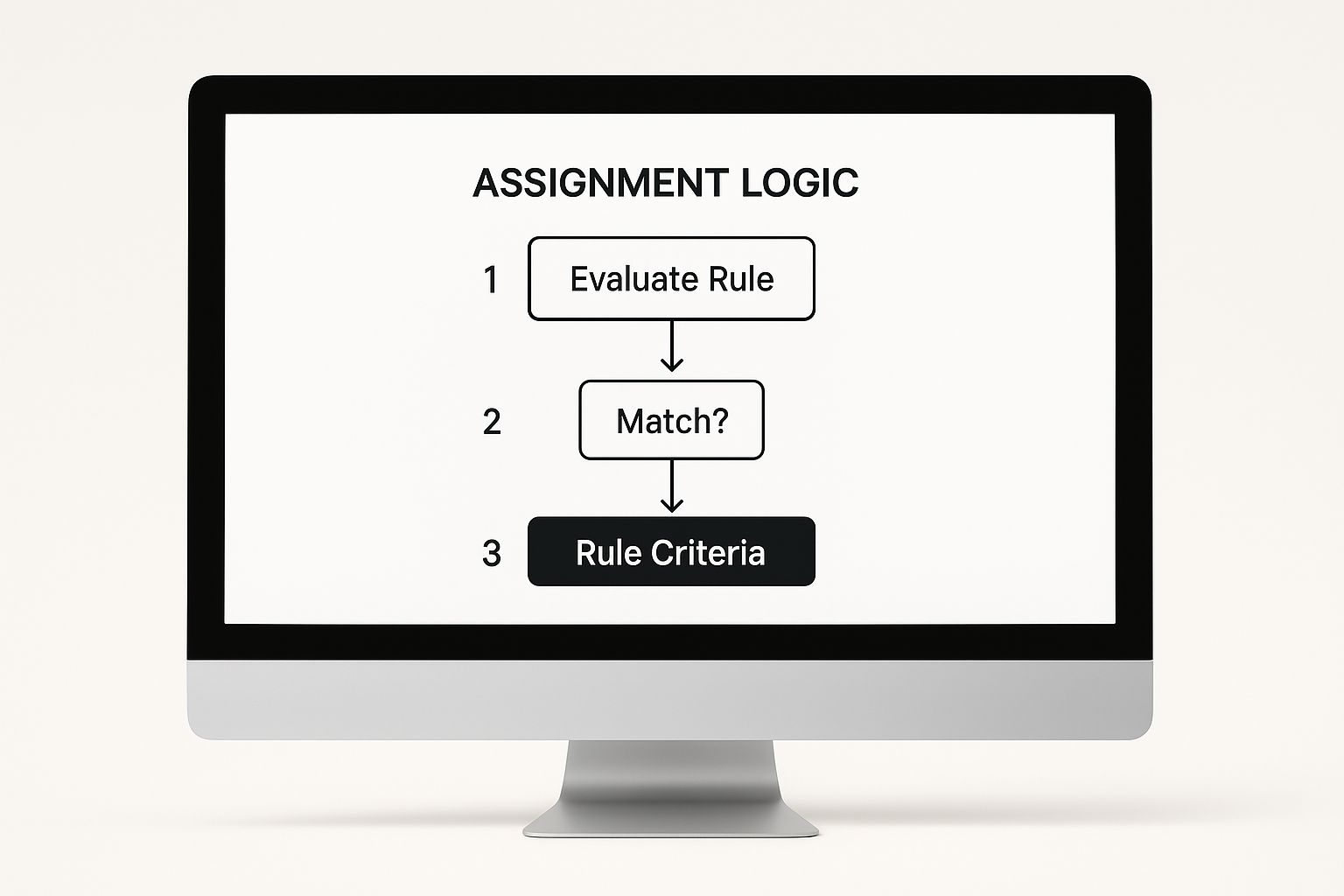
Think of the rule criteria as a bouncer at a club. It's checking IDs (or in this case, data fields) to make sure every lead goes down the right path you've laid out.
Prioritizing High-Value Lead Sources
Let's be real: not all leads are created equal. A prospect who fills out a "Request a Demo" form is screaming "I'm ready to talk," while someone who downloaded a whitepaper is just dipping their toes in. Your assignment rules need to reflect that difference in intent.
For example, you probably want those hot, high-intent leads to skip the general line and go straight to a senior Account Executive (AE) for immediate attention.
- Criteria:
Lead: Lead SourceequalsRequest a Demo - Assign To: User: Jane Doe (Senior AE)
By setting up a rule like this, you're rolling out the red carpet for your most valuable leads. This simple move can have a massive impact on how quickly you engage them and, ultimately, your conversion rates. This is a perfect example of how lead assignment rules in Salesforce can directly boost your bottom line.
The goal isn't just assigning leads; it's assigning them intelligently. Prioritizing by source ensures your best prospects get the fastest response from your most experienced reps.
The Critical Role of Sort Order
So, what happens when a lead could fit multiple rules? Picture this: a lead from Texas also fills out your "Request a Demo" form. Does it go to the Central queue based on location, or directly to Jane Doe because of the source?
This is where the Sort Order field becomes your best friend. Salesforce doesn't look at all your rules at once. It goes down the list, one by one, starting with order 1, then 2, and so on. The very first rule a lead matches is the one that gets applied. Game over.
This means you absolutely must put your most specific or highest-priority rules at the top of the list.
- Sort Order 1:
Lead SourceequalsRequest a Demo-> Assign to Jane Doe - Sort Order 2:
Lead: State/ProvinceequalsTX, Texas-> Assign to Central Sales Queue - Sort Order 3:
Lead: CountryequalsUSA-> Assign to US General Queue
With this setup, our Texas demo-requester correctly goes to Jane Doe because it hits rule #1 first. If you had flipped the order, the lead would have incorrectly been sent to the Central queue, completely defeating your priority logic. Getting the sort order right isn't just a best practice; it's fundamental to making your rules work at all.
So, you’ve got the basics down. Your leads are flowing to the right territories and getting tagged to the right campaigns. That’s a solid start, but it's table stakes. The real magic happens when you build a truly intelligent distribution system.
This is where high-performing teams separate themselves from the pack. They move beyond simple, static instructions to create a dynamic lead management machine that can handle complex sales motions, ensure fairness, and squeeze every last drop of value from their pipeline. Let's get into it.
Implementing Round-Robin Assignments
One of the oldest problems in sales is the "feast or famine" pipeline. Simple rules often dump leads on one or two reps while everyone else is staring at an empty queue. That’s a recipe for low morale and missed targets.
A round-robin assignment is the classic solution. It distributes leads evenly, like dealing a fresh hand of cards. Every rep gets a fair shot, which keeps the team motivated and the workload balanced.
Now, Salesforce doesn't offer a native, click-a-button round-robin feature. But don't worry, you can build a decent version yourself with a custom field.
Here’s a quick and dirty way to set it up:
- First, create a new custom auto-number field on your Lead object. Call it something simple like "Lead Number."
- Next, whip up a formula field to act as your "Round Robin ID." You can use the
MOD()function to cycle through numbers—say, 1 through 5 if you have five reps on the team. - Finally, build out your lead assignment rules in Salesforce. You’ll set up rule entries that assign leads based on that new "Round Robin ID." (e.g., if ID = 1, assign to Rep A; if ID = 2, assign to Rep B, and so on).
This method is a go-to for many teams using Sales Cloud to get a fair workload distribution. You can even layer more complex rules on top of it to make sure your VIP leads are still prioritized.
Routing Based on Expertise and Product Interest
Generic lead routing gets the job done. Specialized routing closes deals faster.
Think about it. A lead from a Fortune 500 bank downloads your whitepaper on enterprise-grade security. Who do you want talking to them? The new SDR who just finished onboarding, or your senior AE who’s spent a decade in FinTech?
The answer is obvious. This is where you create rules that match leads to reps based on specific, nuanced criteria.
- Industry Expertise: Route all leads where
IndustryequalsFinancedirectly to your FinTech specialist. - Product Interest: If a lead’s
Last Campaignfield contains "Project Management Tool," send it straight to the rep who lives and breathes that solution. - Company Size: Any lead where
Annual Revenueis greater than $500 million should be fast-tracked to your enterprise sales team's queue. No questions asked.
This level of granular routing ensures that from the very first touchpoint, the prospect is talking to someone who actually understands their world. It cuts down the discovery time and builds instant credibility.
The Essential Catch-All Rule
So, what happens when a lead doesn’t match any of your brilliant, carefully crafted rules? Without a safety net, it gets tossed to the Default Lead Owner—which, let's be honest, is often a black hole where leads go to die. This is a critical failure point that quietly bleeds revenue from businesses every single day.
To stop this from happening, your very last rule entry (the one with the highest Sort Order number) must be a catch-all rule.
This rule has zero criteria. Its only job is to scoop up any lead that has slipped past all your other rules. It should assign these leads to a specific "Unassigned Leads" queue that a sales manager or RevOps team member actively monitors.
This simple step guarantees that 100% of your leads get reviewed. Nothing gets lost. For more on this, check out our guide on lead routing best practices.
How to Test and Optimize Your Assignment Rules
Getting your lead assignment rules in Salesforce up and running is just the beginning. The real magic—and the competitive edge—comes from treating them less like a one-time project and more like a living, breathing system that you constantly refine. If you skip this part, you're essentially just guessing.

Here’s a non-negotiable best practice: never, ever test new logic in your live production org. Always, always start in a sandbox. It’s your safe space, a playground where you can confirm everything works exactly as planned without blowing up your sales team's workflow or messing with real data. I always recommend creating a handful of test leads that mirror your most common real-world scenarios.
Setting Up Your Testing Framework
Your sandbox testing can't be a random click-around. You need a structured game plan to catch problems before they become real problems. The goal is to sniff out the common pitfalls before they ever have a chance to impact your pipeline.
Think of it as a pre-flight checklist for your rules:
- Confirm Geographic Routing: Create a lead from California. Does it correctly route to the West Coast team? Make another from New York. Does it go to the East Coast queue? Simple, but essential.
- Verify Source Priority: What about a hot lead? Create a test lead with a high-priority
Lead Sourcelike "Request a Demo." Make sure it skips the general queue and goes straight to a senior rep like it's supposed to. - Check for Rule Conflicts: Cook up a test lead that meets the criteria for two or three different rules at once. Does your Sort Order logic hold up? Does the lead get assigned based on the highest-priority rule every time?
- Test for Inactive Users: This one is a classic—and costly—mistake. Double-check that none of your rules are trying to assign leads to a former employee or a queue that nobody monitors. It happens more than you'd think.
The point of testing isn't just to see if your rules work. It's to actively try to break them. Finding the edge cases and flaws in a sandbox is a huge win. It prevents those cringe-worthy, revenue-killing errors from ever seeing the light of day.
Shifting from Testing to Optimization
Once your rules are live and happily routing leads, your job isn't over. It just shifts from one-time testing to ongoing optimization. This is where you lean on Salesforce reports and dashboards to see what’s actually happening and find opportunities to make things even better. Don’t assume your logic is flawless—let the data be your guide.
Start by tracking the key performance indicators (KPIs) that tell you how effective your lead distribution really is. A simple dashboard can give you a powerful, at-a-glance view of what's working and what needs a little TLC.
Here are a few metrics I always keep an eye on:
- Average Lead Response Time by Rep/Queue: Are certain reps or teams taking way longer to follow up? This could be a sign of an unbalanced workload that your rules need to account for.
- Conversion Rate by Territory: Is the West Coast team crushing their numbers while another territory lags? Dig in. Is it the reps, the quality of leads they're getting, or something funky in your routing logic?
- Lead Reassignment Rate: How often are leads being manually passed to someone else after the automation runs? A high number here is a giant red flag that your rule criteria just aren't hitting the mark.
Data consistently shows that when you match leads with reps who have specialized knowledge, you create a much better sales experience and see higher customer satisfaction. In fact, well-configured lead assignment rules can boost close rates by up to 30% simply by getting leads to the right person faster. By tracking these metrics, you can fine-tune your rules to hit that level of specialization and really start moving the needle.
Common Questions About Lead Assignment Rules
Even with a perfectly mapped-out plan, you're bound to run into some head-scratchers when you start working with lead assignment rules in Salesforce. Getting a handle on these common questions is key to running a tight ship and quickly squashing any issues that pop up.
Let's dive into some of the questions I hear most often.
What Happens If a Lead Doesn’t Match Any Rule?
This is easily the most frequent question, and for good reason. What if a lead comes in and doesn't meet a single one of your criteria?
In this case, Salesforce sends it straight to the Default Lead Owner. Think of this as your safety net. To make sure no lead gets lost in the ether, you absolutely have to set this default. It can be a specific admin, a sales manager, or, even better, an "Unassigned" queue that your team checks regularly.
Can I Run Multiple Rules at Once?
Another point of confusion is whether you can have a bunch of different assignment rules running at the same time.
The short answer is no. Salesforce only lets you have one lead assignment rule active at a time.
But—and this is a big but—you can create multiple sets of rules. You might have your standard, day-to-day rule set, and then a special one you activate just for a huge event like Dreamforce. This lets you swap them out manually when you need to, giving you a ton of flexibility without making your main rule a cluttered mess.
Think of your active rule as the "on-duty" playbook. You can have other playbooks ready on the sideline, but only one can be directing the action on the field at any given moment.
How Do These Rules Work With Other Salesforce Features?
It's also important to understand how assignment rules play with other parts of your Salesforce org. For instance, they work hand-in-glove with lead scoring. As we cover in our guide on Salesforce lead scoring, you can use that score as a super powerful piece of criteria in your rules to route your hottest leads first.
And what about your web-to-lead forms? Easy. You can make sure leads from your website get routed instantly by ticking one simple box in your web-to-lead setup. Just look for "Use Active Assignment Rule." Once that's checked, every lead that comes through your site will hit your active rule right away, completely automating that marketing-to-sales handoff.
Ready to eliminate manual lead assignment and convert more inbound demo requests? Distro routes leads to the right rep's calendar the moment they hit submit. See how it works at https://distro.so.