If you want to get serious about automating follow-up emails, you have to think bigger than just saving time. The real magic happens when you build behavior-driven workflows that fire off the right message at the right moment, turning simple interactions into profitable, long-term conversations.
Why Automated Follow Ups Are a Growth Engine
Let’s be clear: the true power of automating your follow-ups isn’t about clawing back a few hours in your week. It’s about building a systematic, scalable process that nurtures relationships and drives revenue while you’re busy with everything else. Manual follow-ups? They're inconsistent, a nightmare to track, and just can't keep up with customer actions in real time.
Automation flips the script from a reactive chore to a proactive strategy. Instead of a sticky note reminding you to check in with a new lead, a well-crafted welcome series does the heavy lifting, building trust from day one. And when someone ditches their shopping cart, a timely nudge can bring back what would have been a lost sale. Simple, but incredibly effective.
From Manual Effort to Strategic Impact
This leap from manual to automated is a game-changer for growth. It gives you the power to engage every single lead and customer in a personalized way—something that's just not possible to manage by hand once you start scaling. Think of each automated workflow as a dedicated employee working 24/7, guiding your contacts along their customer journey.
This systematic approach really works. Email marketing is famous for its high return on investment, and automated workflows are a huge part of that success story. In fact, even though automated messages are just a small slice of all the emails sent, they punch way above their weight in generating revenue. Why? Because they’re triggered by what a user actually does, making them hyper-relevant and perfectly timed.
The data doesn't lie: email marketing delivers an average ROI of $42 for every $1 spent. But get this—automated workflows like abandoned cart reminders can generate up to 30 times more revenue per recipient than your standard campaigns. It's all about that perfect timing. You can learn more about these compelling email marketing statistics and what they mean for your strategy.
Key Workflows for Business Growth
Before you start building, you need a plan. Different business goals call for different types of automated follow-ups. Knowing which workflow to deploy is the key to actually making an impact. For example, a sequence to onboard a new SaaS user is going to have a completely different vibe and structure than one trying to win back a customer who hasn't bought anything in six months.
Just think about these common scenarios:
- Welcoming new subscribers: This is your big chance to make a killer first impression, set the right expectations, and point them toward their first "aha!" moment with your brand.
- Recovering abandoned carts: A gentle reminder about the items someone left behind can seriously boost your e-commerce sales. It’s low-hanging fruit you can’t afford to ignore.
- Nurturing new leads: A series of helpful, educational emails can warm up cold leads over time, building your credibility and getting them ready for a real sales conversation.
To give you a better idea of how this looks in practice, I've put together a quick overview of the most impactful workflows and what they're designed to achieve.
Key Automated Follow Up Email Workflows
A quick overview of the most impactful types of automated follow-up sequences and their primary business goals.
| Workflow Type | Primary Goal | Best For |
|---|---|---|
| Welcome Series | Build trust & guide new contacts | Onboarding new subscribers, users, or customers |
| Lead Nurturing | Educate & build relationships | Moving marketing-qualified leads toward sales-readiness |
| Abandoned Cart | Recover lost revenue | E-commerce businesses with online checkouts |
| Re-engagement/Win-back | Reactivate dormant contacts | Reviving inactive subscribers or past customers |
| Post-Purchase Follow Up | Increase retention & gather feedback | Driving repeat business and collecting reviews |
By putting these kinds of strategic sequences in place, you’re not just sending emails—you're building a reliable system that consistently turns interest into action. That’s what makes automated follow-up an indispensable engine for business growth.
Building Your Automation Blueprint
Jumping straight into your automation tool without a clear strategy is like trying to build a house without a blueprint. Sure, you might get a few walls up, but you'll quickly find the whole structure is shaky and ineffective. To truly automate follow up emails that get results, you have to start with a solid plan.
Every single automated sequence you create needs one, clear, measurable purpose. Before you write a single word, ask yourself: what is the specific outcome I want from this workflow? Vague goals like "engage users" just won't cut it.
You need to define a quantifiable objective for each and every sequence. For instance:
- For an abandoned cart series: "Recover 15% of abandoned carts within 48 hours."
- For a new user welcome series: "Get 25% of new sign-ups to use a key feature in the first week."
- For a cold lead nurturing sequence: "Book a demo with 5% of MQLs from our last webinar."
Having specific targets gives your automation a clear mission. It also makes it dead simple to measure what's working (and what isn't) later on.
Segmenting for Maximum Impact
Once you've got your goal, the next question is who you're talking to. Sending the same generic follow-up to everyone on your list is a fast track to low engagement and high unsubscribe rates. The real power of automation comes from smart segmentation based on user behavior and data.
Think about the distinct groups within your audience. A first-time buyer needs a completely different message than a loyal customer who's purchased ten times. A user who downloaded your whitepaper on "Advanced Sales Tactics" is in a different headspace than someone who just skimmed your pricing page.
Your goal isn't just to send an email; it's to send the right email to the right person. Effective segmentation can skyrocket your open rates, click-through rates, and ultimately, your conversions, because the message actually feels personal and relevant.
As you map this out, think about how your follow-ups fit into your larger B2B lead nurturing strategies. This big-picture view ensures every email is part of a cohesive journey, not just a random touchpoint.
Mapping Your Customer Journey Touchpoints
With your goals set and your audience segmented, it’s time to map out the customer journey. You need to identify those critical moments where a timely, automated email can make a real difference. These are your trigger points—the specific actions that kick off your workflows.
Consider these key touchpoints as potential triggers:
- A new subscriber signs up: This is your best chance for a powerful first impression. A welcome series is a must.
- A prospect visits your pricing page but doesn't book a demo: This is a huge buying signal. Trigger a follow-up that highlights a relevant case study or offers a quick, no-pressure chat.
- A customer makes their first purchase: Don't just send a receipt. Send a post-purchase thank you that also offers tips on how to get the most out of their new product.
By strategically planning your goals, segments, and touchpoints before you open your software, you guarantee that every automated workflow is purposeful, targeted, and built to drive real business results.
Crafting Your First Automated Welcome Series
Okay, let's get our hands dirty and build your first high-impact workflow. If you only create one automated sequence, make it a welcome series. Seriously. It’s your single best chance to make a killer first impression, build immediate trust, and get new subscribers to that "aha!" moment with your brand.
It all starts with picking the right trigger. For a welcome series, this part is pretty simple: the trigger is when a user subscribes to your newsletter, starts a trial, or grabs a lead magnet. That single action is what kicks off the entire workflow, making sure your first email hits their inbox while you're still top of mind.
This simple framework shows you how to get started.
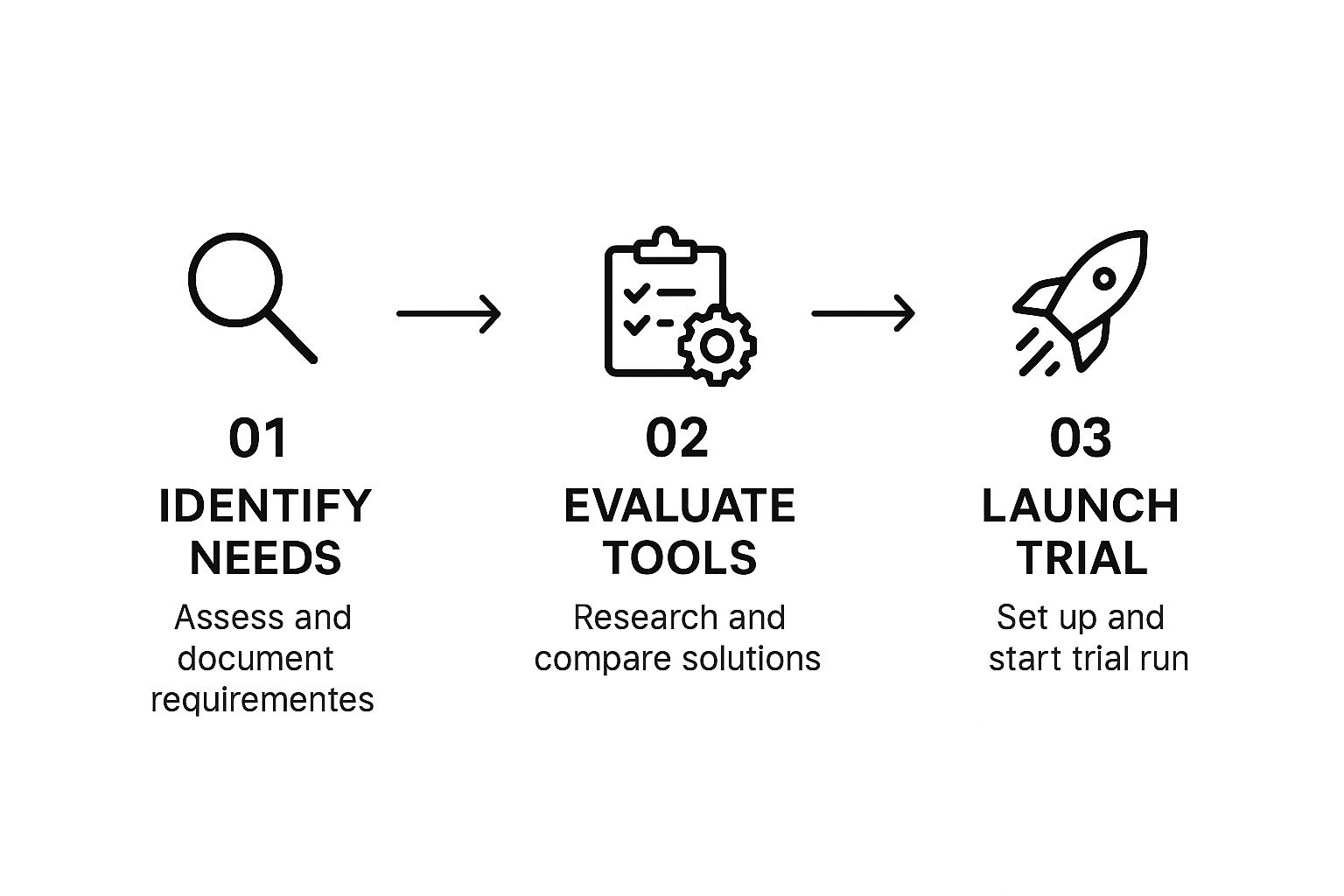
As you can see, successful automation isn’t just about the tech; it starts with strategy. You have to figure out the needs and the right tools before you ever hit "launch" on a campaign.
Designing the Welcome Sequence
A truly great welcome series isn’t just one email—it's a conversation that unfolds over a few days. The goal is to nurture that new relationship without blowing up their inbox. This is where smart time delays become your best friend.
Here’s a proven three-email structure that just works:
- Email 1 (Sent Immediately): The "Hello & Thanks." This is your delivery email. It should have the link to the ebook they asked for or confirm their subscription, coupled with a warm welcome. Keep it short, personal, and focused on showing your appreciation.
- Email 2 (Sent 2 Days Later): The "Social Proof." Now, you build some credibility. Share a powerful customer story, a quick case study, or a few links to your best reviews. This shows them that people just like them are already getting value from what you offer.
- Email 3 (Sent 4 Days Later): The "Valuable Offer." You've built a little trust, so now it's time for a clear call to action. This could be anything from an invite to book a demo, a special first-timer discount, or a link to your most popular blog post.
This staggered approach respects their time while gently guiding them toward becoming a customer.
The Real Power of Welcome Workflows
The impact here is huge. These automated welcome flows might seem small—they make up only about 1.8% of total email sends—but they punch way above their weight. In fact, they’re responsible for a whopping 31% of all email-driven orders.
Welcome emails are consistently one of the most effective sequences you can run, making up nearly 31% of all automated workflows. If you want to dive deeper, you can check out more of these powerful marketing automation statistics to see the full picture.
A well-crafted welcome series does more than just say hello. It sets the tone for your entire relationship, reduces immediate unsubscribes, and starts the lead nurturing process on the right foot.
By taking the time to automate follow up emails for every new subscriber, you create a scalable system that nurtures every single lead perfectly from the moment they join your world. It's one of the highest-leverage activities you can focus on.
Using Your CRM for Smarter Follow Ups
This is where you graduate from simple, time-based sequences to truly intelligent automation. If you're not connecting your email platform to your CRM, you're leaving a massive amount of opportunity on the table. It’s a total game-changer.
Seriously. It transforms your ability to automate follow up emails from a basic marketing task into a hyper-personalized, context-aware sales machine.
Without that CRM connection, your automation is flying blind. It knows someone subscribed, sure, but that's about it. It has no idea about their lead score, their purchase history, or if they have an open support ticket. All that rich, contextual data lives in your CRM, and integrating it is the key to unlocking next-level relevance that actually drives conversions.
Leveraging CRM Data for Trigger-Based Workflows
Imagine triggering a follow-up based on a lead’s specific status or a behavior tracked right inside your CRM. This is how you move beyond generic messaging and into a world where every email feels like it was written just for that one person at that exact moment.
It’s the difference between shouting at a crowd and having a one-on-one conversation.
This integration lets you build incredibly specific workflows. For example, you could create a trigger that only kicks off a sequence when a lead’s score crosses a certain threshold, signaling they're sales-ready. Or maybe you automatically send a re-engagement campaign to high-value customers who haven’t made a purchase in the last 90 days.
By syncing your email platform with your CRM, you’re not just sending emails; you’re responding directly to the customer journey. You can pinpoint the exact moment a prospect is most engaged or a customer is at risk of churning, and deliver the perfect message automatically.
Practical Scenarios for CRM-Driven Follow Ups
So, how does this actually play out in the real world? A well-integrated system lets you create powerful, automated touchpoints that feel seamless to the customer and drive significant business results.
Here are a few powerful examples of what this looks like in practice:
- Targeted Content Follow-Up: A prospect in your CRM downloads a case study about the manufacturing industry. Your system automatically triggers a two-email sequence. The first shares a blog post about manufacturing trends, and the second invites them to a webinar specifically for that vertical.
- Post-Demo Nurturing: A sales rep marks a lead’s status as "Demo Completed" in the CRM. Boom. This action immediately enrolls the prospect in a workflow that sends a thank you, a summary of key takeaways, and a link to book a follow-up call.
- Proactive Customer Retention: A customer’s record shows they haven’t logged into your SaaS platform in 30 days. This triggers an automated email offering helpful tips, a link to a new feature guide, and an invitation to a free training session.
These are just a few possibilities, of course. To see more detailed automations in action, check out our guide on powerful CRM workflow examples. By connecting these systems, you create a powerful feedback loop where customer actions inform your communication, leading to a much smarter, more effective strategy.
Putting Your Strategy on Autopilot with AI
Rule-based workflows are a fantastic start, but if you want to truly level up how you automate follow up emails, you have to look at what's possible with artificial intelligence. AI takes your strategy from a simple, reactive system to one that’s intelligent and predictive.
It’s about letting the machine handle the kind of complex decisions that go way beyond basic "if-then" logic.
Instead of just blasting out a pre-written message, AI can analyze a user’s entire history to dynamically insert the exact product recommendations they're most likely to buy. It can even predict the optimal send time for every single person on your list, not just a broad segment.
The end goal? A communication flow that feels uniquely personal and perfectly timed. Imagine an AI that predicts a customer's churn risk from tiny shifts in their behavior, then automatically triggers a custom-tailored retention campaign to win them back. That’s the kind of power we're talking about.
How to Actually Use AI in Your Workflows
Jumping into AI doesn't mean you have to rip and replace everything you've built. The smart way to start is with small, high-impact applications that make what you're already doing even better.
- AI-Powered Copywriting: Use tools to generate and test multiple versions of email copy and subject lines. Let the data tell you what resonates.
- Predictive Send Times: Why guess the best time to send an email? Let an algorithm figure out the perfect moment for each contact to maximize open rates.
- Dynamic Content: Automatically populate emails with personalized content, like product suggestions or blog posts, based on a user’s real-time browsing history and past purchases.
This isn't just theory anymore. These AI-driven tactics are quickly becoming standard practice. Around 70% of marketers now use generative AI to boost campaign performance, with 34% using it specifically for email copy.
AI supercharges personalization by using recipient details (68%) and past interactions (44%) to customize content on the fly. When you add in AI-driven send-time optimization—which 66% of marketers are already doing—you’ve got a recipe for serious engagement. You can dig into these and other email marketing statistics on Omnisend.
AI is what helps you finally graduate from one-size-fits-many automation to truly individualized communication at scale. It’s the difference between a pre-programmed robot and a genuine assistant that understands context.
By applying these tools, you can build a more adaptive and effective follow-up strategy. This is a core part of what modern, successful campaigns look like today. To learn more about building these kinds of systems, check out our complete guide to autopilot email marketing.
Alright, you’ve launched your automated workflow. High five! But don’t pop the champagne just yet. This is where the real work begins.
Getting your sequences live is step one. Turning them into a revenue-generating machine requires a totally different mindset: a cycle of constant measuring, tweaking, and optimizing. This is what separates the campaigns that just run from the ones that actually drive killer results.
Your first instinct might be to obsess over open rates. We all do it. But while they’re nice to look at, opens don’t pay the bills. You need to focus on the metrics that actually show you what’s moving the needle.
Think in terms of conversions. What’s the conversion rate per email? What’s the conversion rate for the entire workflow? If you notice that Email 3 in your welcome series is booking almost all the demos, you've found your MVP. On the flip side, if Email 2 is causing a spike in unsubscribes, that’s a big red flag telling you the message is off.
Build a Continuous Improvement Loop
The data flowing in from your live workflows is pure gold. It’s your roadmap for what to do next. Use it to create a feedback loop where every test you run is based on real performance, taking all the guesswork out of the equation.
Here’s how you can put this into practice:
- Subject Lines: A/B test something direct like "Your Guide to Faster Onboarding" against a more intriguing subject line like "A quick question for you?" See which one gets more clicks, not just opens.
- Calls-to-Action (CTA): The smallest word changes can have a huge impact. Does "Book a Demo" outperform "See a Live Preview"? You won't know until you test it.
- Email Timing: Play around with the delays between your emails. For some audiences, a two-day gap might create the perfect amount of urgency, while for others, three days feels less pushy.
The name of the game is small, iterative improvements. A tiny 1% improvement each week snowballs into massive gains over the course of a year. Your first draft is never the final version—always be testing.
And if you’re looking for more inspiration on what to test, especially for those sequences meant to give a prospect a gentle nudge, digging into different strategies for how to send a reminder email can uncover some really effective ideas.
At the end of the day, tracking performance isn’t just about putting numbers in a report. It's about learning what truly resonates with your audience so you can do more of it.
Got Questions About Email Automation? We've Got Answers.
When you're diving into the world of automated emails, a few questions always seem to pop up. Let's tackle the big ones so you can start building your workflows with confidence.
How Many Follow-Up Emails is Too Many?
There's no single magic number here, but my rule of thumb is that a sequence of three to five emails is a solid place to start for most campaigns.
The real key, though, isn't the number—it's the value. Each message needs to offer something new, not just be a lazy "just checking in" nudge. If you see engagement completely drop off after two or three emails, that's your cue. It’s probably time to move that contact to a different, less frequent nurturing track instead of burning them out.
How Do You Keep Automated Emails from Sounding... Automated?
This is the million-dollar question, isn't it? To avoid sounding like a robot, you need to lean heavily on your segmentation and CRM data.
Generic blasts are the enemy. Instead, trigger your emails based on what someone actually did—like downloading a specific resource or hanging out on your pricing page.
Mentioning that context makes a world of difference. A simple line like, "Hope you found our case study on manufacturing useful," instantly makes the message feel more relevant and personal. It shows you’re paying attention, and that’s what builds trust.
Ready to convert more inbound leads with intelligent, automated scheduling? See how Distro routes high-intent prospects to the right sales reps instantly, eliminating manual work and accelerating your pipeline. Learn more at Distro.