
"Workflow automation" is more than just a popular business phrase; it's a critical strategy for driving measurable growth and operational efficiency. Many discussions stay high-level, but the real value lies in understanding the specific mechanics of how businesses apply these concepts to solve tangible problems. This article moves past theoretical benefits to provide a detailed breakdown of real-world workflow automation examples.
We will dissect seven distinct case studies across sales, marketing, and operations, from lead scoring and CRM updates to employee onboarding and inventory management. Each example will detail the initial challenge, the automated solution implemented, and the concrete, measurable outcomes achieved. You won't just see what they did; you'll understand why it worked and how to replicate their success.
You’ll find actionable takeaways, strategic insights, and a clear blueprint for applying these tactics to your own processes. We will explore the specific tools and logic behind each automated system, offering a practical guide to optimizing your own operations. For a deeper dive into the foundational technologies and principles, our comprehensive AI workflow automation guide offers an extensive overview. Let's explore how smart automation translates into a powerful competitive advantage.
1. Email Marketing Automation
Email marketing automation is a foundational strategy that uses software to send targeted, personalized emails to subscribers based on predefined triggers or timelines. Instead of manually sending one-off campaigns, this workflow allows businesses to create complex, multi-step "if-then" sequences that engage users automatically. This is one of the most powerful workflow automation examples because it directly nurtures leads, retains customers, and drives revenue with minimal ongoing effort.
Common triggers include a user subscribing to a newsletter (triggering a welcome series), abandoning a shopping cart (triggering a recovery email), or a specific date like a customer's anniversary (triggering a special offer). Platforms like HubSpot and ActiveCampaign make it possible to build sophisticated customer journeys that adapt to user behavior in real time, delivering the right message at the right moment.
Strategic Analysis & Breakdown
The core strength of email automation lies in its ability to deliver personalized communication at scale. Consider Airbnb's booking sequence. Once a user books a stay, a workflow is triggered that sends a confirmation, pre-arrival tips, check-in instructions, and a post-stay review request. Each email is timely, relevant, and automated, enhancing the customer experience without manual intervention from a support agent.
Key Strategic Insight: Effective email automation isn't about sending more emails; it's about sending smarter emails. The goal is to create a seamless, helpful conversation that guides the user toward a specific action, whether it's making a purchase or simply staying engaged with your brand.
This bar chart visualizes the significant returns businesses can expect from implementing automated email workflows, highlighting conversion lifts, ROI, and typical setup time.
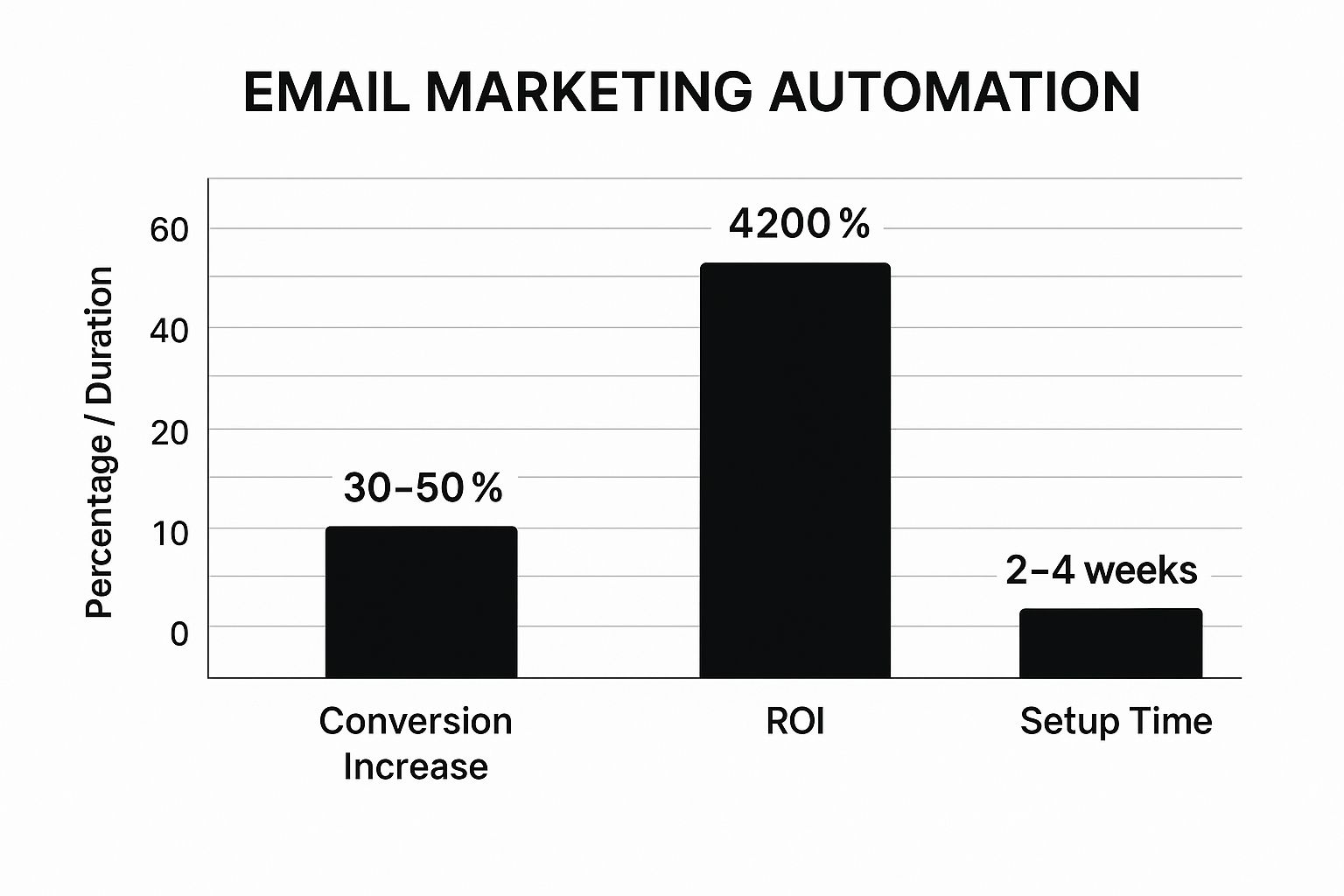
The data clearly shows that while the initial setup requires a few weeks of strategic planning, the long-term payoff in both conversions and financial return is exceptionally high.
Actionable Takeaways & Implementation
To replicate this success, start small and scale.
- Begin with a Welcome Series: This is the lowest-hanging fruit. Create a 3-5 email sequence for new subscribers to introduce your brand and set expectations.
- Segment Your Audience: Use tags and lists to group subscribers based on interests, purchase history, or engagement level. This allows for hyper-targeted messaging.
- Focus on a Single Goal per Email: Every automated email should have one clear call-to-action (CTA). Avoid cluttering your message with multiple competing requests.
- Test and Optimize: Continuously monitor open rates, click-through rates, and conversion metrics. Test different subject lines, send times, and content to improve performance. For a deeper dive into creating effective campaigns, you can explore detailed guides on autopilot email marketing.
2. Customer Support Ticketing Automation
Customer support ticketing automation is a system that intelligently manages incoming customer service requests without immediate human intervention. Instead of manually sorting a flood of inquiries, this workflow automatically categorizes tickets, prioritizes them based on urgency, and assigns them to the right agent or department. This is a critical one of the workflow automation examples for scaling support operations, as it ensures faster response times and frees up agents to focus on complex problem-solving.

Common triggers include a customer submitting a support form, sending an email to a support address, or initiating a chat. Using platforms like Zendesk or Freshdesk, businesses can set up rules that analyze keywords, customer history, or request type. For instance, an email containing "password reset" can be met with an automated response containing a self-service link, while a message with "urgent" or "outage" is immediately escalated to a senior technician.
Strategic Analysis & Breakdown
The primary advantage of ticketing automation is its ability to impose order on chaos, improving both efficiency and the customer experience. Consider how a global company like Spotify uses Zendesk's automated routing. With millions of users, inquiries range from simple billing questions to technical streaming issues. An automated workflow instantly identifies the nature of a request, routes it to the correct specialized team (e.g., payments, technical support), and provides an initial auto-response to manage expectations. This prevents backlogs and ensures the first human interaction is with a knowledgeable agent.
Key Strategic Insight: Automated ticketing isn't about replacing human agents; it’s about empowering them. The system handles the repetitive, administrative tasks of sorting and routing, allowing support professionals to dedicate their expertise to resolving customer issues, not managing a queue.
This approach dramatically reduces first-response times and improves first-contact resolution rates, which are key metrics for customer satisfaction.
Actionable Takeaways & Implementation
To implement this workflow effectively, focus on structure and clarity.
- Create Clear Escalation Paths: Define precise rules for when a ticket should be escalated. This could be based on keywords, the number of times a customer has contacted you, or the time a ticket has remained unresolved.
- Use Customer Data for Personalization: Integrate your support platform with your CRM. Use customer data, like their subscription tier or past issues, to personalize automated responses and prioritize tickets from high-value clients.
- Establish and Review Routing Rules: Start with broad categories like "Billing," "Technical," and "General Inquiry." As you gather data, refine these rules to be more specific, ensuring tickets land with the agent best equipped to handle them.
- Monitor First-Contact Resolution (FCR): Track the percentage of issues resolved in the first interaction. A high FCR is a strong indicator that your routing and automation rules are working correctly. For deeper insights, you can review best practices on platforms like Salesforce Service Cloud.
3. Social Media Content Scheduling
Social media content scheduling uses automation platforms to publish posts across various networks at predetermined times. Instead of manually uploading content in real-time, this workflow allows marketing teams to plan, approve, and schedule posts weeks or months in advance. This is one of the most essential workflow automation examples for modern brands because it ensures a consistent brand presence, frees up community managers for real-time engagement, and optimizes post timing for maximum reach.
Common triggers for this workflow are based on a content calendar, where posts are queued up to align with campaigns, holidays, or product launches. Platforms like Buffer, Hootsuite, and Sprout Social enable teams to manage multiple accounts from a single dashboard, tailoring messages for each platform and analyzing performance data to refine their strategy.
Strategic Analysis & Breakdown
The primary strength of social media automation is its ability to maintain a consistent and strategic brand narrative at scale. Consider National Geographic's approach. They manage a global presence across multiple platforms, using automation to schedule visually stunning content that tells a cohesive story, often planned around documentaries or special features. This ensures their channels remain active and engaging around the clock, catering to international audiences without requiring 24/7 manual oversight.
Key Strategic Insight: Effective social media automation is not about "set it and forget it." It is a tool for executing a well-planned content strategy, freeing up human resources to focus on high-value activities like community engagement, trend analysis, and creating authentic, in-the-moment interactions.
Actionable Takeaways & Implementation
To implement this workflow effectively, focus on strategy before scheduling.
- Customize for Each Platform: Avoid simply cross-posting the same message everywhere. Adapt your copy, image dimensions, and hashtags to fit the unique audience and format of each network (e.g., LinkedIn vs. TikTok).
- Use Analytics to Refine Timing: Leverage the platform's analytics to identify when your specific audience is most active. Schedule your most important posts for these peak engagement windows.
- Maintain a Content Buffer: Always have a queue of approved, evergreen posts ready to go. This prevents content gaps during busy periods or creative dry spells, ensuring consistency.
- Mix in Real-Time Engagement: Balance your scheduled content with spontaneous, real-time posts and interactions. This keeps your feed authentic and responsive to current events and audience conversations. To dive deeper into the practicalities of streamlining your content output, learn more about how to automate social media posting and enhance your strategy.
4. Invoice and Payment Processing Automation
Invoice and payment processing automation streamlines the entire financial transaction lifecycle, from generating an invoice to collecting payment and reconciling accounts. Instead of manual data entry and follow-ups, this workflow uses software to automatically create invoices based on sales orders or completed services, send them to clients, issue payment reminders, and record transactions in the accounting system. This is a critical one of the workflow automation examples for its direct impact on cash flow, operational efficiency, and financial accuracy.
Common triggers for this automation include a project being marked as complete in a project management tool (triggering invoice creation), a subscription renewal date approaching (triggering a recurring bill), or an invoice passing its due date (triggering a reminder sequence). Platforms like QuickBooks, Xero, and Stripe have popularized this by enabling businesses to connect sales activities directly to financial workflows, ensuring prompt and accurate billing without constant human oversight.
Strategic Analysis & Breakdown
The core strength of financial automation lies in its ability to reduce the a company's order-to-cash cycle time significantly. Consider a SaaS company using Stripe's subscription billing. When a customer signs up, a workflow automatically creates their account, charges their card, and issues a receipt. Each month, the system repeats the process, handles any payment failures with automated dunning emails, and updates revenue recognition reports. This eliminates manual billing errors and frees up finance teams from chasing payments.
Key Strategic Insight: Automated payment processing isn't just about getting paid faster; it's about creating a predictable and professional financial experience for your customers. A smooth, error-free billing process builds trust and reduces the administrative friction that can lead to customer churn.
This automation transforms a traditionally high-effort, error-prone function into a reliable, self-sustaining system that directly protects revenue.
Actionable Takeaways & Implementation
To implement a robust financial workflow, focus on clarity and reliability.
- Start with Recurring Billing: If you have subscription-based services, automating recurring invoices and payments provides the most immediate ROI by securing predictable revenue.
- Integrate Your Systems: Connect your CRM or project management tool directly to your accounting software. This ensures that invoices are generated automatically based on accurate, real-time data from sales or service delivery.
- Offer Multiple Payment Options: Reduce payment friction by providing various options like credit cards, ACH transfers, and digital wallets. The easier it is to pay, the faster you will get paid.
- Automate Reminder Sequences: Set up a gentle but firm sequence of reminders for overdue invoices. Start with a polite email a few days before the due date and escalate to more direct communications if the payment becomes significantly late. Tools like Xero excel at this.
5. Lead Scoring and CRM Automation
Lead scoring and CRM automation create an intelligent system that automatically evaluates and prioritizes potential customers. Instead of sales reps manually sifting through every new contact, this workflow tracks prospect interactions, assigns point values to actions, and routes only the most qualified leads to the sales team. This is a critical example of workflow automation examples as it bridges the gap between marketing and sales, ensuring that high-value opportunities receive immediate attention.
Common scoring actions include opening an email, visiting the pricing page, or downloading a whitepaper. Platforms like HubSpot and Salesforce use this data to build a comprehensive profile for each lead. Once a lead's score crosses a predefined threshold, the system automatically assigns them to a sales rep and can even trigger a personalized follow-up sequence, dramatically increasing the speed and efficiency of the sales pipeline.
Strategic Analysis & Breakdown
The primary strength of this workflow is its ability to focus sales efforts on prospects who have demonstrated genuine interest and fit the ideal customer profile. For example, a B2B software company might use Pardot's lead scoring to track a prospect. If the prospect visits the "Enterprise Features" page (+10 points), downloads a case study (+15 points), and has a "Director" job title (+20 points), their score quickly qualifies them as a hot lead. The automation then instantly assigns them to a senior account executive for immediate outreach.
Key Strategic Insight: Automated lead scoring isn't just about identifying hot leads; it's about systematically managing the entire funnel. It prevents high-potential leads from falling through the cracks while nurturing cooler leads until they are ready for a sales conversation, maximizing the value of every inbound inquiry.
This system ensures that sales reps spend their time selling, not prospecting, which directly accelerates the sales cycle and boosts conversion rates.
Actionable Takeaways & Implementation
To implement this workflow effectively, focus on alignment and iterative improvement.
- Align Sales and Marketing: Both teams must agree on what constitutes a Marketing Qualified Lead (MQL) and a Sales Qualified Lead (SQL). This shared definition is the foundation of your scoring model.
- Start with Simple Criteria: Begin by assigning points to a few key demographic attributes (like company size or job title) and high-intent behaviors (like requesting a demo).
- Use Negative Scoring: Implement negative scores for disqualifying actions or profiles. For example, subtract points for student email addresses or visits to the careers page to filter out non-prospects.
- Review and Refine: Your scoring model is not static. Regularly review which leads convert to customers and adjust your point values accordingly. For more guidance, explore these detailed lead scoring best practices.
6. Employee Onboarding Automation
Employee onboarding automation uses a workflow to manage the entire new hire integration process, from the moment an offer is accepted through the first 90 days of employment. Instead of relying on manual checklists and disjointed emails, this system automates everything from document collection and IT provisioning to training schedules and welcome messages. This is a critical one of the workflow automation examples because it ensures a consistent, positive experience, boosts retention, and gets new hires productive faster.
Common triggers include the signing of an offer letter (initiating paperwork collection), a set number of days before the start date (triggering IT equipment setup), or the completion of a training module (unlocking the next task). Platforms like BambooHR and Workday allow HR teams to design role-specific onboarding journeys that guide employees step-by-step, ensuring no critical compliance or cultural integration points are missed.
Strategic Analysis & Breakdown
The primary strength of onboarding automation is its ability to blend efficiency with a personalized human touch at scale. Consider Microsoft's comprehensive onboarding workflow, which automates IT setup and benefits enrollment while also scheduling introductory meetings with key team members and a designated "onboarding buddy." This hybrid approach frees up HR and managers from administrative burdens, allowing them to focus on high-value, person-to-person integration.
Key Strategic Insight: Exceptional onboarding automation isn't about replacing human interaction; it's about flawlessly handling the administrative backend so that human interaction can be more meaningful. The goal is to make a new hire feel supported, prepared, and welcomed from day one.
This video from BambooHR explains how to build an automated workflow that balances tasks with culture.
The system ensures logistical readiness while enabling managers to focus on making a great first impression.
Actionable Takeaways & Implementation
To build an effective onboarding workflow, focus on structure and feedback.
- Create Role-Specific Tracks: A developer's onboarding needs are different from a salesperson's. Build unique workflows tailored to each department's tools, training, and 30-60-90 day goals.
- Set Clear Expectations and Timelines: Use the workflow to send automated reminders and checklists to the new hire, their manager, and IT. This ensures everyone knows their responsibilities and deadlines.
- Incorporate Personal Touchpoints: Schedule automated prompts for managers to conduct check-in meetings at the one-week, 30-day, and 90-day marks.
- Gather Feedback to Improve: The final step in the workflow should be an automated survey asking about the onboarding experience. Use this data to continuously refine the process, mirroring tactics found in successful customer onboarding strategies.
7. Inventory Management and Reordering
Automated inventory management uses systems to monitor stock levels, predict demand, and automatically reorder products when they reach a predefined low point. This workflow moves beyond simple stock alerts by integrating directly with suppliers to generate purchase orders, track incoming shipments, and update inventory records in real time. For businesses managing physical goods, this is one of the most critical workflow automation examples as it prevents stockouts, minimizes excess inventory, and frees up capital.
Common triggers for this workflow are inventory levels dropping below a set reorder point or a predictive forecast anticipating a future surge in demand. Platforms like Oracle NetSuite and inFlow Inventory connect sales data with warehouse data, creating a closed-loop system where a customer purchase automatically adjusts stock counts and can initiate a replenishment order from a supplier without any human intervention. This ensures product availability and operational efficiency.
Strategic Analysis & Breakdown
The core strength of this automation is its ability to transform inventory from a reactive cost center into a proactive, data-driven asset. Consider Zara's fast-fashion model, which relies on automated inventory systems to track sales in real time. This data is instantly fed back to its design and production centers, allowing the company to rapidly replenish popular items and discontinue slow-movers, keeping its product line fresh and aligned with consumer demand.
Key Strategic Insight: Advanced inventory automation is less about just reordering stock and more about achieving supply chain agility. The goal is to create a system so responsive that it can sense and react to market shifts instantly, reducing both the risk of overstock and the lost revenue from stockouts.
This dynamic replenishment cycle, driven by real-time sales data, is what allows companies like Zara to maintain a lean inventory while maximizing sales opportunities, a feat impossible to achieve through manual tracking.
Actionable Takeaways & Implementation
To implement this workflow effectively, focus on data accuracy and gradual integration.
- Start with High-Volume Products: Begin by automating the reordering process for your best-selling, most predictable items to prove the concept and refine your system.
- Implement Safety Stock Levels: Set automated rules to maintain a buffer or "safety stock" for critical items. This prevents stockouts caused by unexpected demand spikes or supplier delays.
- Integrate with Sales Forecasting: Connect your inventory system to your sales data and forecasting tools. This allows the workflow to move from simple reorder points to predictive replenishment based on anticipated demand.
- Monitor Supplier Performance: Use the system to track supplier lead times and fulfillment accuracy. Set rules to automatically favor suppliers who have demonstrated reliability.
7 Workflow Automation Examples Comparison
| Automation Type | Implementation Complexity 🔄 | Resource Requirements ⚡ | Expected Outcomes 📊 | Ideal Use Cases 💡 | Key Advantages ⭐ |
|---|---|---|---|---|---|
| Email Marketing Automation | Medium (2-4 weeks setup; requires ongoing optimization) | Moderate (email platform + analytics) | ↑ Conversion rates by 30-50%; 4200% ROI | Lead nurturing; e-commerce recovery | Scalable personalization; time-saving |
| Customer Support Ticketing | Medium to High (rule configuration & maintenance) | Moderate to High (support agents + software) | ↓ Response time up to 80%; improved ticket routing | IT helpdesk; customer service | Consistent CX; efficient ticket handling |
| Social Media Content Scheduling | Low to Medium (setup scheduling & analytics integration) | Low (tools + content creation) | ↑ Engagement up to 50%; saves 5-10 hours/week | Multi-platform social campaigns | Consistent presence; optimal timing |
| Invoice & Payment Processing | High (complex config, integrations, security measures) | High (financial systems + integrations) | ↓ Payment collection time 50-70%; ↓ errors 95% | Finance departments; SaaS billing | Cash flow predictability; error reduction |
| Lead Scoring & CRM Automation | Medium to High (requires historical data, alignment) | Moderate (CRM integration + data) | ↑ Lead-to-customer conversion 20-30%; ↑ sales productivity 40-60% | B2B sales; marketing teams | Data-driven sales; qualified lead focus |
| Employee Onboarding Automation | Medium to High (multiple system integrations) | Moderate (HRIS + training systems) | ↓ Onboarding time 60-80%; 25% better retention | HR departments; large organizations | Consistent experience; compliance |
| Inventory Management & Reordering | High (data accuracy, supplier integration, forecasting) | High (ERP, supplier systems) | ↓ Stockouts 80-90%; ↓ holding costs 20-30% | Retail, supply chain, warehousing | Demand forecasting; cost optimization |
From Examples to Execution: Your Automation Starting Point
Throughout this deep dive, we've dissected a diverse set of workflow automation examples, moving far beyond surface-level descriptions to uncover the strategic engine driving each success story. From sophisticated lead scoring in sales to streamlined employee onboarding in HR, a clear pattern emerges: automation isn't just about doing things faster. It's about doing the right things with precision, consistency, and strategic foresight.
The core lesson is that the most impactful automation addresses a specific, high-friction bottleneck. Whether it's the manual triage of support tickets, the tedious process of scheduling social media posts, or the critical handoff of a qualified lead from marketing to sales, each example showcased a direct correlation between a targeted automated solution and a measurable business outcome. These weren't generic fixes; they were calculated interventions designed to reclaim time, reduce errors, and create space for high-value human work.
Your Path to Implementation
Translating these examples into action within your own organization requires a strategic, phased approach. Don't aim to automate everything at once. Instead, use the insights from these case studies to build your roadmap.
- Identify High-Friction Points: Where do your teams spend the most time on repetitive, low-value tasks? Which processes are most prone to human error or delays? Start here. The lead routing and CRM updates we examined are prime examples of high-friction points that deliver immediate ROI when automated.
- Define Clear Outcomes: What does success look like? Is it a 25% reduction in lead response time, a 15% increase in team capacity, or a 99% accuracy rate in invoice processing? Quantifiable goals are essential for measuring the impact of your automation efforts.
- Start Small and Iterate: Choose one or two processes from your list. Implement a simple, focused automation, just as we saw with basic email sequences or initial support ticket categorization. Measure the results, gather feedback from your team, and then expand and refine the workflow. This iterative method minimizes risk and builds momentum.
The True Value of Automation: Strategic Capacity
Ultimately, mastering workflow automation is about more than just efficiency. It’s about building a more resilient, intelligent, and scalable organization. When you automate the predictable, you empower your people to handle the exceptional. Your sales team can spend less time on data entry and more time building relationships. Your marketing team can focus on creative strategy instead of manual campaign execution. Your operations team can proactively manage systems rather than reactively fixing broken processes.
By thoughtfully applying the principles and tactics seen in these workflow automation examples, you transform your operational workflows from a cost center into a strategic advantage. You’re not just implementing tools; you're engineering a smarter way to work, creating the foundation for sustained growth and a significant competitive edge.
Ready to eliminate the manual routing and scheduling bottlenecks that slow down your revenue teams? Distro provides the most advanced routing and scheduling automation, ensuring every inbound lead is instantly qualified, routed, and booked on the right sales rep’s calendar. Explore how Distro can turn your lead conversion process into a powerful, automated engine.