Why Your Current Sales Process Is Costing You Deals
Let's be honest, most sales teams are leaving money on the table because their processes are outdated. I've talked to tons of sales directors, and the same problems keep popping up: slow lead response times, scheduling nightmares, and reps drowning in admin work instead of, you know, selling. When your sales process feels clunky to prospects, they'll simply go somewhere else. I've personally seen a 24-hour response delay cost a company a six-figure deal. It's that impactful.
Think about your own online shopping experiences. Have you ever abandoned a purchase because the checkout process was too complicated? Your prospects feel the exact same way about a difficult sales process. They expect things to be quick and easy. If you want a deeper dive into improving your approach, check out this article on sales process optimization. If your team is constantly scrambling with emails, juggling calendars, and manually inputting data, it's a clear sign your system needs a serious upgrade.
Identifying Hidden Bottlenecks in Your Sales Workflow
These bottlenecks can be sneaky, but they pack a serious punch. Take poor lead distribution, for example. A hot prospect can end up in limbo simply because they weren't routed to the right rep based on expertise or availability. This leads to delays and frustration – a recipe for losing deals.
Then there's the dreaded scheduling friction. Just as a prospect's interest peaks, they're hit with a week-long wait for a demo and an endless chain of emails just to find a time that works. It kills momentum and makes the whole process feel like a chore.
And let's not forget about follow-ups. Generic, impersonal emails often go straight to the trash. But targeted, timely follow-ups that actually offer value? Those can nurture prospects and keep them engaged. These seemingly small details can have a massive effect on your bottom line.
The world of sales is constantly changing. Advanced data analytics and process mining are transforming how sales organizations identify and fix inefficiencies. For example, IKEA used process mining to analyze their order fulfillment, finding and fixing problems across procurement, payments, and logistics. The result? A much smoother sales process. Learning from these examples can help you spot your own bottlenecks and start winning more deals.
This isn't about pointing fingers; it's about recognizing that old ways might not be cutting it anymore. The sales world is always evolving. By identifying and addressing these issues, you can set your team up for success and help them reach their full potential.
Creating Smart Lead Routing That Makes Sense
Forget simple round-robin. Truly smart lead routing is like matchmaking for your sales team – and that's where the magic happens. The best sales organizations I've worked with understand this. They factor in everything from a rep's area of expertise and current workload to time zones, the complexity of the deal, and even personality! I once saw a company's close rate jump by 40% just by making sure their enterprise leads went to reps who actually enjoyed those longer, more complex sales cycles.
Geographic and Industry Specialization
One of the keys to making this work is finding the right balance between being fair and being effective. Take geographic routing, for example. It completely eliminates the "timezone excuse" by assigning leads to reps in the same region. No more early morning or late night calls! Similarly, matching leads based on industry specialization connects prospects with reps who already understand their specific industry’s pain points. This immediately makes prospects feel understood and builds rapport from the very first interaction. Want to dive deeper into routing best practices? Check out this helpful guide on lead routing best practices.
Advanced Techniques: Lead Scoring Integration
Ready to take things up a notch? Integrating your lead scoring system is a game-changer. This allows you to automatically send high-intent prospects straight to your top performers. Picture this: your CRM (Hubspot) recognizes a prospect who's visited your pricing page multiple times and downloaded several case studies. That prospect is gold, and your system instantly routes them to your A-player, who's ready to seal the deal.
The infographic below really brings this to life. It shows the impact of streamlined lead routing on a few critical metrics: Average Lead Response Time, Conversion Rate, and Sales Cycle Length.
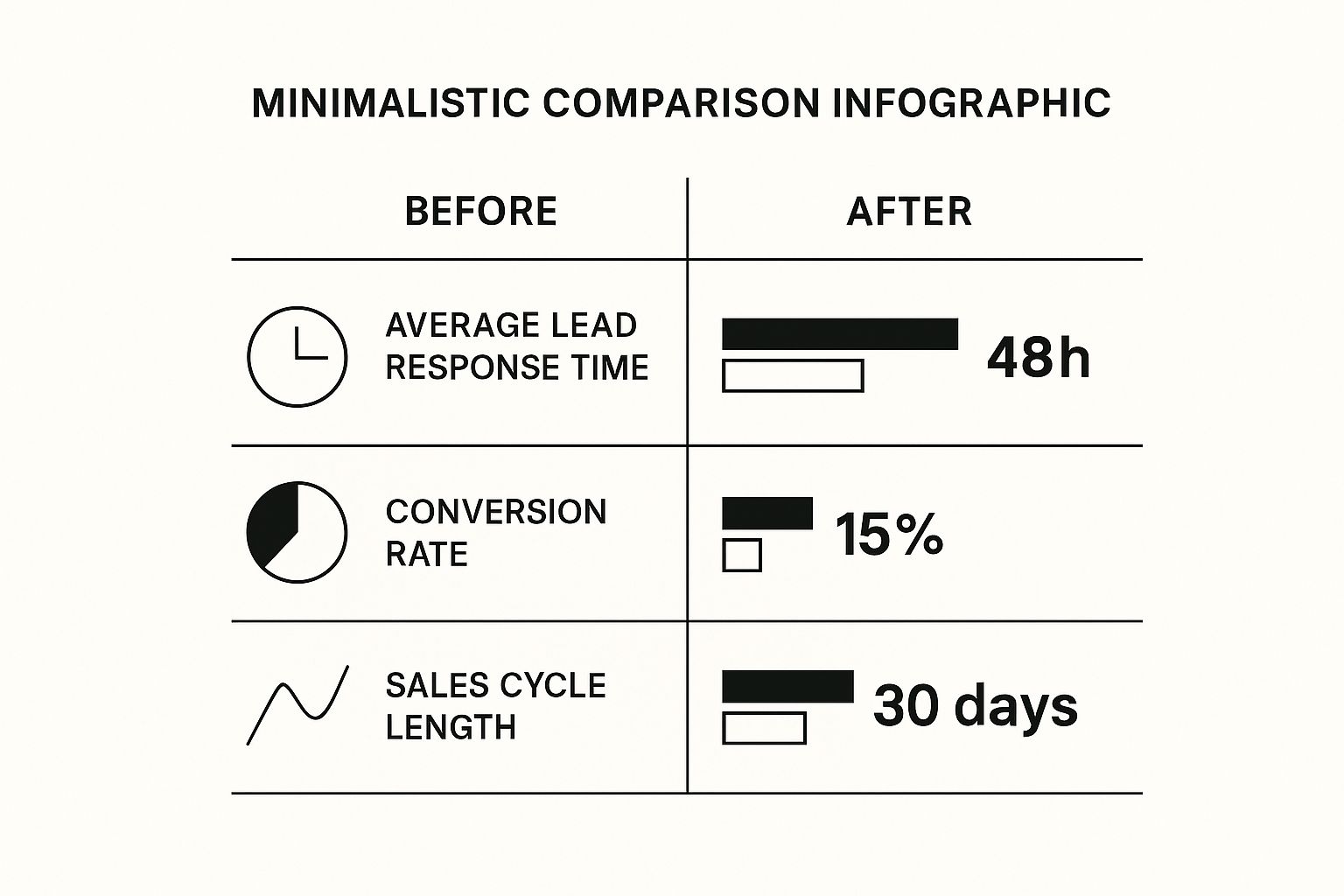
As you can see, optimizing lead routing can dramatically cut response time from 48 hours to 8 hours, double conversion rates from 15% to 30%, and shrink the sales cycle in half – from 30 days to 15 days. Impressive, right?
Managing Team Dynamics
Now, let’s be real. Smart lead routing isn’t always sunshine and rainbows. You need to be prepared to manage the impact on your team dynamics. If some reps consistently get the “better” leads, it can create friction. That's why transparency and open communication are so important. Explain the logic behind your routing system and highlight how it benefits the entire team – not just a select few. You could even implement a rotating system for those high-value leads to keep things fair and boost morale. A happy sales team is a productive sales team. Ultimately, when the company hits its revenue goals, everyone wins.
To help you choose the right routing strategy for your team, take a look at this comparison table:
Lead Routing Strategies Comparison: This table compares different lead routing approaches with their pros, cons, and ideal use cases.
| Routing Method | Best For | Conversion Impact | Setup Complexity |
|---|---|---|---|
| Round Robin | Even distribution, new teams | Can be inefficient if reps have different skill levels | Low |
| Geographic | Regionalized sales teams, reducing time zone differences | Improves response times, potentially increases conversions | Medium |
| Industry Specialization | Teams with specialized expertise | Significantly improves conversions by matching expertise to prospect needs | Medium |
| Lead Scoring Integration | Maximizing conversion of high-potential leads | Highest potential for conversion increase | High |
This table summarizes some of the key differences between common lead routing methods. As you can see, each method has its own strengths and weaknesses, and the best choice for you will depend on the specifics of your sales team and your overall goals. Don't be afraid to experiment and find what works best!
Choosing Your CRM Without The Marketing Fluff
Every CRM vendor promises the perfect solution. Having implemented dozens of systems, I can tell you that’s simply not true. The difference between a CRM that empowers your sales and one that becomes a glorified digital filing cabinet comes down to automation. Most buyers get distracted by flashy demos and miss these critical details.
Let's cut through the hype and focus on what matters for streamlining sales: lead routing and scheduling automation. We'll explore which integrations are essential versus optional. Surprisingly, customization flexibility often trumps a bunch of out-of-the-box features. Think of it like a suit: tailored always fits better than off-the-rack. You might also find this interesting: CRM workflow examples.
Key Integrations and Customization
Think about your current lead routing. Are leads getting lost in inboxes, waiting to be assigned? A CRM with strong integrations can automatically route leads based on criteria like territory, company size, or product interest. This saves you manual work and speeds up response times. Integrating an automated lead generation system can supercharge your lead routing.
A customizable CRM lets you adapt the system to your sales process, not the other way around. This is key for scheduling automation. You need a system that handles your team's specific availability, including prep time, travel, and even buffer time between calls. The right CRM can drastically improve your sales efficiency. For example, 94% of companies saw increased sales productivity after implementing a CRM. They also saw sales increase by up to 29% and forecast accuracy improve by 42%. Check out these sales statistics for more.
Scalability for Future Growth
Finally, consider scalability. The CRM that works for your current team size might not work when you double or triple in size. Choose a system that grows with you to avoid costly migrations later. Implementing a new CRM requires careful planning. Look at case studies of successful CRM migrations to understand the change management strategies that ensure team adoption and prevent a return to spreadsheets and sticky notes. It's about building for the future, not just a quick fix.
Automated Scheduling That Doesn't Feel Robotic
Let's be honest, scheduling can be a major pain point for sales teams. The companies that really excel in sales have cracked the code: they've eliminated the scheduling friction while still retaining that all-important personal touch that closes deals. I've seen it firsthand, and I'm here to share what actually works.

Take a look at this screenshot of a Calendly interface. Calendly is a popular scheduling tool, and you can see why. The layout is clean, the different meeting types are clear, and the call to action is obvious. It perfectly illustrates how these tools can simplify booking, especially for your potential customers.
Integrating Calendar Management With Your CRM
The most effective sales teams I've worked with connect their calendar management directly to their CRM. This allows for some seriously intelligent availability rules. Think about automatically blocking time for prep work before important calls, factoring in travel time, and even scheduling buffer time to avoid back-to-back meeting fatigue. It shows respect for both your team's time and your prospects'.
Imagine a lead requests a demo. Your CRM, seamlessly integrated with a scheduling tool, instantly fires off a link to your available slots. They book a time, and boom – the meeting automatically pops up on everyone's calendars. No back-and-forth emails, no awkward phone tag, just pure efficiency.
Handling Complex Scheduling Scenarios
Now, what about those more complicated scheduling situations? Let's say you need to schedule a demo with multiple people across different time zones. This is where automated scheduling really shines. Tools like Calendly allow prospects to see everyone's combined availability, making it a breeze to find a time that works for the entire group.
And don't forget about automated follow-up sequences. They’re absolutely crucial. If a meeting needs to be rescheduled, your system can automatically send out reminders and keep the prospect engaged without you having to lift a finger. It's all about maintaining momentum and showing you're on top of things, which is a huge part of a streamlined sales process.
Time Zones, Buffer Times, and Last-Minute Changes
Managing time zones doesn't have to be a logistical nightmare. Scheduling tools can automatically convert meeting times, eliminating confusion and making sure everyone's on the same page. I've found that even just 15 minutes of buffer time between calls can do wonders for preventing burnout and giving your reps time to breathe. And let's face it, last-minute changes are inevitable. Automated notifications keep everyone informed and prevent those frustrating miscommunications. Even when things are a bit chaotic behind the scenes, you'll still project an image of professionalism.
To help you choose the right tool, I've put together a comparison of some popular options:
Meeting Scheduling Tools Feature Matrix: Compare key features of popular scheduling automation tools and their CRM integration capabilities
| Tool | CRM Integration | Team Features | Customization Level | Pricing Range |
|---|---|---|---|---|
| Calendly | Wide range of CRM integrations (Salesforce, HubSpot, etc.) | Team scheduling, pooled availability | High | Free - $36/user/month |
| x.ai | Integrates with popular CRMs | AI-powered scheduling assistant | Medium | $17-$59+/user/month |
| Acuity Scheduling | Supports various CRM integrations | Client self-scheduling, packages & subscriptions | High | $14 - $45+/month |
| Doodle | Limited CRM integrations | Group polls, surveys | Medium | $6.95 - $8.95/user/month |
This table gives you a quick overview of some popular tools, their CRM integration capabilities, team features, how much you can customize them, and the general price range. Choosing the right tool will depend on your specific needs and budget. But investing in the right scheduling automation can truly transform your sales process.
Follow-Up Sequences That Actually Convert

Let's talk follow-up automation. The real secret isn't blasting prospects with endless messages. It's about walking that fine line between helpful and annoying. It's about timing and value. The best in the sales game get this.
They build automated sequences that feel personal and helpful, not like some robotic "just checking in."
Multi-Channel Nurturing Without the Overwhelm
Top performers use a mix of channels – email, SMS, LinkedIn, even direct mail. But they’re strategic about it. No one wants to feel stalked.
I've seen a perfectly timed SMS, referencing a past conversation, revive a lead that had gone cold. That personal touch is way more effective than a generic email blast. Want a deeper dive into automating your sales process? Check out our guide on sales process automation.
Timing Strategies and Psychology
Timing is everything. Think about the psychology of buying. When are your prospects most likely to engage? It depends on the industry and deal size, but understanding these nuances is key.
A quick follow-up after a demo is essential. A complex enterprise deal might need a more measured approach.
Content Frameworks and Personalization
Generic follow-ups? Trash. Focus on content that truly adds value. Think insightful articles, relevant case studies, or even a quick video tip related to their industry.
Real personalization goes beyond just using their first name. Referencing a previous chat, a specific pain point, or even a shared interest can make a world of difference.
Integration and Relevance to the Buyer's Journey
Your follow-up needs to align with where the prospect is in their buying journey. This means integrating your CRM and marketing automation tools.
Imagine this: a prospect downloads a case study. Your system automatically sends a follow-up email with a related blog post. This targeted approach keeps them engaged and nudges them closer to a sale.
Real-World Examples and Common Mistakes
I've seen high-converting sequences across multiple industries. SaaS companies with free trials, consultants sharing valuable knowledge, product-based businesses using customer testimonials.
But I've also seen the mistakes that drive people to unsubscribe: generic content, bad timing, and too many messages. The goal? Create sequences that prospects actually want to receive, building anticipation, not annoyance.
Measuring What Actually Matters For Growth
I've seen so many sales teams drowning in data, yet parched for real insights. They track vanity metrics, giving a superficial sense of progress, but missing the actionable stuff that truly fuels growth. This misfocus leads to bad decisions and lost deals. Worse, the wrong metrics create a false sense of security, leading to strategies that just don't deliver.
Key Performance Indicators for Automated Sales
So, what should you measure? With automated sales, certain key performance indicators (KPIs) are essential. Response time is huge. How fast are your reps connecting with leads after a form submission or demo request? A slow response can kill deals before they even begin. Then there’s conversion rate. How many initial contacts become qualified opportunities? This shows how effectively your automation moves prospects through the sales funnel.
Beyond the basics, consider rep satisfaction. Are your salespeople actually happy with the automated tools? If they're battling the system, it'll affect their performance. Equally important are system adoption rates. If your team isn't fully using the tech, you won't see the full automation benefits. Sales process optimization is about getting the most out of every opportunity through ongoing performance analysis. Tracking metrics like win rates and sales velocity helps uncover inefficiencies and make data-driven improvements. Want to go deeper? Check out this resource on sales performance analysis.
Building Actionable Dashboards and Benchmarks
The point isn't just to collect data. You need to turn it into usable insights. That's where dashboards come in. A good dashboard gives a clear overview of your key metrics, highlighting areas for improvement. But pretty charts aren't enough. You need benchmarks to provide context and drive ongoing progress. These shouldn’t feel like micromanaging, but rather, tools that empower your team. Effective follow-up is also key. These cold email automation strategies can help boost your response rates.
A/B Testing, Data-Driven Adjustments, and Accountability
A/B testing is a game-changer for optimizing automated sales. Experiment with different email sequences, lead routing rules, and scheduling processes. See what works best with your prospects and drives the highest conversions. Then, use the data to make smart adjustments. Small tweaks to your automation can have a big impact over time. Finally, build accountability systems that motivate, not punish. When your team knows what's expected and has the tools to succeed, they'll embrace the processes and drive real results.
Your Implementation Roadmap That Actually Works
Ready to make your sales process smoother without turning everything upside down? This roadmap breaks down the implementation into bite-sized pieces, keeping things moving forward while building a solid foundation. I've been through this process many times, and trust me, managing the change is the secret sauce.
Phase 1: Find Your Cheerleaders and Get Everyone Excited
Skip the top-down orders. Find the salespeople who are already eager for change and can get their colleagues on board. These folks are essential for getting the team excited and using the new system. This first phase is all about communication and building enthusiasm. Expect it to take about 2-4 weeks.
Phase 2: Try It Out and Fine-Tune the Process
Don't try to do everything at once. Pick one or two key areas to test your new automated tools and workflows, like lead routing or automated scheduling. Work directly with your test group to find any hiccups and smooth out the process. This is your chance to tweak things before going company-wide. Realistically, this phase takes 4-6 weeks.
Phase 3: Roll It Out and Keep Improving
Once your pilot program is a hit, it's time to expand. Provide thorough training and support for a smooth transition. Remember, this isn't a "set it and forget it" situation. Keep an eye on your key metrics, get feedback from your team, and make adjustments to optimize your sales process. This is an ongoing effort, but you'll see big improvements within the first 3-6 months.
Troubleshooting and Keeping Sales on Track
Expect a few bumps along the way. Some reps might resist the new system. Address their concerns directly. Highlight the advantages – less paperwork, more time selling, and more closed deals. Be ready to provide extra help and solve any technical problems. Keeping sales strong during the change is crucial. Set realistic expectations and celebrate early wins to keep everyone motivated.
Feedback Loops and Long-Term Gains
Set up regular feedback sessions. Ask your team what's working and what isn't. Use this feedback to refine your process so it truly helps your sales team. Every step of this roadmap focuses on showing the value of a streamlined sales process. Notching wins along the way builds the systems that will drive long-term growth.
Ready to transform your inbound sales and see a 3X increase in demo request form conversions? Check out Distro for powerful meeting scheduling software that automates lead routing and optimizes your entire sales process.