
To really improve team collaboration, you have to look past the usual communication tools and tackle the friction points buried in your team’s day-to-day work. The best way to do this is with strategic automation. Focusing on automating meeting scheduling and routing new leads is a game-changer, as it clears out major bottlenecks and frees up your team to focus on work that actually matters.
Why Modern Team Collaboration Is Breaking Down
Let’s be real for a moment. The old ways of working together just aren't cutting it anymore. The massive shift to remote and hybrid work didn't just change our locations; it put a magnifying glass on all the little, frustrating tasks that suck the life out of productivity and morale. This isn't about having more Zoom calls. The real issue is the invisible, manual drudgery that teams have to slog through every single day.
This hidden work creates some serious drag. Just think about the mental gymnastics involved in coordinating schedules across three different time zones. Or the momentum that dies on the vine when a hot lead sits untouched in a general inbox. These aren't just minor annoyances—they're fundamental breakdowns in your workflow that stall progress and breed frustration.
To get a clearer picture of these common pain points, here’s a quick breakdown of the problems and how automated workflows can solve them.
Key Collaboration Blockers and Their Automated Solutions
| Common Bottleneck | Impact on Collaboration | Automated Workflow Solution |
|---|---|---|
| Manual Meeting Scheduling | Wasted time in email back-and-forth, delayed projects, and scheduling fatigue. | Automated Scheduling: Use tools that let prospects book directly on a team's calendar based on real-time availability. |
| Inefficient Lead Distribution | Hot leads go cold waiting for assignment, causing lost revenue and friction between marketing and sales. | Automated Lead Routing: Instantly route new leads to the right sales rep based on territory, industry, or other custom rules. |
| Poor Handoffs | Critical context is lost when passing a customer from one team to another (e.g., sales to success). | Unified Workflows: Trigger automated tasks, notifications, and data syncs to ensure seamless transitions between teams. |
| Time Zone Complications | Coordinating with a global team leads to confusion, missed meetings, and burnout from off-hours work. | Intelligent Availability: Display scheduling options in the user's local time zone, eliminating manual conversion and confusion. |
These examples show that the problem isn't a lack of tools, but a lack of intelligent processes connecting them.
The True Cost of Manual Coordination
Every time a team member has to stop what they're doing to handle a logistical task, collaboration takes a hit. This constant context-switching is the enemy of deep work and a breeding ground for mistakes. A seemingly simple request like booking a project kickoff can easily balloon into a dozen emails. A sloppy sales handoff? That could be a lost customer.
These problems stack up, creating an environment where everything feels clunky and inefficient. And the data shows just how much is at stake. A Deloitte study highlighted by ProofHub found that 73% of employees who collaborate effectively report better job performance. On top of that, 60% say it sparks more creativity. You can’t afford to leave those benefits on the table because of broken internal processes.
The real challenge isn't that your team isn't trying hard enough. It's that they're stuck using outdated, manual systems. Real improvement comes from fixing the process, not just telling people to work harder.
To truly fix team collaboration, we have to zero in on these specific friction points. Automation isn’t just some tech buzzword; it’s a direct response to the most common roadblocks that derail modern teams. By automating repetitive, low-value work like scheduling and lead assignment, you’re not just saving time—you’re creating a smoother, more effective way to operate.
Automate Meeting Schedules to Reclaim Your Team's Day

Think about how much time your team burns just trying to schedule meetings. It’s a silent productivity killer, hiding in plain sight as a flurry of "What time works for you?" emails and endless calendar tag.
This isn't just about finding a slot faster. It's about eliminating a source of constant, low-level friction that drains everyone's mental energy. When you automate the scheduling dance, your team can jump straight to what matters—the project kickoff, the client call—without the administrative headache.
A McKinsey survey found that poor decisions are just as common as good ones, and a lot of that stems from rushed, poorly coordinated meetings. Automating the setup is one of the fastest ways to improve collaboration and give everyone their focus back.
Shift from Coordination to Action
The first move is a mental one: get your team to stop "coordinating" and start "booking." Instead of firing off a long email thread, team members should be sharing a direct link that shows their real-time availability.
This simple change has a massive impact. It puts the power in the hands of the person requesting the meeting, letting them pick a time that works for them with zero back-and-forth. This is a game-changer for client-facing teams who need to book demos or support calls on the spot.
For example, a sales rep can wrap up a great discovery call by dropping their booking link into the chat. The prospect can schedule the next step immediately, while their interest is at its peak. That kind of speed is a serious competitive advantage.
Best Practices for Team Scheduling Automation
Just flipping the switch on a scheduling tool isn't enough. To get your team to actually use it, you need a smart approach that works for both internal and external meetings.
Define Smart Availability Windows: Don't just sync your entire calendar and call it a day. Guide your team to set specific "office hours" for different meeting types. A sales rep might block out afternoons for demos, while a project manager carves out mornings for internal check-ins. This is how you protect deep work time.
Integrate with Existing Calendars: This is non-negotiable. The system must connect flawlessly with the tools your team already lives in, like Google Calendar or Outlook. This keeps availability accurate and prevents the dreaded double-booking that destroys trust in the system.
Create Purpose-Driven Booking Links: Ditch the one-size-fits-all link. You should have different links for different jobs, each with its own rules.
- "15-Minute Quick Sync" Link: A short, no-buffer meeting perfect for quick internal questions.
- "30-Minute Demo Call" Link: Automatically adds a 15-minute buffer afterward for the rep to take notes and log follow-up tasks.
- "Project Kickoff" Link: A 60-minute slot that can be booked by multiple people at once.
The whole point of automation is to make life simpler, not more complicated. If the tool needs constant manual overrides or creates more confusion than it solves, your team will abandon it. The best systems just work, humming quietly in the background to make everyone's day smoother.
Handle Time Zones Without the Headaches
For any team spread across the globe, time zones are a major collaboration killer. Nothing sours team morale faster than an accidental 5 AM meeting request—it's not just inconvenient, it shows a lack of consideration.
Modern scheduling tools fix this automatically. When someone clicks a booking link, the available times are shown in their local time zone. No more mental math, no more mistakes. For particularly complex setups, using a dedicated meeting time zone converter can be a lifesaver.
This small, automated conversion has a huge impact on making global team members feel seen and respected. For a deeper look at this, check out our guide on the best way to schedule meetings for teams of any size.
By putting these practices in place, you’re not just saving a few minutes here and there. You're reclaiming countless hours and knocking down a major barrier to truly effective teamwork.
Build Smart Lead Routing for Seamless Sales Handoffs
Beyond just scheduling meetings, one of the biggest points of friction I see in growing companies is the handoff from marketing to sales. A hot lead comes in, and every second of delay or confusion just drains its momentum. It's a classic scenario where team collaboration efforts fall flat—not because of bad communication, but because of a fundamentally broken process.
We’ve all seen it: the dreaded "who owns this lead?" black hole. It's a real and incredibly costly problem. It creates tension between teams, leaves a bad taste in the mouths of potential customers, and hits the bottom line directly.
Smart lead routing isn't just a nice-to-have; it's a strategic weapon. It replaces the old, slow manual guesswork with pure speed and precision. By automating how leads get assigned, you guarantee the right prospect connects with the right salesperson, instantly. This turns a clunky, multi-step headache into a single, seamless action.
First Things First: Define Your Routing Rules
Before you even think about touching any software, you need a map. A crystal-clear plan for where your leads should go. Automation is only as good as the strategy behind it. Get your sales and marketing leaders in a room and hash out the logic that will govern your lead distribution.
The whole point is to create rules that are both fair to your reps and effective for the business. This planning phase is absolutely critical if you want to build a system that doesn't need constant babysitting.
Here are some of the most common routing criteria we see:
- Geography or Territory: This is a classic. You assign leads based on the prospect's state, country, or a predefined sales region. Perfect for teams with dedicated territories.
- Company Size: Simple but effective. Route smaller businesses to your SMB-focused team and send the big fish—enterprise-level inquiries—to your senior account executives.
- Lead Source: Not all leads are created equal. Leads from high-intent sources, like a demo request form, should absolutely get priority over someone who just signed up for your newsletter.
- Industry: If you have reps who are experts in certain verticals like SaaS, healthcare, or finance, it's a no-brainer to route those specific leads directly to them.
This isn't just about logistics. The act of defining these rules forces your teams to get on the same page about what a qualified lead actually is and how it should be handled. That alignment alone is a huge win for collaboration.
The best lead routing systems I've ever built were based on a simple, shared understanding between marketing and sales. When both teams agree on the rules of engagement, the technology becomes a powerful tool for their shared success, not another thing to argue about.
Turn Those Rules Into Automated Workflows
Once you've got your logic down, it's time to bring it to life with a lead routing tool like Distro. This is where you translate that strategy on a whiteboard into an active, 24/7 workflow.
Let’s look at a common scenario: a prospect fills out a "Request a Demo" form on your website at 10 PM.
The Old, Broken Way:
- The lead notification lands in a generic inbox, where it sits overnight.
- The next morning, a sales manager gets around to reviewing it.
- They forward it to a rep who's probably already swamped.
- Hours tick by. By the time the rep finally reaches out, the prospect’s initial excitement has cooled.
The Smart, Automated Way:
- The form submission instantly triggers your routing software.
- The system reads the prospect's details (e.g., they're in California, work at a 500-person company).
- It automatically assigns the lead to the West Coast account executive who covers mid-market accounts.
- At the same time, the prospect is shown that AE's calendar and can book a demo right then and there.
That immediate connection is everything. It cuts out the risk of human error and ensures 100% of your high-intent leads get immediate attention. You can dive deeper into perfecting this crucial moment with our complete guide to the sales handoff process.
Integrate and Notify for Total Transparency
For an automated system to feel truly collaborative, it needs to talk to the rest of your tech stack and, just as importantly, your people.
- CRM Integration: Make sure every routed lead and every scheduled meeting is automatically logged in your CRM, whether it's Salesforce or HubSpot. This creates a single source of truth and saves everyone from mind-numbing manual data entry.
- Instant Notifications: Set up automated alerts in Slack or email. When a rep gets a new lead, they need to know right now. A simple message like, "New Demo Booked: Prospect from Acme Corp with Jane Doe" keeps the whole team in the loop and accountable.
This kind of tight integration and transparency builds trust. Marketing sees their hard-earned leads are being handled promptly, and sales gets the context they need without chasing anyone down. It’s not just a hunch; one survey found that 86% of respondents blamed workplace failures on poor collaboration or communication. Automated systems tackle that problem head-on, building a more connected and powerful revenue team.
Solve Global Collaboration Challenges with Automation
Working with a team scattered across the globe is a powerful asset, but let's be honest—it also comes with a unique set of headaches. When your team is spread across multiple time zones, even the simplest collaborative tasks can feel clunky and inefficient. This is where automation stops being a "nice-to-have" and becomes absolutely essential for building a truly connected and effective global team.
The friction is real. A Capterra global survey highlights just how much of a drag these issues can be. 44% of employees pointed to volatile hours from time zone differences as a major problem. On top of that, 42% cited language barriers and 33% struggled with cultural misunderstandings. These aren't minor gripes; they're foundational cracks that can seriously damage trust and sink productivity. You can dig into more of these dynamics in their full report.
End Time Zone Confusion with Intelligent Scheduling
The most immediate and grating problem for any global team is scheduling. The constant mental gymnastics of converting time zones is exhausting and just asking for mistakes. Accidentally sending a meeting invite for 5 AM to a colleague in another country isn't just an inconvenience; it can feel disrespectful and make them feel like an afterthought.
This is a problem that automated scheduling tools solve instantly. By design, they detect a user's location and automatically show all available meeting slots in their local time. This one feature wipes out all the confusion and shows a baseline of respect for everyone's work-life balance. It’s a simple, automated act of empathy that builds goodwill and makes cross-border teamwork feel effortless.
A global team's strength lies in its diversity of perspective, not its ability to do time zone conversions. Automation handles the logistical noise so your team can focus on the collaboration that matters.
This infographic lays it out perfectly, showing how building trust—a key outcome of considerate collaboration—directly fuels team performance.
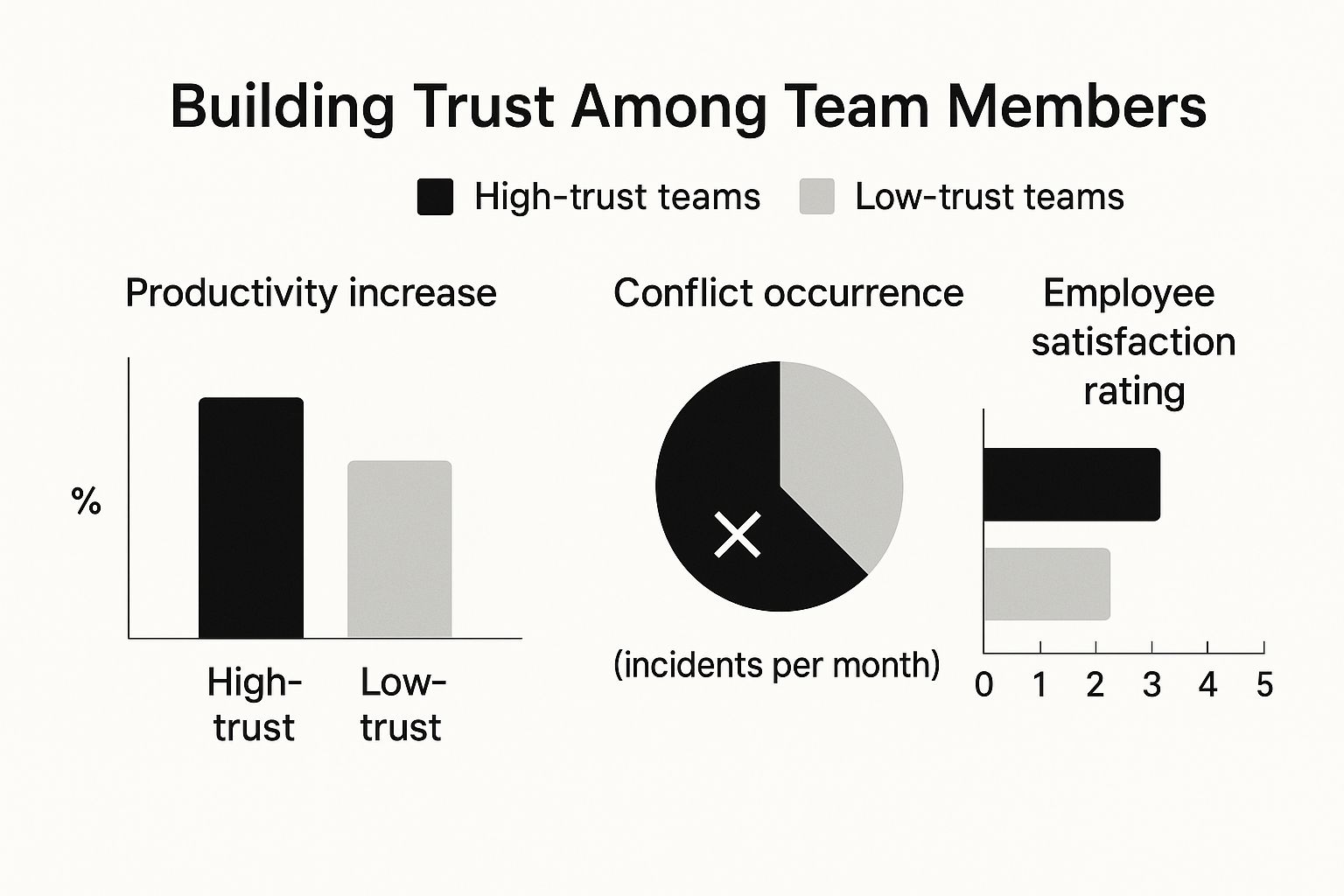
The data speaks for itself: teams built on trust and respect aren't just more productive; they also have less conflict and higher job satisfaction.
Route Tasks and Leads with Cultural and Regional Context
Going beyond just scheduling, automation can intelligently route tasks and communications based on factors that are crucial for global success. Imagine a customer support ticket comes in from Brazil, written in Portuguese. Instead of it landing in a general queue, an automated workflow can instantly route it to a support agent who is a fluent Portuguese speaker and gets the nuances of the regional market.
This same logic applies powerfully to sales and marketing. You can design workflows that incorporate specific criteria to not only improve team collaboration but also create a much better customer experience.
- Language Skills: Automatically assign incoming leads or inquiries to team members who speak the prospect's native language.
- Regional Expertise: Route tasks to employees who have deep knowledge of a specific market’s cultural norms and business practices.
- Workload Balancing: Use round-robin routing that respects local holidays and working hours, ensuring tasks are only assigned to team members who are actually online and available.
By building these rules into your system, you’re doing more than just optimizing for efficiency. You're actively embedding cultural awareness and regional expertise right into your daily operations. This shows your team you value their unique skills and ensures customers get a more personalized and effective experience. For more practical ideas, check out these workflow automation examples that are easily adaptable for global teams.
Let's break down how this works in practice. Many of the most common pain points of international collaboration have a direct, automated solution.
Global Team Challenges vs Automated Solutions
| Global Challenge | How It Hurts Collaboration | Specific Automation Fix |
|---|---|---|
| Scheduling Across Time Zones | Causes confusion, missed meetings, and burnout from odd hours. | Automated schedulers display availability in each user's local time. |
| Language Barriers | Leads to miscommunication with customers and within the team. | Language-based routing directs inquiries to native-speaking team members. |
| Lack of Regional Knowledge | Sales or support can feel generic and miss key cultural nuances. | Territory-based assignment ensures leads are handled by reps with local expertise. |
| Uneven Work Distribution | Some team members get overloaded while others are idle due to holidays or time off. | Workload-balancing workflows consider local holidays and office hours for fair routing. |
As the table shows, there's a clear, strategic fix for each of these common global roadblocks.
Ultimately, using automation to solve these challenges is about more than just tools. It’s a strategy for making your international team feel more aligned, respected, and unified—the absolute bedrock of successful collaboration.
Don't Just Buy Tools, Build a Culture

Let's be honest: implementing automated scheduling and lead routing tools is the easy part. The real work—and where you’ll see game-changing improvements in team collaboration—is making those new workflows stick.
Technology is a fantastic enabler, but it’s the human side of things that builds a truly collaborative culture. We're talking about habits, communication, and trust. A tool is only as good as the team using it, so the goal is to embed these smarter ways of working right into your company’s DNA.
Create a Clear Rollout and Training Plan
You can't just drop a shiny new tool into your team's lap and hope for the best. A thoughtful rollout strategy is what separates successful adoption from a frustrating flop. It all starts with being upfront about the "why."
Explain the specific headaches the new system solves. Don't talk about features; talk about benefits. Frame it in terms they'll understand immediately, like "fewer back-and-forth emails to book a demo" or "no more confusion over who owns a new lead."
Your training needs to be more than a one-and-done webinar. Make it practical and hands-on.
- Tailor the Training: Your SDRs and your Account Executives have different needs. Show each group exactly how the tool makes their specific daily grind easier.
- Build a Knowledge Base: A quick "how-to" video or a simple one-page PDF can be a lifesaver. Show them how to create a custom booking link or explain what happens when a lead gets routed their way.
- Appoint "Champions": Find a few tech-savvy people on the team who can be the go-to experts for their peers. This builds a grassroots support network and takes all the pressure off a single manager.
How you handle this initial phase sets the tone. A well-managed rollout shows you respect your team's time and are genuinely invested in their success.
Establish Simple Rules of the Road
Once the tools are live, you need to agree on some simple guidelines for how to use them. This isn't about creating red tape; it's about setting shared expectations to prevent chaos and keep everyone on the same page.
Think of these as the guardrails that make your automated workflows actually work. They ensure everyone uses the system the same way, which is the bedrock of better team collaboration. While new tools are great, this often means optimizing the communication channels you already have. For instance, knowing how to effectively use communication platforms like Slack is just as critical as adopting new software.
Here are a few examples of the kinds of "rules" you might set:
- Booking Link Etiquette: "Always use the '30-Minute Demo' link for first-time prospect meetings. This guarantees the system adds the right notes and buffers your calendar for follow-up."
- Lead Response Time: "All leads routed from the new system must get a first touch within one hour."
- Calendar Management: "Block off 'deep work' time in your calendar so the scheduling tool knows not to book meetings during those focused periods."
Simple agreements like these remove ambiguity and help build the habits that let automation do its magic.
Gather Feedback and Continuously Refine
No process is perfect on day one. A huge part of sustaining a collaborative culture is creating a feedback loop where your team feels heard. You have to actively ask them what’s working and what’s causing friction.
The people using the tools every day are your greatest source of insight. Listening to them isn't just good for morale; it's the fastest way to identify and fix blind spots in your process, leading to better decisions and stronger team buy-in.
Schedule regular check-ins, maybe at the 30-day and 90-day marks, specifically to talk about the new workflows. Ask direct questions:
- "What's one thing we could tweak in the lead routing rules to make your life easier?"
- "Are the automated scheduling links causing any weird issues?"
- "Is there a specific situation where the current setup just doesn't work?"
This approach shows your team the system isn't set in stone. It’s an evolving process you’re all improving together. When people feel involved in the decisions, they're far more engaged and bought-in.
Celebrate the Wins and Reinforce the Value
Finally, don't forget to celebrate your progress. When you see positive results from your new systems, shout it from the rooftops! Highlighting these wins reinforces the value of the change and motivates everyone to stay the course.
Track the key metrics that show the real-world impact. You could even create a simple, shared dashboard showing the improvements over time.
Key Metrics to Track and Share
| Metric | Why It Matters | Example Win |
|---|---|---|
| Lead Response Time | Shows your team is faster and more efficient. | "We've slashed our average lead response time from 4 hours to just 15 minutes!" |
| Meetings Booked Rate | Measures how effective your new scheduling process is. | "Our demo request form now converts 50% more visitors into booked meetings." |
| Time Saved on Admin | Highlights the reclaimed productivity. | "The team is saving an estimated 5 hours per rep every week on scheduling tasks." |
By making these results visible, you turn an abstract process change into a tangible team victory. It proves that the effort to adapt paid off, building momentum and solidifying a culture that truly values smart, effective collaboration.
Of course, even with a solid plan, rolling out new automated workflows always brings up a few questions. It’s completely normal.
Answering these questions upfront is the best way to get everyone on board and make the change feel less like a mandate and more like a shared upgrade. Here are the most common things we hear from teams as they start automating their collaboration.
How Do We Get People to Actually Use the New Tools?
This is always the first question, and it's the most important one. The answer has very little to do with the tech and everything to do with your people. You can't just drop a new tool in Slack and expect everyone to jump on it. You have to sell the benefit.
Start by telling them exactly what’s in it for them.
Instead of a dry announcement like, "We're now using an automated scheduler," reframe it around their daily frustrations. Try something like, "This tool will probably save you three hours a week by killing the back-and-forth emails for scheduling." For your sales reps, the hook is all about speed—"This lets you book a demo with a hot lead the second they fill out the form, before they have a chance to cool off."
Real adoption is a mix of smart communication and hands-on support.
- Show, don't just tell. Run short, role-specific training sessions. Walk your sales team through exactly how to use their new routing and booking links in a real-life scenario.
- Make it dead simple to get started. Put together a one-page guide or a few quick videos that answer the most common "how do I..." questions.
- Shout out the early adopters. When you see team members using the new system and getting results, praise them publicly. It creates a bit of positive peer pressure and shows everyone else what's possible.
What's the Difference Between a Basic Scheduler and Smart Routing?
This is a great question because it gets right to the core of strategic automation versus simple productivity hacks. While they both make collaborating easier, they solve totally different business problems.
A basic scheduling tool is like a digital personal assistant. It lets one person share their open calendar slots so someone else can easily book a time. It’s fantastic for individuals and kills the headache of one-on-one meeting coordination.
A smart routing tool, on the other hand, is more like an air traffic controller for your entire revenue team. It doesn't just book meetings; it first decides who is the right person to take that meeting based on rules you define.
For example, when a lead comes in from your demo form, a smart router can instantly analyze the data and send them to the perfect rep based on:
- Territory: Leads from Germany go straight to your rep in Berlin.
- Company Size: Enterprise-level leads are routed to your senior account executives.
- Product Interest: Any inquiry about "Product X" goes directly to that product's specialist team.
Here’s the simplest way to think about it: a scheduler helps you manage your time. A smart router helps you manage your opportunities. It’s the difference between personal efficiency and strategic team alignment.
How Can We Measure the ROI of Automating These Workflows?
Measuring the return on your investment is absolutely essential. You need to prove that these systems are worth the effort. The good news is that the impact is usually direct and easy to see in the numbers. You're not looking for fuzzy improvements; you're tracking hard metrics that directly impact revenue.
To get a clear picture, you need to focus on a few key performance indicators (KPIs) before and after you roll out the new workflows.
Key Metrics for Measuring Automation ROI
| Metric | What It Measures | How to Track It |
|---|---|---|
| Lead Response Time | The speed at which your team first engages a new inbound lead. | Measure the time from form submission to the first rep contact. |
| Meeting Conversion Rate | The percentage of website visitors who actually book a meeting. | Track completions on your "Request a Demo" or "Contact Us" forms. |
| Meetings per Rep | The volume of qualified meetings each salesperson is handling. | Pull reports from your scheduling platform and CRM. |
| Sales Cycle Length | The time it takes to move a lead from first touch to a closed deal. | This data should be readily available in your CRM pipeline stages. |
First, get a baseline for these metrics today. Then, after running the new automated system for 90 days, pull the numbers again. When you can show your team that the meeting conversion rate jumped by 50% or that the average lead response time was cut from hours to minutes, you have undeniable proof that your investment is paying off.
Ready to stop letting hot leads slip through the cracks and empower your team with seamless handoffs? Distro provides intelligent lead routing and automated scheduling to help you convert more inbound leads when their intent is highest. Learn how you can triple your demo request conversions at https://distro.so.