
Automating business processes is really just about using technology to handle the recurring, predictable tasks that eat up your team's day. Think of it as replacing the soul-crushing manual work with smart, automated actions. Most of the time, this means targeting those repetitive, rules-based activities to boost efficiency, cut down on human error, and—most importantly—free up your people for work that actually requires a brain.
Why Automation Is No Longer Optional
In the kind of market we're all operating in today, the conversation around automation has completely changed. It's not just about shaving a few hours off data entry anymore. It’s now a core strategy for building a business that’s more resilient, nimble, and genuinely competitive. If you're still thinking of automation as just a cost-cutting tool, you're missing the whole point.
The real magic happens when you empower your most valuable asset: your people.
When you liberate your talented team members from mind-numbing, repetitive work, they can finally focus their energy on solving complex problems, dreaming up creative initiatives, and building real relationships with customers. This is how you carve out a meaningful competitive edge.
From Efficiency to Empowerment
Think about the ripple effect this has on your team's morale and actual output. Instead of burning hours reconciling invoices or manually updating CRM records, your finance and sales folks could be analyzing spending trends or nurturing high-value leads. That kind of shift doesn’t just make you more productive; it leads to higher job satisfaction and builds a culture where people feel like they can actually innovate. To really get a handle on how this can elevate your business, it's worth exploring the full benefits of digital workflow automation.
The numbers back this up in a big way. The global industrial automation market is on track to hit somewhere around $226–227 billion in 2025. Companies that get on board with automation see an average 22% cut in operating costs, and over 90% of workers say it makes them more productive.
But here’s the reality check: it's not a silver bullet. Roughly 70% of these projects fail to hit their goals, which tells you just how important a smart, thoughtful strategy is. You can dig into more automation stats and industry data over at Thunderbit.com.
The whole point of automation should be to create better jobs. When you strip away the robotic parts of someone's work, you let them focus on the things that require critical thinking, empathy, and creativity—the human qualities that technology can't touch.
At the end of the day, learning how to automate business processes isn't so much about the tech itself. It’s about being strategic with your resources. It's about making a conscious decision about where human intelligence adds the most value and letting technology handle the rest.
Pinpointing Your Best Automation Opportunities
Jumping straight into automation tools without a clear target is like buying expensive gym equipment before deciding on a workout plan. You’ll have all the impressive gear but see no real results. The smartest automation strategies always start with a simple audit of your daily operations to figure out what's silently draining your team's time and energy.
The goal isn't to automate everything. You’re hunting for the high-impact, low-effort wins that build momentum and get your team excited. These are almost always the tasks everyone dreads—the ones that are repetitive, predictable, and just begging for human error to creep in.
The Anatomy of a Perfect Automation Candidate
The best processes to automate share a few common traits. They're the gears turning in the background—essential, but tedious. When you're looking for where to start, hunt for workflows that fit this description.
A great way to begin is by asking your team a simple question: "What's the most annoying, repetitive task you do every single week?" Their answers will be a goldmine.
Look for processes that are:
- Highly Repetitive: Think about tasks done daily or weekly in the exact same way. This could be generating standard reports, sending templated follow-up emails, or updating CRM records after a call.
- Rule-Based: If you can map out a task with a clear set of "if-then" instructions, it's a prime candidate. A classic example: "If a lead from a company with over 500 employees fills out a form, then assign it to a senior account executive."
- Prone to Human Error: Manual data entry is the poster child for this. Copying and pasting information between systems is another. A single typo can create a cascade of problems that automation completely prevents.
- Time-Consuming but Low-Value: These are the activities that eat up hours but don’t require strategic thinking or creativity. Think about the time spent manually scheduling meetings versus the time spent actually preparing for them.
The real objective of learning how to automate business processes is to give your team back its most valuable resource: time for critical thinking. By offloading the robotic work, you unlock human potential.
Real-World Examples Across Departments
Automation opportunities are everywhere, not just siloed in one corner of your business. In finance, you might automate the approval process for any invoice under $500. For HR, it could be streamlining the new hire onboarding process by automatically sending out welcome packets and scheduling introductory meetings.
And for sales and marketing? The opportunities are massive. Manually qualifying and routing inbound leads is a huge, classic bottleneck. It introduces delays that kill conversion rates right when a prospect’s interest is at its peak.
This screenshot from our homepage at Distro shows how automating just one part of the sales process—lead routing and scheduling—can have a major impact.

You can see a clear, automated workflow where an inbound lead from a form is instantly routed to the correct sales rep's calendar. All the manual steps and delays are gone. This is a perfect example of a high-impact automation: it's rule-based, it's repetitive, and it's directly tied to revenue. By pinpointing this specific bottleneck, you can directly influence your pipeline and close more deals, faster.
Mapping Your Workflow Before You Automate
Trying to automate a broken, inefficient process doesn't magically fix it. All it does is help you make the same mistakes, just a whole lot faster. Before you even think about looking at software, you absolutely have to map out your current workflow. It's a non-negotiable step that separates the successful automation projects from the ones that just create bigger messes.
This doesn't have to be a complicated, high-tech exercise. Seriously, a flowchart on a whiteboard or a quick diagram in a digital canvas is all you need. The goal is to get a bird's-eye view of a process from its trigger all the way to its conclusion. You need to see every single step, every decision point, who's involved, and where things get stuck. Only then can you actually see where the real problems are hiding.
Automating a process without mapping it first is like trying to build furniture without the instructions. You might end up with something, but it probably won't be what you wanted, and it's almost certain to be unstable.
From Confusion To Clarity: A Real-World Example
Let’s look at a process that’s often a huge pain point for businesses: handling a customer refund request. Without a map, it can feel like a chaotic storm of emails, Slack DMs, and shoulder taps. But the moment you draw it out, you bring some much-needed order to that chaos.
A simple map of this process would probably look something like this:
- The Trigger: A customer submits a refund request through a support ticket.
- First Action: A support agent checks the request against your refund policy.
- The Big Question: Is the request for less than $100? This is a key decision point.
- Two Paths Emerge: If it's under $100, the agent processes the refund on the spot. If it's over, the request gets kicked up to a manager for approval.
- Finishing Up: Once it gets the green light, the finance team gets a heads-up to issue the payment, and the customer gets an email confirming everything.
When you lay it all out like that, the weak spots jump right out at you. Maybe you realize that manager approvals are taking, on average, three days—a massive delay that's killing customer satisfaction. Or perhaps you discover there's no standard way for support to notify finance, leading to missed payments and angry customers. These are the specific problems you need automation to solve. You can find more detailed workflow automation examples to spark some ideas for your own business.
This visual process flow infographic gives a great breakdown of the foundational steps, from identifying the tasks right through to picking the right tools.
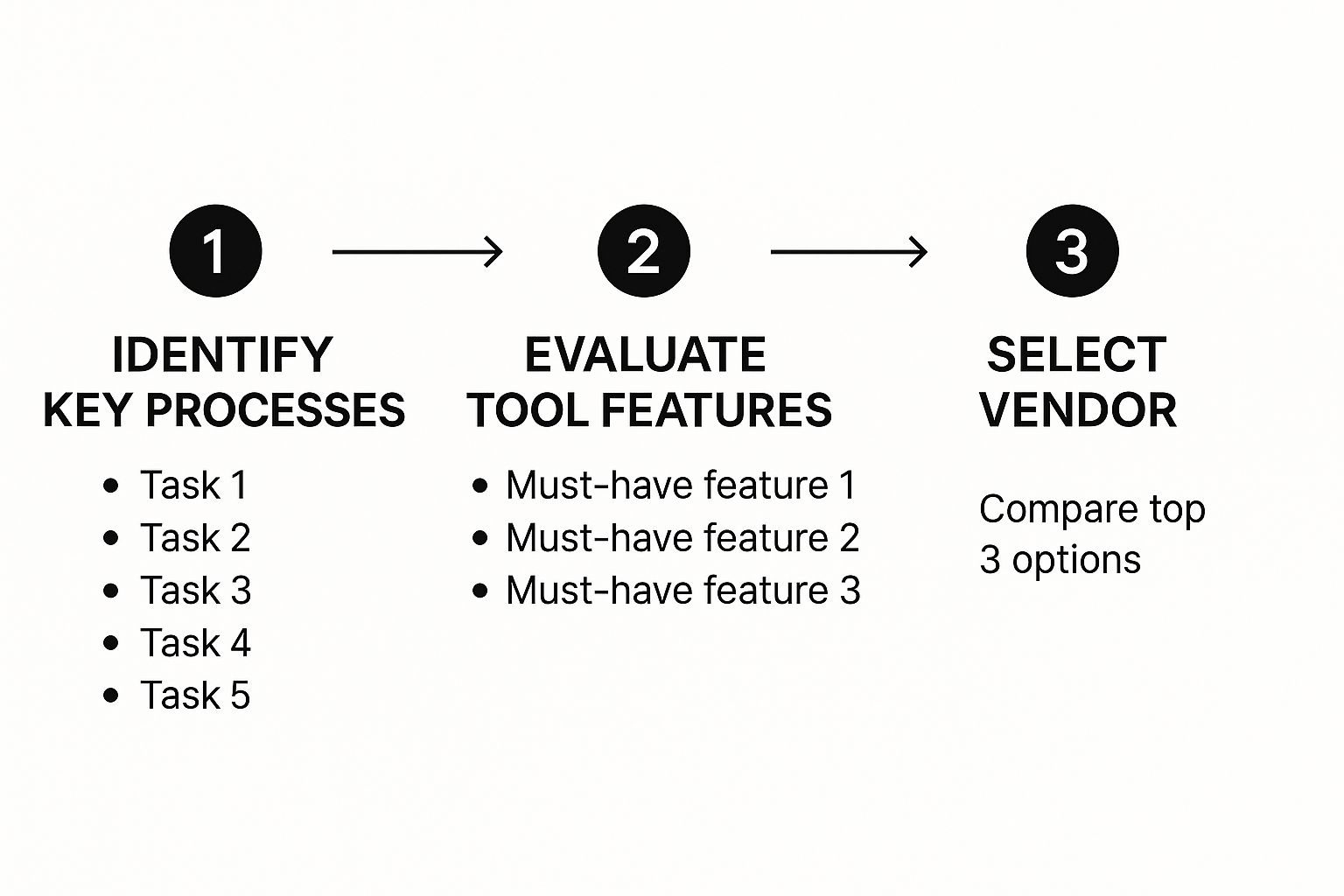
What the infographic really drives home is that smart automation isn't about a single decision. It's a sequence of informed choices, and it all starts with deeply understanding your own internal processes. By following this path, you make sure the tools you look at and the vendors you talk to are perfectly matched to the problems you've already identified. This simple step helps you avoid a costly mismatch between what you need and what you end up buying.
Choosing the Right Business Automation Toolkit
Alright, you've pinpointed your best automation opportunities and meticulously mapped out your workflows. Now for the fun part: picking your tools. The market is absolutely flooded with options, and it’s ridiculously easy to get lost in a sea of features, integrations, and pricing tiers.
Here’s the secret: stop looking for the one "best" tool. That's a myth. Instead, you need to understand the main categories of automation software and what each is fundamentally built to do.
Think of it like building a house. You wouldn't use a sledgehammer to drive a finish nail, right? In the same way, the tool you’d grab for a simple email sequence is worlds apart from one designed to scrape data from a clunky, old desktop app. Matching the tool to the specific task you’ve mapped out is everything.

So, look back at your process map. Is it a complex dance of tasks hopping between modern, cloud-based apps? Or is it a mind-numbing, repetitive action happening inside a single, legacy program? Your answer will point you straight to the right category.
Understanding the Main Types of Automation Tools
Most automation platforms fall into a few key buckets. Knowing the difference will save you from countless hours of pointless product demos and frustrating dead ends.
- Workflow Management Software: This is your command center for orchestrating processes that span different teams and modern applications. Think of multi-step workflows like employee onboarding, content approvals, or complex sales handoffs where tasks need to flow smoothly between people and various software. We dive deeper into this for sales teams in our guide to CRM workflow software.
- Integration Platforms (iPaaS): Consider these the universal translators for your entire tech stack. An Integration Platform as a Service (iPaaS) is purpose-built to get different applications talking to each other, allowing data to flow seamlessly between them. A classic example is using an iPaaS to automatically create a new invoice in QuickBooks the moment a deal is marked "won" in Salesforce.
- Robotic Process Automation (RPA): This is the specialist you call in for the old-school, legacy systems. RPA tools use software "bots" that mimic human actions on a computer screen—clicking buttons, typing into fields, and copying and pasting data. It’s the perfect solution when you need to automate a process stuck inside a desktop application that has no modern API to connect with.
To help you visualize where each type fits, here’s a quick breakdown:
Comparing Automation Tool Categories
| Tool Category | Best For | Example Use Case | Key Consideration |
|---|---|---|---|
| Workflow Management | Orchestrating multi-step processes across teams and cloud applications. | A new customer contract triggers tasks for legal, finance, and onboarding teams. | Requires well-defined processes and strong team collaboration. |
| Integration Platform (iPaaS) | Connecting disparate software systems to sync and share data automatically. | When a new lead is added to your CRM, it's automatically added to your email marketing tool. | Focuses on data flow between apps, not human-in-the-loop tasks. |
| Robotic Process Automation (RPA) | Automating repetitive, screen-based tasks in legacy or desktop applications. | Copying data from a daily spreadsheet and pasting it into an old accounting program. | Ideal for systems without APIs, but can be brittle if the UI changes. |
Choosing the right category first narrows your search dramatically, letting you focus only on the vendors that can actually solve your problem.
When to Use Robotic Process Automation
RPA has exploded in popularity for a simple reason: countless businesses still depend on older, yet absolutely critical, software. A recent Deloitte report found that by 2025, 53% of businesses had already put RPA into action. Its real power is its ability to work with the systems you already have—no expensive, disruptive system overhaul required.
The expected ROI from adopting RPA can be substantial, ranging from 30% to 200% in the first year alone. This is because it directly targets high-volume, manual tasks that are often resistant to other forms of automation.
This growth is fueled by some pretty impressive results. McKinsey estimates that a staggering 45% of current business tasks are prime candidates for automation. You can read more about the impact of RPA on business efficiency to see what's possible.
Bottom line: reach for RPA when you’re dealing with structured data and repetitive, rules-based tasks in systems that simply can’t talk to your other software.
To make the right choice, evaluate each category based on what you truly need. Don't get hypnotized by a flashy, endless feature list. The goal is to find the solution that elegantly solves the specific bottleneck you've already identified and mapped.
Alright, you've mapped your processes and picked your tools. The big temptation now is to just flip the switch and hope for the best.
Don't do it.
A successful rollout isn't a grand opening; it's a carefully controlled experiment. The smartest way to go about this is with a phased approach, starting small to prove the concept before you even think about scaling it across the entire company.
This all starts with a pilot project. Find a single, high-impact workflow—that lead routing process or the clunky invoice approval you mapped earlier is a perfect candidate—and automate it for a small, controlled group. This gives you a safe space to iron out the kinks, get honest feedback from the team on the front lines, and make adjustments without blowing up the whole business.
From Pilot Project to Full-Scale Deployment
Think of your pilot as the first draft. Once it’s running, your main job is to listen.
Seriously, go talk to the people using the new automated workflow. Does it actually save them time? Is it intuitive? What parts are clunky or just plain confusing? Their insights are gold, and you need them to refine the process before you roll it out any wider.
This feedback loop is everything:
- Launch the Pilot: Get the automation live for one specific team or process.
- Gather Feedback: Proactively ask for input on what's working and what’s not.
- Iterate and Improve: Use that feedback to make targeted tweaks to the workflow.
- Scale Methodically: Only when the process is polished and proven should you start rolling it out to other teams.
As you move from planning to actually deploying your automations, you might find value in seeking expert implementation support to make sure the transition is smooth. Getting people on board is a massive piece of this puzzle. You have to clearly communicate the "why" behind the change and show employees how it directly makes their jobs better. Do that, and your biggest skeptics will become your biggest fans.
Proving the Value With the Right Metrics
So, how do you actually know if any of this is working? "Time saved" is a decent starting point, but it barely scratches the surface. If you want to really understand the impact and get buy-in for future projects, you need to track a broader set of Key Performance Indicators (KPIs).
The point of measurement isn’t just to prove ROI. It's to create a feedback loop for continuous improvement. The data you gather should directly inform your next automation project.
When you get this right, the benefits go way beyond simple efficiency gains. The data shows that automating workflows can slash errors by 70%, and companies often see a 6.7% bump in customer engagement.
Your measurement dashboard needs to focus on real business outcomes.
- Error Rate Reduction: Track the percentage drop in mistakes in the automated process compared to the old manual way. This is a huge win for finance and data entry tasks.
- Process Cycle Time: How long does it take to get something done from start to finish? For a sales team, this could be the time from a lead filling out a form to a meeting getting booked. You can learn more about this in our guide to sales process automation.
- Employee Satisfaction: Don't forget the human side of things. Use quick surveys to see if your team feels less bogged down by repetitive work and more engaged in the stuff that matters.
- Throughput: How many more tasks can be completed in the same amount of time? Think invoices processed, leads qualified, or reports generated.
By tracking these KPIs, you start building a powerful business case. You're no longer just talking about saving a few hours here and there; you're showing real, measurable improvements in quality, speed, and even team morale. This data-driven approach is what turns a one-off project into a company-wide automation strategy.
Common Automation Questions Answered
Even with the best-laid plans, jumping into business process automation is going to bring up a few questions. It’s only natural. Hitting these common concerns head-on will help clear things up and give you the confidence to move from a strategy on paper to a real-world execution.
Let's dive into some of the most frequent questions I hear from teams just starting out.

How Much Does It Cost to Automate a Process?
This is always the first question, and the honest-to-goodness answer is: it really depends. The cost can swing wildly based on how complex the task is and what kind of tool you need to get the job done.
Simple automations using no-code platforms can get you started with subscription fees of just a few hundred dollars a month. But for bigger, more involved projects that might need Robotic Process Automation (RPA) or some custom code, you could be looking at an investment in the thousands.
The real focus shouldn't be the price tag itself, but the return you get on that investment (ROI). My advice? Start with a project where the math is a no-brainer. Think about a task that eats up 20 hours of manual work every single week. When you look at it that way, the software cost often pays for itself almost immediately.
Will Automation Replace Jobs in My Company?
This is a big one, and it's a totally valid concern. But the modern approach to automation isn't about replacing people—it’s about making them better at their jobs. When you offload the tedious, mind-numbing work like data entry or pulling the same report every Monday, you free up your team to focus on the things humans are uniquely good at.
Automation is about a strategic shift from low-value tasks to high-value contributions. It unlocks human potential by freeing people to handle strategic thinking, customer relationships, and creative problem-solving.
This shift lets your team pour their energy into work that requires real empathy, critical thinking, and creativity—things software just can't do. While some job descriptions might change over time, automation typically creates new opportunities for people to manage, refine, and optimize these new, more efficient systems.
What Are the Biggest Risks When Implementing Automation?
In my experience, the biggest risks almost always come down to one thing: bad planning. If you try to automate on a shaky foundation, you're setting yourself up for a headache.
Here are the top three pitfalls I see teams fall into:
- Automating a Flawed Process: If your manual workflow is a mess, automating it just means you'll make mistakes faster. You'll have a very efficient, very broken process.
- Lack of Team Buy-In: If your team doesn't understand why this change is happening and what's in it for them, they'll resist it. This leads to low adoption, frustration, and a failed project.
- Choosing the Wrong Tool: Picking a tool that's too complicated, too basic, or just doesn't play well with the software you already use will create more work than it saves.
You can dodge most of these issues by doing your homework. Map out your processes first, have an open conversation with your team about the "why," and always, always run a small pilot project to test your chosen tool before you roll it out to everyone.
Ready to stop losing high-intent leads to slow manual processes? Distro automatically routes and schedules meetings with the right sales reps the moment a prospect fills out your form. See how you can 3x your demo request conversions at https://distro.so.