
Think of your business as a high-performance pit crew in a nail-biting race. To win, every single action—from changing a tire to refueling—has to happen in perfect sync. In this world, CRM workflow software is your digital crew chief, automatically coordinating every move between your sales, marketing, and customer service teams.
It’s so much more than a digital address book or a glorified contact list. This is the automated system that makes sure no lead is ever forgotten, no customer question gets lost in the shuffle, and no follow-up is ever missed. This jump from manual grunt work to smart automation is what creates a consistently amazing customer experience and sets you up to scale.
The Shift From Manual To Automated
Let's be honest. Without automation, most teams are juggling customer interactions with a patchwork of sticky notes, messy spreadsheets, or just plain old memory. This kind of setup is a recipe for human error, creating bottlenecks and letting golden opportunities slip right through the cracks. CRM workflow software comes in and replaces these fragile manual systems with reliable, rule-based automation.
For example, when a new lead fills out a demo request on your website, the software can instantly spring into action:
- Assign the lead to the right sales rep based on their territory or team availability.
- Shoot a personalized welcome email to that new lead.
- Pop a follow-up task directly into the rep’s calendar.
- Switch the lead's status in the CRM from "New" to "Contacted."
A CRM workflow automates the sequence of actions that guide a customer or internal process from start to finish. It’s about creating a predictable, repeatable system for success.
This isn't just a nice-to-have anymore; it's becoming essential. The global Customer Relationship Management (CRM) market exploded from roughly $14 billion in 2010 to $69 billion by 2020—a massive 393% jump. This tells you just how critical tools like CRM workflow software have become.
But just buying the software isn't a magic bullet. A staggering 83% of senior executives admit they have to actively push their teams to actually use the software properly. It highlights that the tool is only as good as the strategy behind it.
To help you visualize what this looks like in practice, here is a screenshot of a CRM workflow solution that shows how these rules and triggers are often built.
The difference between wrestling with manual tasks and using an automated system is night and day. Let's break down a few common scenarios.
Manual Pitfalls vs Automated Precision
| Business Task | Manual Process (Without Workflow Software) | Automated Process (With Workflow Software) |
|---|---|---|
| New Lead Follow-Up | A rep manually checks for new leads, copies info, drafts an email, and sets a calendar reminder. It's slow and easy to miss things. | The system instantly assigns the lead, sends a welcome email, and creates a task for the rep. Nothing falls through the cracks. |
| Customer Onboarding | A support agent sends a series of welcome emails by hand, hoping they remember the right sequence and timing for each new customer. | A pre-built onboarding sequence is automatically triggered, delivering helpful content and check-ins at the perfect time. |
| Updating Deal Stages | A salesperson has to remember to go back into the CRM and manually update a deal's status after every call or meeting. | After a meeting is logged, the workflow automatically moves the deal to the next stage and can even trigger a follow-up task. |
This comparison really drives home the point. By automating the predictable, you empower your team to handle the unpredictable—the nuanced conversations and strategic thinking that truly drive the business forward. It flips your customer management from a reactive chore into a proactive strategy for growth.
The Core Engine of CRM Workflow Automation
To really get what makes CRM workflow software tick, you have to look under the hood. At its heart, the entire system runs on a surprisingly simple concept you probably remember from a high school coding class: if-this-then-that (IFTTT). This is the basic building block for pretty much all automation.
Think of it like setting up a line of dominoes. The first domino falling (the trigger) is some event you define. Once it’s tipped over, it kicks off a chain reaction, knocking down all the other dominoes in a sequence (the actions). This is exactly how workflow software works, turning tedious, manual processes into automated sequences that just happen in the background.
For example, a super common workflow might look like this:
- IF a new lead from the website gets assigned to a sales rep…
- THEN the system automatically sends a personalized welcome email…
- AND it creates a follow-up task for that rep, due in 24 hours.
This one simple rule just eliminated three manual steps, killed any potential for delay, and made sure every single new lead gets the same, immediate attention. This is the foundational mechanic that frees your team from soul-crushing admin work.
Breaking Down the Automation Mechanics
While the "if-then" idea is straightforward, modern CRM workflow software applies it in some pretty sophisticated ways. The core capabilities are really just the individual parts that make up these automated chains. Let's dig into the essential pieces.
1. Rule-Based Triggers
A trigger is the specific event that kicks off a workflow. Simple as that. Without a trigger, the automation never starts. Triggers can be based on almost any activity or data change that happens inside your CRM.
Common examples include:
- A new record is created: Like a new contact, company, or deal popping up.
- A record field is updated: For instance, when a sales rep changes a lead's status from "New" to "Qualified."
- A specific time is reached: Think of a contract renewal date that's approaching or a set follow-up period that has passed.
- A customer interaction occurs: A customer opens an email, clicks a link, or—God forbid—submits a support ticket.
These triggers are the "if" part of the equation. They're constantly listening for the right conditions to set your automated processes in motion.
The real magic of a workflow is turning a simple data change into a meaningful business action. When a lead's status flips to "Hot," it's not just a field update; it's a blaring signal for the system to engage right now.
2. Automated Actions and Task Assignment
Once a trigger fires, the system executes one or more predefined actions. This is the "that" in our "if-this-then-that" logic. These actions are the workhorses of your automation, doing the tasks your team would otherwise have to do by hand.
This can mean:
- Creating tasks: Automatically generating a "Call Lead" task for a sales rep.
- Sending communications: Firing off a specific email or SMS to a contact.
- Updating data: Bumping a deal to the next stage in the pipeline or slapping a tag on a contact record.
- Routing information: Immediately assigning a high-priority support ticket to a senior technician.
This kind of intelligent assignment ensures the right person gets the right task at exactly the right time. It builds a far more responsive and accountable organization. For more complex operations, some businesses are even exploring a deeper level of automation by enhancing CRM with robotic process automation to see how it can extend these capabilities even further.
These core mechanics—triggers and actions—are the two halves that form the backbone of any effective CRM workflow. They’re what turn your CRM from a passive database into an active, intelligent system that actually drives your business forward.
Real-World Gains from Smarter Workflows

Let's move past the theory. The real test of CRM workflow software is what it does for your bottom line. We're not talking about fuzzy concepts here; we're talking about measurable wins in productivity, customer happiness, and data you can actually trust.
Think about a small e-commerce business that's starting to take off. In the early days, the team could juggle everything. But as orders poured in, they started drowning in manual tasks. Confirmations went out late. Follow-ups were hit-or-miss. Reps were spending more time wrestling with spreadsheets than actually selling. It’s a classic sign that your manual processes have hit a wall.
By setting up a basic CRM workflow software, they could flip the script. A new order would automatically trigger a confirmation email, update the inventory count, and queue up a follow-up to check on customer satisfaction. The impact was instant and obvious.
Skyrocket Sales Productivity
One of the biggest wins is getting back your team's most precious resource: time. We all know how much of a black hole administrative work can be—data entry, scheduling follow-ups, dragging deals across stages. It’s shocking how little time most reps actually spend selling.
Workflow automation attacks this problem directly.
- No More Repetitive Data Entry: Workflows can automatically log calls, fill in contact details, and move deals along the pipeline.
- Automated Follow-ups: It acts as a safety net, scheduling tasks and sending reminders so no lead ever falls through the cracks.
- Free Up Reps to Sell: When you strip away the busywork, your team can finally focus on building relationships and closing deals.
This single shift can turn your sales team from glorified data clerks into a revenue-driving force. You'll see it in shorter sales cycles and better conversion rates. For a closer look, you can check out these real-world CRM workflow examples to see how different teams put this into practice.
Build Unbreakable Customer Loyalty
In a crowded market, the experience you provide is everything. Consistent, timely, and relevant communication is how you build loyalty. But trying to deliver that kind of personalized experience at scale without automation is a recipe for disaster.
CRM workflows ensure every customer interaction is handled with care. A customer submits a support ticket? The system can instantly acknowledge it and get it to the right person. A few days after a purchase, a workflow can send a thank-you note followed by a few helpful onboarding tips.
A study found a 40% boost in customer satisfaction scores for businesses that automated key communication touchpoints. This kind of consistency builds trust and makes customers feel seen, turning them from one-time buyers into genuine fans.
Ensure Pristine Data Integrity
Bad data is the silent killer of growth. When information is entered by hand, mistakes are bound to happen. Typos, outdated info, and weird formatting lead to bad decisions and marketing campaigns that miss the mark completely.
Think of CRM workflow software as a bouncer for your database. By automating data entry and updates based on rules you set, it dramatically cuts down on human error. This keeps your customer data clean, accurate, and reliable—which is the bedrock of any effective segmentation or personalization strategy.
The need for this kind of reliability is fueling explosive industry growth. The CRM market, currently around $101.4 billion, is on track to hit $262.74 billion by 2032. A huge piece of that is mobile CRM, which lets teams manage their workflows from anywhere and shows just how critical this kind of accessible automation has become.
CRM Workflow Blueprints You Can Use Today
Theory is great, but let's be honest—it’s seeing how a system actually works in the real world that makes the lightbulb go on. To make CRM workflow software feel less like an abstract concept and more like a tool you can use right now, let's look at some practical blueprints you can steal for your own business.
Think of these as simple recipes for turning a clunky, manual process into a smooth, automated one. They show how automation can crush common bottlenecks across sales, marketing, and customer service. If you want even more ideas, check out these other workflow automation examples to see how different businesses are putting these principles to work.
Sales Blueprint for Hot Lead Follow-Up
In sales, speed is everything. A lead that has to wait is a lead that goes cold. Fast. This workflow ensures your hottest prospects get immediate, consistent attention the moment they signal they're interested, which can make a huge difference in your conversion rates.
The Goal: Instantly engage high-priority leads so no opportunity ever slips through the cracks.
The Workflow:
- Trigger: A lead fills out the "Request a Demo" form on your site. The system immediately flags this as a high-intent action.
- Action 1 (Routing): The CRM workflow software instantly scans the lead's info (like company size or location) and assigns them to the right sales rep based on your territory rules. No more manual assignments.
- Action 2 (Notification): The assigned rep gets an instant ping via email or Slack, complete with the lead's details and a direct link to their CRM record.
- Action 3 (Communication): At the same time, an automated—but personalized—email goes out to the lead: "Thanks for your interest! [Rep's Name] will be in touch shortly to get your demo on the calendar."
- Action 4 (Task Creation): A task automatically pops up in the rep's CRM dashboard: "Call Hot Lead." The deadline? Within one hour.
This simple sequence completely eliminates manual lead handoffs, slashes response time from hours to seconds, and guarantees every hot lead gets the same VIP treatment.
Marketing Blueprint for Event Follow-Up
You just wrapped up a fantastic trade show and came back with a pile of new contacts. Now what? How do you nurture them all effectively without spending the next two weeks glued to your email? This marketing workflow automates the entire follow-up process and even segments contacts by how interested they actually are.
The Goal: To nurture new event leads with relevant content and pinpoint the most engaged prospects for the sales team.
The Workflow:
- Trigger: A list of new contacts is imported into the CRM and tagged with the event name, like "SaaSCon 2024."
- Action 1 (Initial Email): The system fires off an automated "Nice to meet you at SaaSCon!" email, maybe with a link to a relevant case study.
- Conditional Split: Now, the workflow just waits and watches.
- IF the contact clicks the link, they're automatically tagged "Engaged." Two days later, they get a second email that's more product-focused.
- IF the contact doesn't even open the first email within three days, they're sent a different, more general "Stay in Touch" email.
- Action 2 (Sales Handoff): As soon as a contact gets tagged "Engaged," a task is created for a sales development rep (SDR) to start their personalized outreach.
This workflow makes sure every new contact gets a timely follow-up, but it also does the heavy lifting of separating the curious from the genuinely interested. Your sales team can then focus their energy where it matters most.
The most powerful workflows aren't just about doing tasks faster; they're about making smarter decisions automatically. By using conditional logic, the software can adapt its actions based on real customer behavior.
Service Blueprint for Ticket Escalation
When a customer has an urgent problem, they don’t want to sit in a general support queue. They need a fast resolution. This customer service workflow ensures high-priority issues get escalated to the right person, immediately.
The Goal: To quickly identify and route urgent support tickets to senior staff for faster resolution.
The Workflow:
- Trigger: A customer submits a new support ticket through your help desk.
- Action 1 (Analysis): The workflow scans the ticket's subject and description for keywords like "Urgent," "Outage," or "Critical."
- Conditional Split:
- IF it finds a priority keyword, the ticket is instantly flagged as "High-Priority" and routed to the Tier 2 support queue. The support manager gets a notification, too.
- IF no keywords are found, the ticket just follows the standard rules and goes to the Tier 1 team.
Putting workflows like these into practice follows a clear path. The infographic below shows what a high-level implementation looks like.
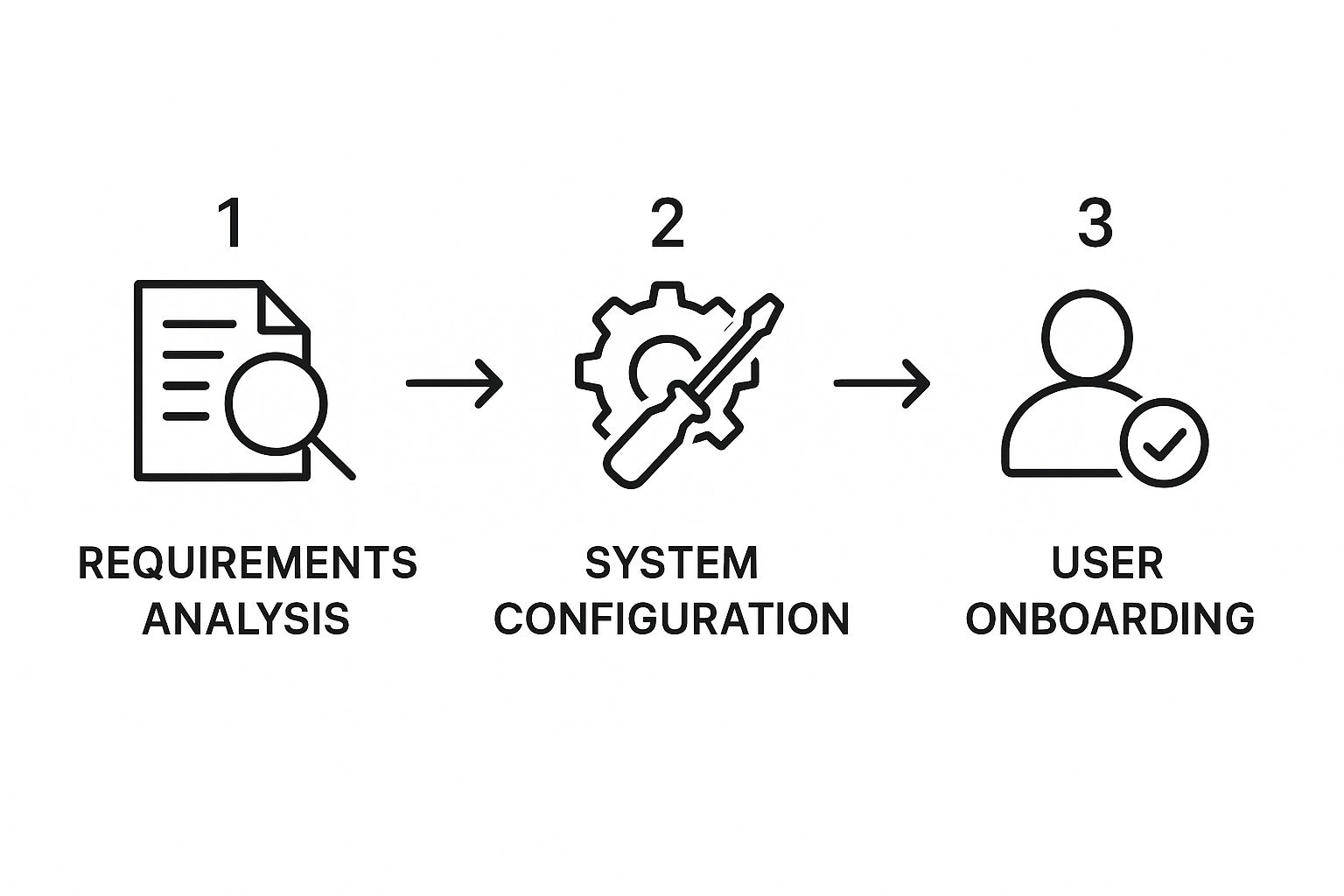
As you can see, successful automation isn't magic. It starts with a solid understanding of your own needs, moves into careful setup, and finishes by getting your team ready to use the new system.
How to Choose the Right CRM Workflow Software

Picking a new CRM workflow software can feel like a huge undertaking. I get it. But if you break it down into a few key steps, it becomes a lot less intimidating. The real secret? Start by looking inward at your own operations before you even peek at a single product demo.
The goal is to find a platform that molds to your business, not one that forces you to contort your processes to fit its limitations. You're looking for a glove, not a straitjacket.
Start With a Workflow Audit
Before you can evaluate any software, you have to know what you’re trying to fix. Get your sales, marketing, and service teams in a room (or on a call) and have them walk you through their daily grind. This is your workflow audit.
Map out your key processes exactly as they are today. Where do things get stuck? What mind-numbing, repetitive tasks are eating up everyone's time? Identifying these specific pain points gives you a concrete shopping list of problems that your new CRM workflow software must solve.
Key Evaluation Criteria
With your audit done, you now have a lens to assess potential solutions. Don't get distracted by flashy features. Instead, focus on the fundamentals that will determine whether this is a successful long-term partnership.
- User-Friendliness: The most powerful software on the planet is useless if your team dreads logging in. Look for a clean interface and an intuitive, visual workflow builder. Your mission is to empower your team, not hand them another technical headache.
- Integration Capabilities: Your CRM doesn't live on an island. It has to play nice with the tools you already rely on every day—your email, your calendar, your accounting software. Poor integrations create data silos and manual workarounds, which is exactly what you're trying to eliminate.
- Scalability for Growth: The platform you pick today needs to support the business you're building for tomorrow. Can it handle more users, more data, and more complex workflows as you scale? A scalable solution saves you from a gut-wrenching migration process down the road.
Your evaluation shouldn't just be a feature-for-feature bake-off. It’s about finding a true partner. Dig into the quality of their customer support, read user reviews, and get a feel for how they help customers win. A responsive support team is worth its weight in gold, especially during implementation.
Looking Beyond the Price Tag
It’s tempting to fixate on the monthly subscription fee, but that’s just the tip of the iceberg. The total cost of ownership (TCO) includes things like implementation fees, training costs, and extra charges for critical integrations or premium support. A platform that looks cheaper upfront can easily become more expensive in the long run.
When you're looking at options, big names like Salesforce CRM offer a massive suite of automation tools that often set the industry benchmark. It's no surprise that cloud-based solutions are dominating the market, making up 68.7% of all CRM revenues—they offer the flexibility modern businesses demand. As more small and mid-sized companies jump on board, understanding the full cost picture is non-negotiable for making a smart investment.
Ultimately, choosing the right software is about aligning technology with your business goals. By focusing on your specific needs first and evaluating platforms holistically, you can confidently pick a solution that will streamline your operations, boost your sales process automation, and fuel real, sustainable growth.
A Practical Roadmap for Successful Implementation
So you've chosen your CRM workflow software. That’s a huge step. But the real work—and the real payoff—starts the second you sign that contract. A powerful tool is only as good as its adoption, and a clumsy rollout can kill enthusiasm before you ever see a return.
This isn’t about just flipping a switch. This is about change management.
The secret? Don’t try to boil the ocean. Forget about overhauling every single process on day one. Instead, we’re going to focus on a “start small, win big” approach that builds momentum and gets your team on board by delivering immediate, tangible results.
Get Leadership Buy-In and Find Your Champion
Before you even think about migrating a single contact, you need two things. First, leadership buy-in that goes deeper than just approving the budget. Your leaders need to be the biggest cheerleaders for this change. They should be talking about its importance in meetings and, most importantly, using it themselves.
Second, you need to anoint an internal CRM champion. This isn't necessarily a manager; it's the person who’s genuinely excited about the new system. They’re the one who sees the potential and can serve as the go-to resource for their colleagues, bridging the gap between the tech and the team.
- Your Champion’s Job: This person will be on the front lines, helping test workflows, answering questions, and collecting feedback.
- Leadership’s Job: Executives should be the ones highlighting the wins that come from these new workflows, constantly reinforcing the why behind the change.
Start with High-Impact, Low-Effort Workflows
Your very first automated process needs to be a slam dunk. Work with your teams to pinpoint a process that is:
- High-Pain: A task everyone dreads. Think repetitive data entry, manual follow-ups, or anything that's just a tedious time-suck.
- High-Impact: Something where an improvement is instantly felt by everyone. Speeding up how quickly new leads get a response is a classic example. Another is automating the first few customer onboarding emails.
When you automate a major source of frustration, you’re not just fixing a broken process—you're giving your team back their time and sanity. That immediate, personal benefit is the single best way to convert skeptics into fans of the new CRM workflow software.
A successful implementation isn’t a tech project; it’s a people project. When you focus on getting those early wins, you create a positive feedback loop that turns doubt into widespread adoption.
Deliver Hands-On, Relevant Training
Generic, one-size-fits-all training sessions are a waste of everyone's time. To get people to actually use the software, the training has to be specific to their role and answer their silent, all-important question: “What’s in it for me?”
Don’t just click through every feature. Show the sales team exactly how the new workflow eliminates the manual data entry they hate. Show the customer service team how automated ticket escalations mean no more panicked emails.
The best training is hands-on. Let your team members practice with real-world scenarios they face every day. It’s infinitely more effective than watching someone else click around on a screen.
This roadmap—securing buy-in, starting small, and training for relevance—is how you turn a software purchase into an engine for growth. It’s about focusing on your people and their processes first, which is the only way to guarantee your technology investment actually pays off.
Common Questions About CRM Workflows
When you first dive into the world of CRM workflow software, a few questions always seem to pop up. It's totally normal. Getting some straight answers can make all the difference in feeling confident about the path you're on.
Here are a few of the most common questions we hear, with no-nonsense answers.
CRM Workflows vs. Marketing Automation
"So, what's the difference between a CRM workflow and marketing automation?" This is a great question, and it's easy to see why they get confused since there’s some overlap.
Here’s a simple way to think about it: marketing automation is a specialist, while a CRM workflow is the general manager of the whole operation.
- Marketing Automation lives at the top of the funnel. Its job is to grab new leads and warm them up with things like email campaigns, landing pages, and lead scoring. It gets them prepped and ready for the sales team.
- CRM Workflow Automation is way bigger in scope. It oversees the entire customer journey—from that first marketing email, through the sales process (like assigning a hot lead to a rep), and even into customer service (like automatically creating a support ticket). It’s the connective tissue between all your teams.
So, marketing automation is a vital piece of the puzzle, but it’s just one part of a much larger CRM workflow strategy.
How Hard Are These Workflows to Set Up?
This is a totally valid worry. Nobody wants to invest in a new tool only to find out they need a Ph.D. in computer science to use it.
The good news? Modern CRM workflow software is built for regular business folks, not developers. Most of the good platforms have visual, drag-and-drop builders that feel pretty intuitive.
You can get a simple workflow—like sending a welcome email when a new contact is added—up and running in a few minutes. Sure, more complex flows with multiple steps and "if-then" logic will take a bit more thought, but you won't need to write a single line of code. These tools are meant to empower you, not put up technical roadblocks.
Can I Connect It to My Other Tools?
You better be able to. In fact, if a platform doesn't play well with others, you should see that as a massive red flag. Solid integrations are what prevent your data from getting trapped in silos and keep your business running smoothly.
Any top-tier CRM platform is built to connect with the tools you're already using every day:
- Email clients like Gmail and Outlook
- Calendars for scheduling meetings
- Marketing automation platforms
- Accounting and ERP software
And for anything more specific or custom, they usually have a robust API or connect to services like Zapier. This lets you hook up thousands of other apps, making sure your CRM workflow software acts as the true command center for your entire tech stack, not just another island.
Ready to stop letting high-intent leads slip through the cracks? Distro automatically routes prospects from your demo forms directly to the right sales rep’s calendar, eliminating delays and tripling conversion rates. Learn how Distro can accelerate your sales pipeline.